113
Genos2 Owner’s Manual
Connections—Using Your Instrument with Other Devices
Using the LINE OUT SUB [3]–[4] jacks as AUX OUT jacks
You can switch the function of the LINE OUT SUB [3]–[4] jacks to AUX OUT jacks from the instrument’s display called up via
[MENU] à [Line Out]. For details, refer to the Reference Manual on the website.
NOTICE
Do not route the output from the AUX OUT jacks to the AUX IN jacks. If you make this connection, the signal input at the AUX IN jacks is output
from the AUX OUT jacks, possibly resulting in a feedback loop that will make normal performance impossible, and may even damage the
equipment.
NOTE
The output volume from AUX OUT jacks cannot be controlled by the MASTER VOLUME control.
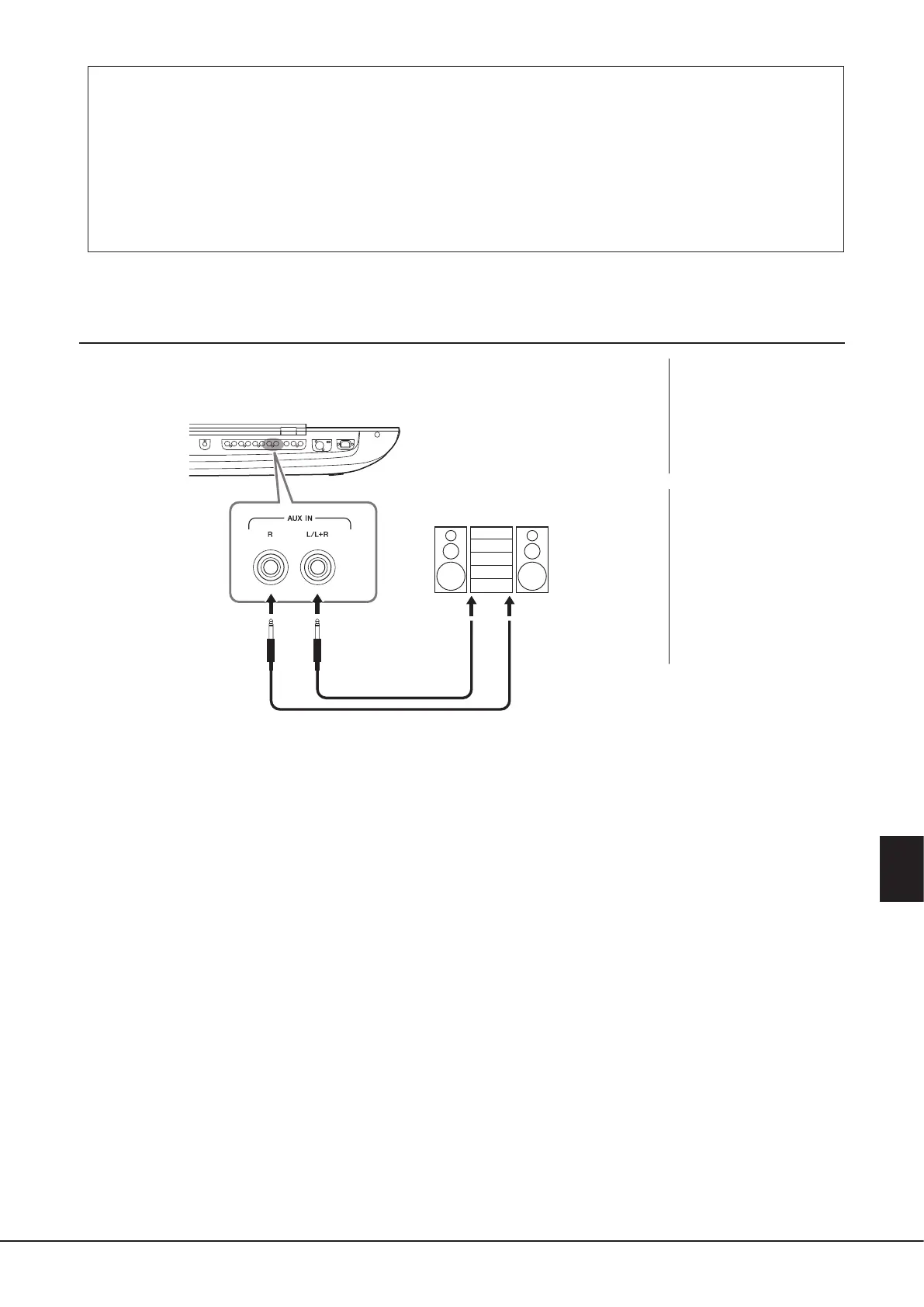
Playing External Audio Devices with Genos2 (AUX IN jacks)
You can connect the output jacks of an external device (such as CD player, portable audio player,
tone generator, etc.) to the instrument’s AUX IN [L/L+R]/[R] jacks, letting you hear the sound of
that device through the headphones or the optional Yamaha GNS-MS01 speakers of Genos2.
NOTICE
To avoid damage to the
devices, rst turn on the power
to the external device, then to
the instrument. When turning
o the power, rst turn o the
power to the instrument, then
to the external device.
NOTE
• Use only the [L/L+R] jack for
connection with a monaural
device.
• The input signal from the
AUX IN jacks is aected by the
setting of the instrument’s
[MASTER VOLUME] dial, and
the volume balance with other
parts such as entire keyboard
can be adjusted by the Mixer
display (page90).
Phone plug
(standard)
CD player, portable audio
player, tone generator
LINE OUT
Audio cable



 To Next Page