36
Genos2 Owner’s Manual
Calling up the Desired Display Instantly—Direct Access
With the convenient Direct Access function, you can instantly call up the desired display—with just a single additional button
press. Refer to the “Direct Access Chart” on page126 for a list of the displays that can be called up with the Direct Access
function.
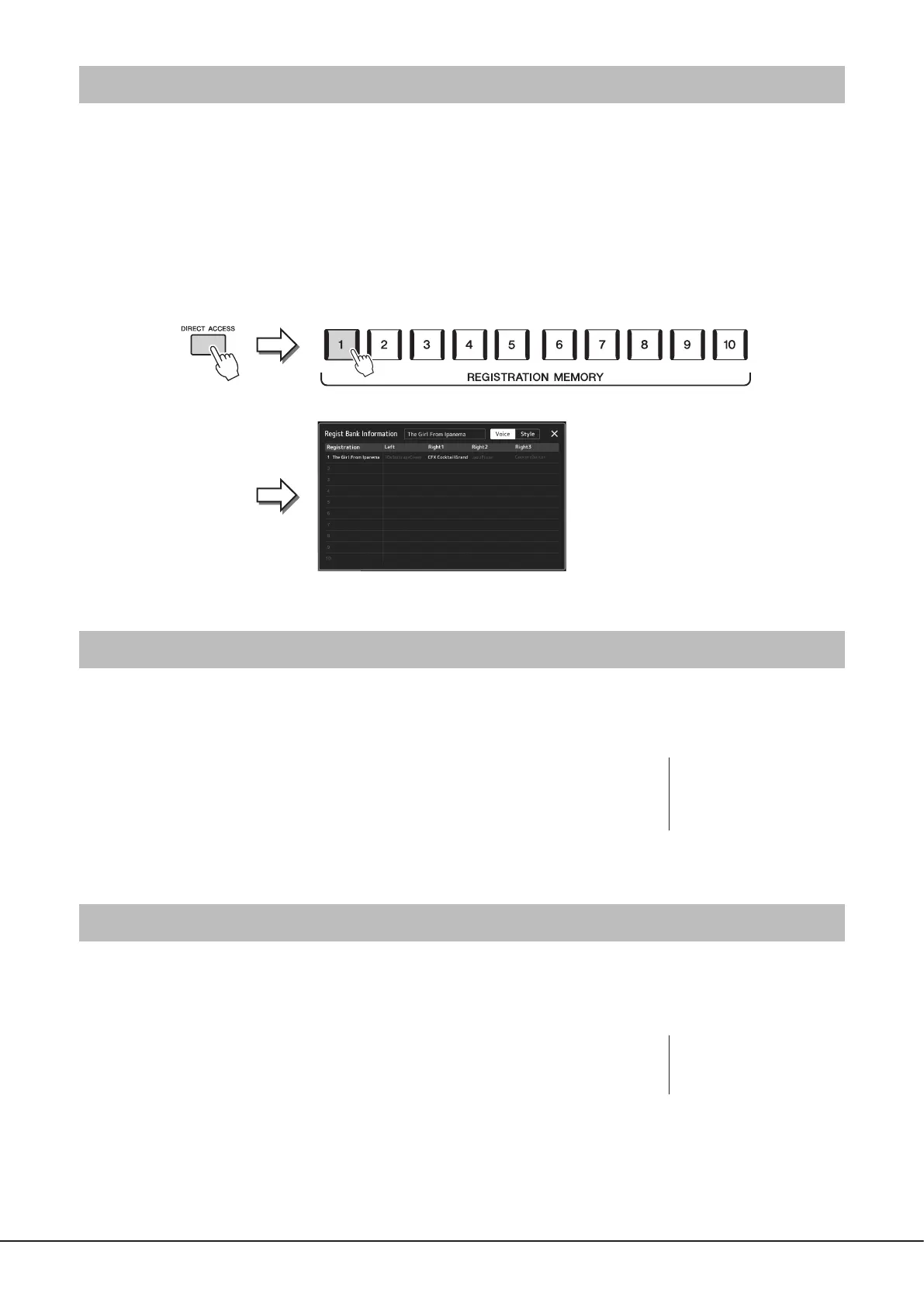
1 Press the [DIRECT ACCESS] button.
A message appears in the display prompting you to press the appropriate button.
2 Press the button (or move the knob, slider, joystick or connected pedal) corresponding to the
desired setting display to instantly call up that display.
For example, pressing one of the REGISTRATION MEMORY [1]–[10] buttons calls up the Regist Bank Info display (page99).
Reset the Panel Settings
You can reset the panel settings that are related to Voices, Styles, MIDI settings, Line Out settings and so on, without powering o
and on. This is helpful when you inadvertently load or make some settings and you can’t hear anything, even when playing the
keyboard, or when you want to reset to the basic settings.
1 Press the [DIRECT ACCESS] button.
A pop-up window for direct access appears with [Panel Reset] indication.
2 Touch [Panel Reset].
After a conrming message appears, touch [Reset] to reset the settings.
Playing the Demos
The Demos provide dynamic demonstrations of the high-quality sounds.
1 Call up the Demo display via [MENU] à [Demo].
2 Touch the display to show and play the desired Demo.
You can pause Demo playback by touching [Pause] and play the keyboard with the Voice
primarily used at that point. To resume Demo playback, touch [Pause] again.
3 Press the [EXIT] button to exit from the Demo display.
NOTE
The Panel Reset function may
not be available depending on
the instrument status, such as
during recording.
NOTE
To return to the higher level
menu, touch [Menu] on the
display.



 To Next Page