68
Genos2 Owner’s Manual
[BREAK] button
This lets you add dynamic breaks in the rhythm of the accompaniment. Press the [BREAK] button
during Style playback. When the one-measure Break pattern nishes playing, Style playback
automatically shifts to the Main section.
About the lamp status of the section buttons (INTRO/MAIN VARIATION/BREAK/ENDING)
• Red: The section is currently selected.
• Red (ashing): The section will be played next, following the currently selected section.
* The MAIN VARIATION [A]–[D] button lamps also ash in red when the ll-in is playing.
• Blue: The section contains data but is not currently selected.
• O: The section contains no data and cannot be played.
Recording and Playing Back a Chord Sequence—Chord Looper
While playing back a Style, you usually specify chords with your left hand. However, with the convenient Chord Looper function,
you can record a sequence of the chords and play it back in a loop. For example, if you record a “C à F à G à C” chord
progression, Style playback will continue automatically with the chords “C à F à G à C à C à F à G à C à ...” Since the chords
play back in a loop, you don’t need to repeat the chord pattern manually anymore—letting you focus on your performance and
other operations.
Loop playback a chord sequence while playing back the Style
You can record desired chord sequence instantly and loop it.
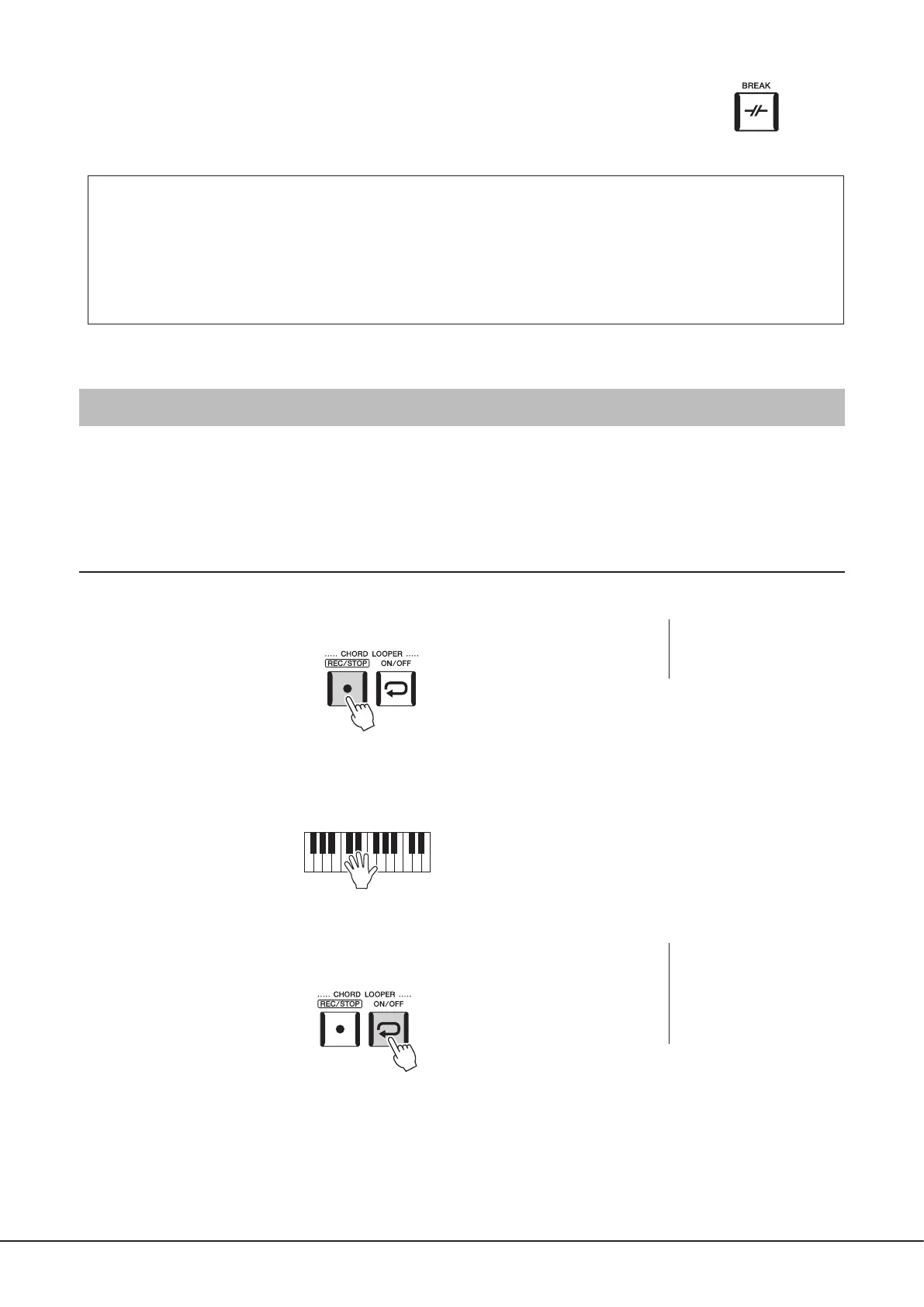
1 While playing back a Style, press the CHORD LOOPER [REC/STOP] button.
The [REC/STOP] button ashes to indicate the Chord Looper function is standby to record.
On the next measure of the Style, the [REC/STOP] button is turned on and the recording starts.
2 Enter the chords on the keyboard, according to the playback tempo of the Style.
The chord sequence continues to be recorded until you stop recording in step 3.
3 Press the CHORD LOOPER [ON/OFF] button to stop recording and start
loop playback of the chord sequence.
Recording stops, and the [ON/OFF] button ashes in orange and loop playback standby is entered.
On the next measure of the Style, the [ON/OFF] button lights in orange, and the chord sequence recorded in step 2 will be
played back in a loop.
NOTE
When the [REC/STOP] is turned
on, the [ACMP] button is turned
on automatically.
NOTE
While the chord sequence is
played back, the [ACMP] button
ashes, chord input from the
keyboard is disabled, and the
entire keyboard is only used for
performance.



 To Next Page