52
Genos2 Owner’s Manual
Selecting a Voice for Each Keyboard Part
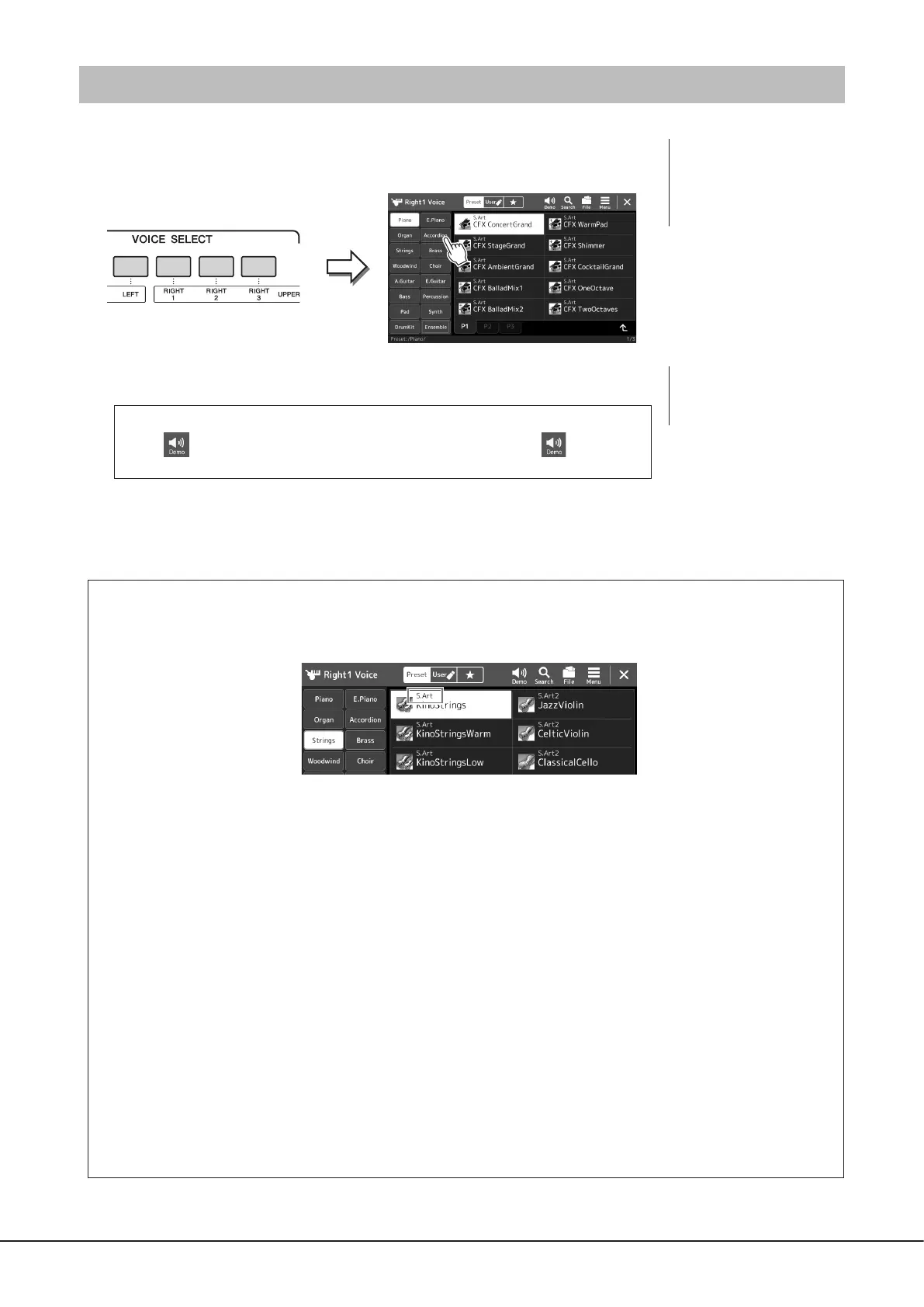
1 Press the VOICE SELECT button corresponding to the desired part.
The Voice Selection display (for the desired part) appears.
2 Touch the desired Voice.
To hear the characteristics of the Voices:
Touch (Demo) to start demo playback of the selected Voice. Touch (Demo)
again to stop playback.
3 If necessary, try out the selected Voice.
Make sure that the desired keyboard part is turned on, and play the keyboard.
Voice Characteristics
The Voice type and its dening characteristics are indicated above the Voice name. There are various Voice characteristics;
however, only the following ones are covered here. For detailed explanations, refer to the Reference Manual on the website
(page10).
• S.Art, S.Art2 (Super Articulation) Voices (page71)
Lets you create subtle, very realistic expressive nuances, simply by how you play, and by pressing a single button to add
nuances.
• FM Voices
Characterized by dynamic changes in sound that cannot be achieved with PCM sound sources, since this is using a FM tone
generator that is synthetic sound sources.
• Organ Flutes Voices (page53)
Lets you recreate all of the classic organ sounds by adjusting the ute footage levels and the percussive sounds, just like on
conventional organs.
• Revo Drum, Revo SFX Voices
The Drum and SFX Voices let you play various drums and percussion instruments or SFX (sound eects) sounds on the
keyboard. Especially, Revo Drum Voices recreate the natural sound of drums, even when playing the same key multiple times.
Details are given in the Drum/Key Assignment List of the separate Data List.
• Ambient Drum, Ambient SFX Voices
Provides realistic and lively drum sounds that are dicult to achieve with DSP eects. When these Voices are used in a
selected Style, you can adjust the ratio of wet (reverberant sound) and dry (unprocessed sound) sound in real time by using
the Live Control knob/slider to which “Ambience Depth” is assigned.
NOTE
For basic operations of the Voice
Selection display, refer to “File
Selection Display” (page32).
NOTE
You can also call up the Voice
Selection display via the Home
display (page30) or the Voice
Part Setup display (Reference
Manual on the web site).



 To Next Page