82
Genos2 Owner’s Manual
Singing with Song Playback—
Operations While Performing
Operation Guide
4
This section explains operations you can do during your singing performance with Songs: Song playback, displaying score and
lyrics, adjusting the volume between two Songs, and switching microphone-related functions.
Controlling Song Playback
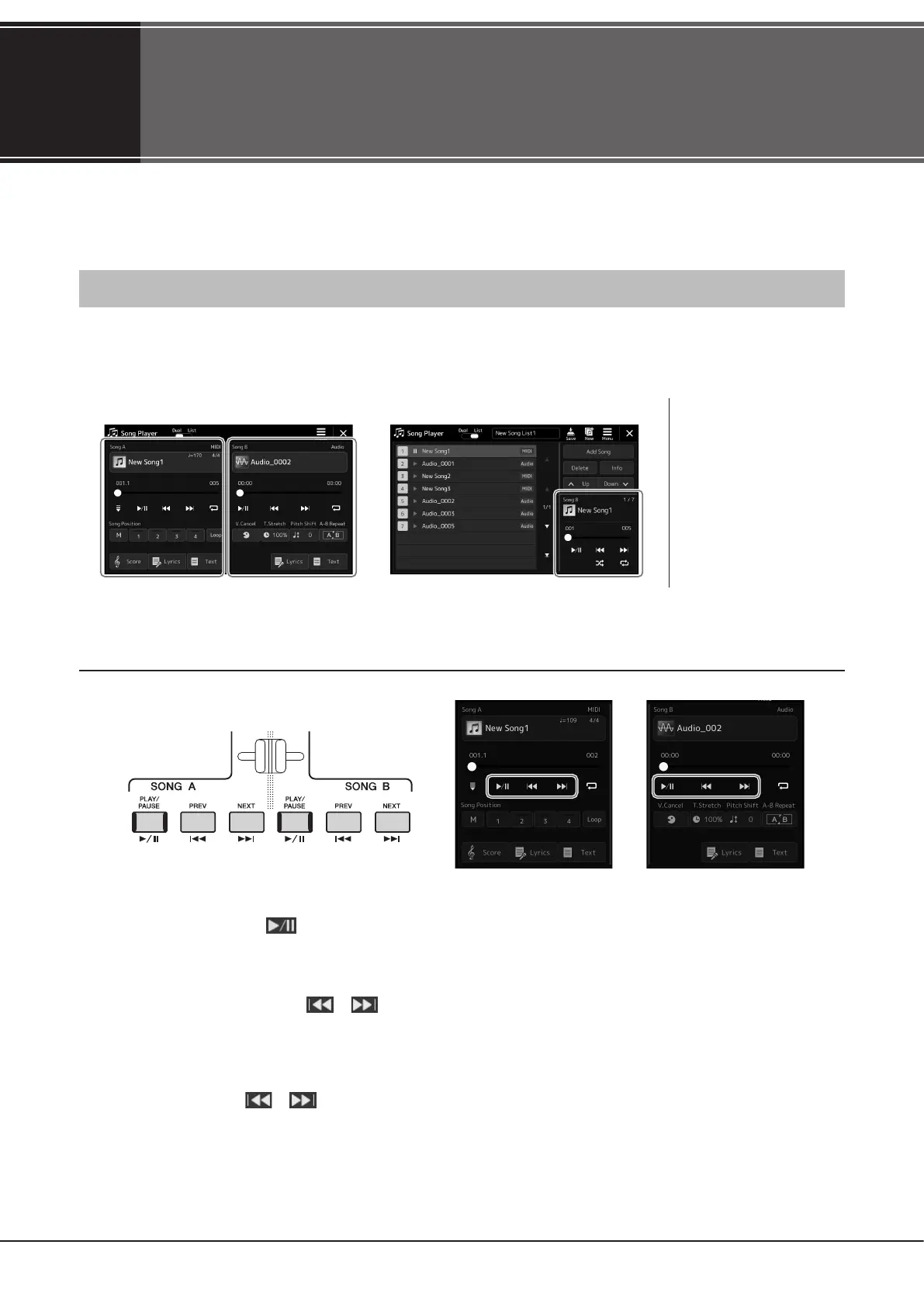
Song playback can be controlled by pressing buttons on the panel or from the Song playback display which is called up by
pressing the [SONG] button. The control displays for SONG A and SONG B (if used) appear, allowing you to control the currently
selected MIDI/Audio Song(s) on the screen.
Song Playback display
Basic playback operations (for MIDI and Audio Songs)
Play/Pause ([PLAY/PAUSE] button)
Press (or touch) [PLAY/PAUSE] ( ) button to start Song playback of the corresponding side (SONG A or SONG B). During
playback, pressing it pauses playback. Pressing it again resumes Song playback from the current position.
Selecting previous/next Song ([PREV] or [NEXT] button)
Press (or touch) the [PREV] or [NEXT] ( or ) button to select the previous/next Song. In the Dual player mode, this
operation selects the previous/next Song le in the same folder. At the Song List mode, this operation selects the previous/next
Song on the Song List.
Rewind/Fast Forward ([PREV] or [NEXT] button)
Hold the [PREV] or [NEXT] ( or ) button to move backward/forward continuously through the current le.
NOTE
• For details on MIDI Song/
Audio Song, switching
between Song playback
modes, and Song selection,
refer to page76.
• In the Song List mode, only
basic playback operations are
possible. On the other hand,
you can play back multiple
Songs continuously. For
details, refer to the Reference
Manual on the website.
Dual Player mode (SONG A, SONG B) Song List mode (SONG B only)



 To Next Page