59
Genos2 Owner’s Manual
Playing with Styles—Setups
1
Setting up Multi Pads
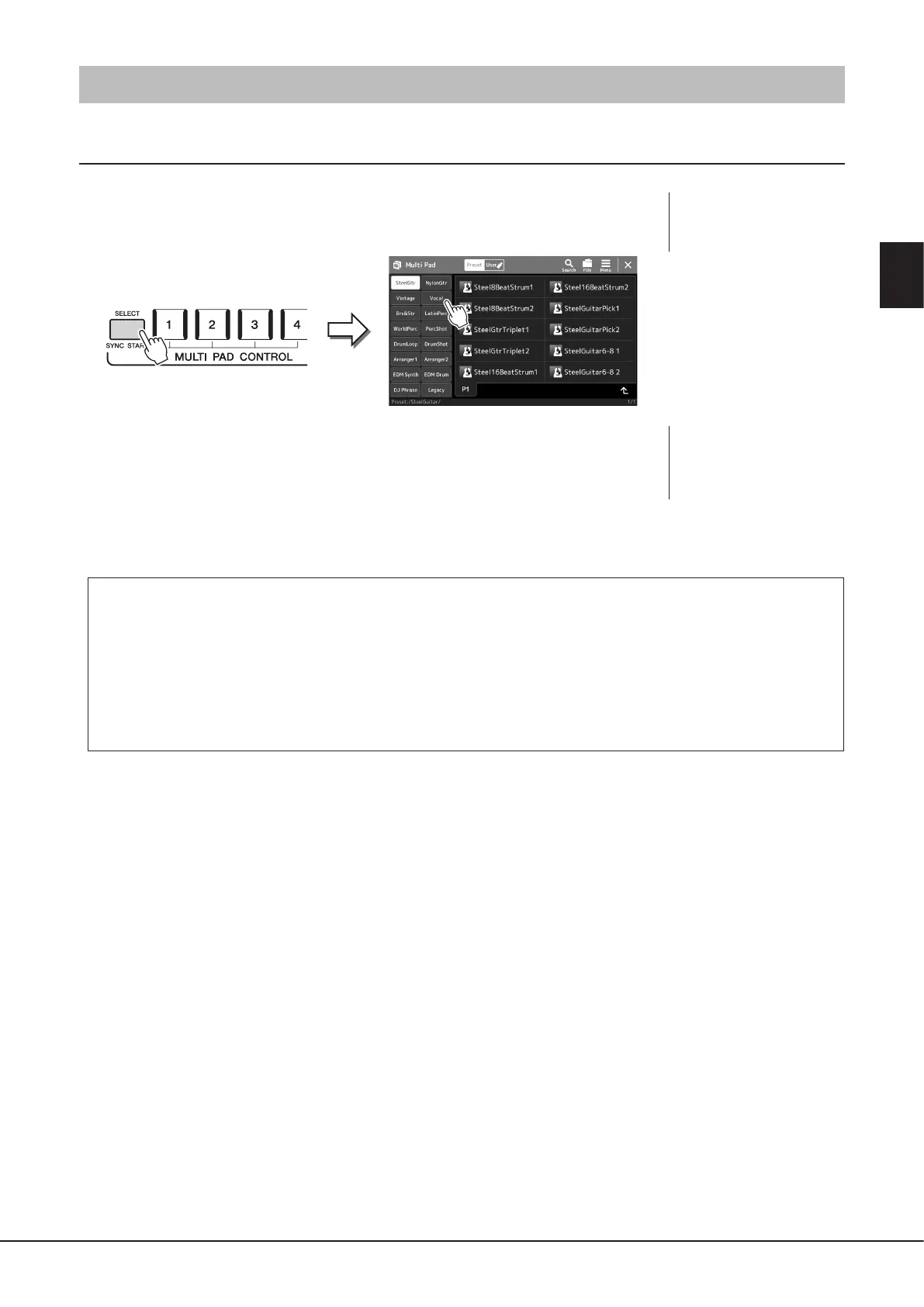
Selecting Multi Pads
1 Press the MULTI PAD CONTROL [SELECT] button to call up the Multi Pad
Bank Selection display.
2 Touch the desired Multi Pad Bank.
3 If necessary, try out the selected Multi Pad(s).
Simply press the MULTI PAD CONTROL [1]–[4] buttons to start playback of the corresponding
phrase. To stop playback, press the [STOP] button.
For more information on Multi Pad playback control, refer to “Controlling Multi Pad
Playback” (page74).
Creating and Editing Multi Pads
You can create your original Multi Pads in one of three ways:
• Recording new phrases
• Editing existing Multi Pad phrases
• Linking with audio les (Audio Link Multi Pad)
Also, you can make your original Multi Pad Bank by managing each Multi Pad.
For details, refer to the Reference Manual on the web site (page10).
NOTE
You can also call up the Multi
Pad Selection display via the
Home display (page30).
NOTE
For basic operations of the
Multi Pad Selection display,
refer to “File Selection Display”
(page32).



 To Next Page