71
Genos2 Owner’s Manual
Playing with Styles—Operations While Performing
2
Applying sustain to the RIGHT 1–3 Voices
The [SUSTAIN] button turns the Sustain function on and o. When on, all notes played on the
keyboard with the right-hand parts (RIGHT 1, 2, 3) have a longer sustain.
Playing and Controlling Super Articulation Voices
The Super Articulation Voices (S.Art Voices and S.Art2 Voices) enable you to create subtle, very
realistic expressive nuances, simply by how you play. The Voice type (S.Art, S.Art2) is indicated
above the name of Super Articulation Voices, on the Voice Selection display. Moreover, with the
[ART. 1]/[ART. 2]/[ART. 3] buttons in this instrument, you can add those expressive nuances by
simply pressing a single button.
Automatic articulation eects of Super Articulation Voices
S.Art Voices
The S.Art Voices provide many benets with great playability and expressive real-time control.
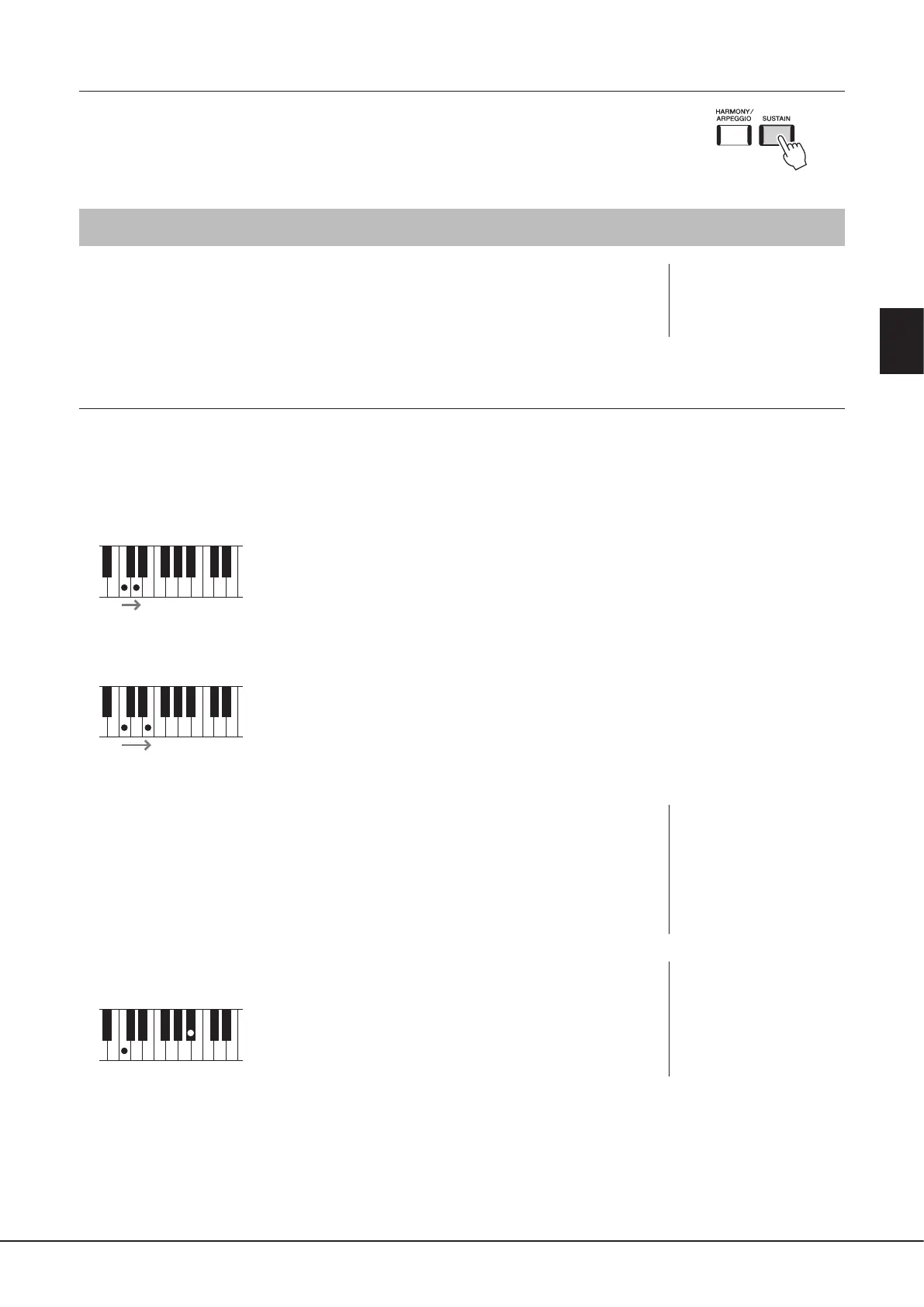
Example: Saxophone Voice
If you play a C note and then an adjacent D in a very legato way, you will hear the note change seamlessly, as though a
saxophone player played it in a single breath.
Example: Concert Guitar Voice
If you play a C note and then the E just above in a very legato but rm way, the pitch slides up from C to E.
S.Art2 Voices
Some of the wind instrument and strings Voices feature a special technology called AEM, which
utilizes detailed samples of special expressive techniques used on those specic instruments—to
bend or slide into notes, to “join” dierent notes together, or to add expressive nuances at the
end of a note, etc. You can add these articulations by playing legato or non-legato, or jumping
between notes in octave intervals or greater.
Example: Clarinet Voice
If you hold a C note and play the Bb above, you’ll hear a glissando up to the Bb. Some “note o”
eects are also produced automatically when you hold a note for over a certain time.
NOTE
The applied articulation eect
diers depending on the
selected Voice. For details, refer
to the Data List on the website.
NOTE
AEM (Articulation Element
Modeling) is a technology
that simulates the sound of
acoustic instruments naturally
by smoothly joining the most
appropriate sound samples
selected from the data base in
real time during performance.
NOTE
Each S.Art2 Voice has its own
default vibrato setting, so
that when you select a S.Art2
Voice, the appropriate vibrato
is applied. You can adjust the
vibrato by moving up or down
the Joystick.



 To Next Page