72
Genos2 Owner’s Manual
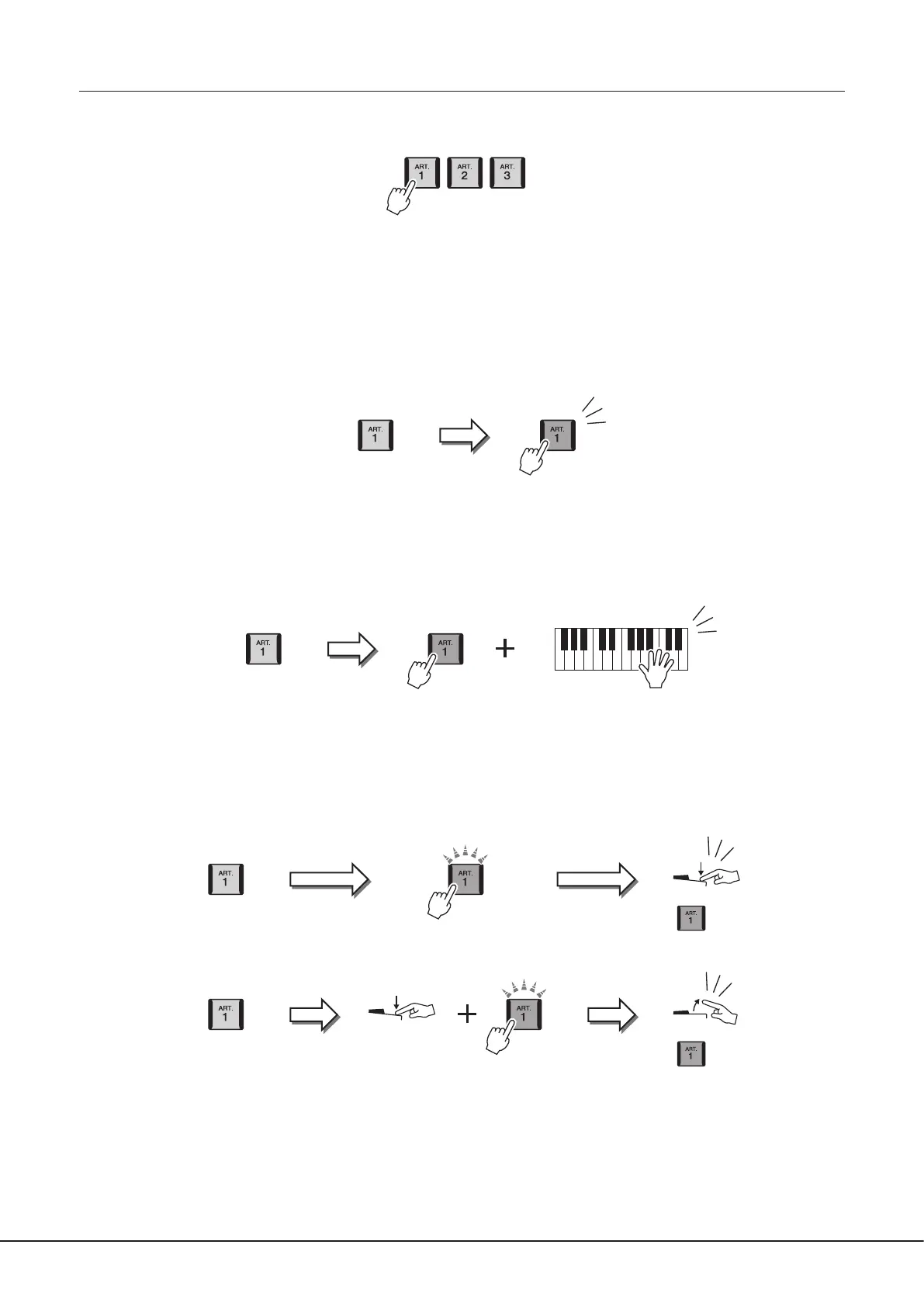
Adding articulation eects by the [ART. 1]–[ART. 3] buttons
When you select a Super Articulation Voice, the [ART. 1]/[ART. 2]/[ART. 3] buttons may light in blue. Pressing a lit button adds the
eect (buttons not lit have no eect).
Below are three examples of Super Articulation Eects by the buttons.
Example 1
Pressing the available [ART] button triggers dierent playing eects and techniques, separate from your keyboard playing.
For example, pressing the [ART] button for a S.Art saxophone Voice can produce breath noise or key noise, while doing the same
for a S.Art guitar Voice can produce fret noise or body-tapping sound. You can eectively intersperse these into the notes as you
play.
While the articulation eect sounds, the button lights in red.
Example 2
Playing the keyboard while holding down the available [ART] button changes the nature of the Voice.
For example, in the case of the NylonGuitar SW Voice in A.GUITAR category, holding down the [ART. 1] button lets you play
harmonics for the guitar Voice. Releasing the button returns the Voice to normal.
The button lights in red while it is being held down.
Example 3
When an S.Art2 Voice is selected, pressing the available [ART] button and playing/releasing a note enables you to add articulation
eects, such as bend up/down, glissando up/down, brass fall, etc.
When you press the available [ART] button, it will ash in red until the eect is nished playing. You can cancel by pressing the
button again while it ashes. Immediately after you press/release the note and articulation eect sounds, the button lights in red.
Blue Red
Articulation Sound
Articulation Sound
RedBlue
Blue
Blue
Red (ashing)
Articulation Sound
Key on
Red (lit)
Articulation Sound
Key o
Red (lit)
Red (ashing)



 To Next Page