31
Genos2 Owner’s Manual
Basic Operations
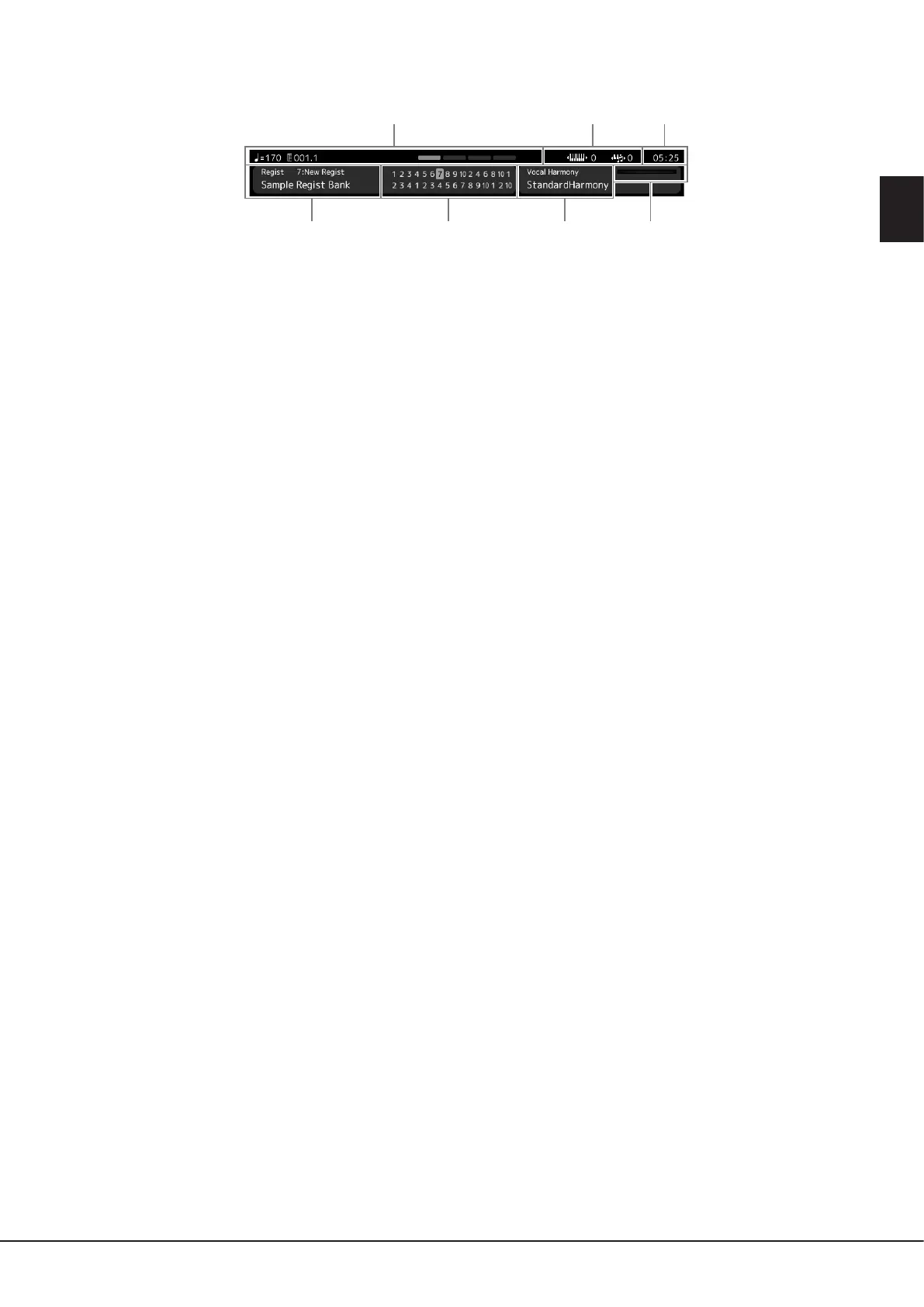
Information area in the Home display
q
tr y u
w e
1 Bar/Beat/Tempo
Displays the current position (bar/beat/tempo) in Style playback or MIDI Song playback. By rotating the Data dial, you can call
up the Tempo pop-up display and adjust the tempo.
2 Upper Octave/Transpose
Displays the amount that the upper octave value is shifted, and the amount of master transposition in semitone units
(page61).
3 Clock
The current time is shown here.
4 Registration Memory Bank
Indicates the currently selected Registration Memory Bank name and Registration Memory number. Touching a Registration
Memory Bank name calls up the Registration Memory Bank Selection display.
5 Registration Sequence
Appears when the Registration Sequence is active. For instructions on programming the sequence, refer to the Reference
Manual on the website.
6 Vocal Harmony Type name
Indicates the current Vocal Harmony Type (page80). Touching a Vocal Harmony Type name calls up the Vocal Harmony
Type Selection display.
7 MIC Input level indicator
When a microphone is connected, this indicates the input level. Adjust the level with the [MIC GAIN] knob so that the
indicator lights in green or yellow (but not in red). For details on connecting a microphone, refer to page110.



 To Next Page