75
Genos2 Owner’s Manual
Playing with Styles—Operations While Performing
2
Using the Multi Pad Synchro Start Function
You can also start Multi Pad playback by playing the keyboard or by starting Style playback.
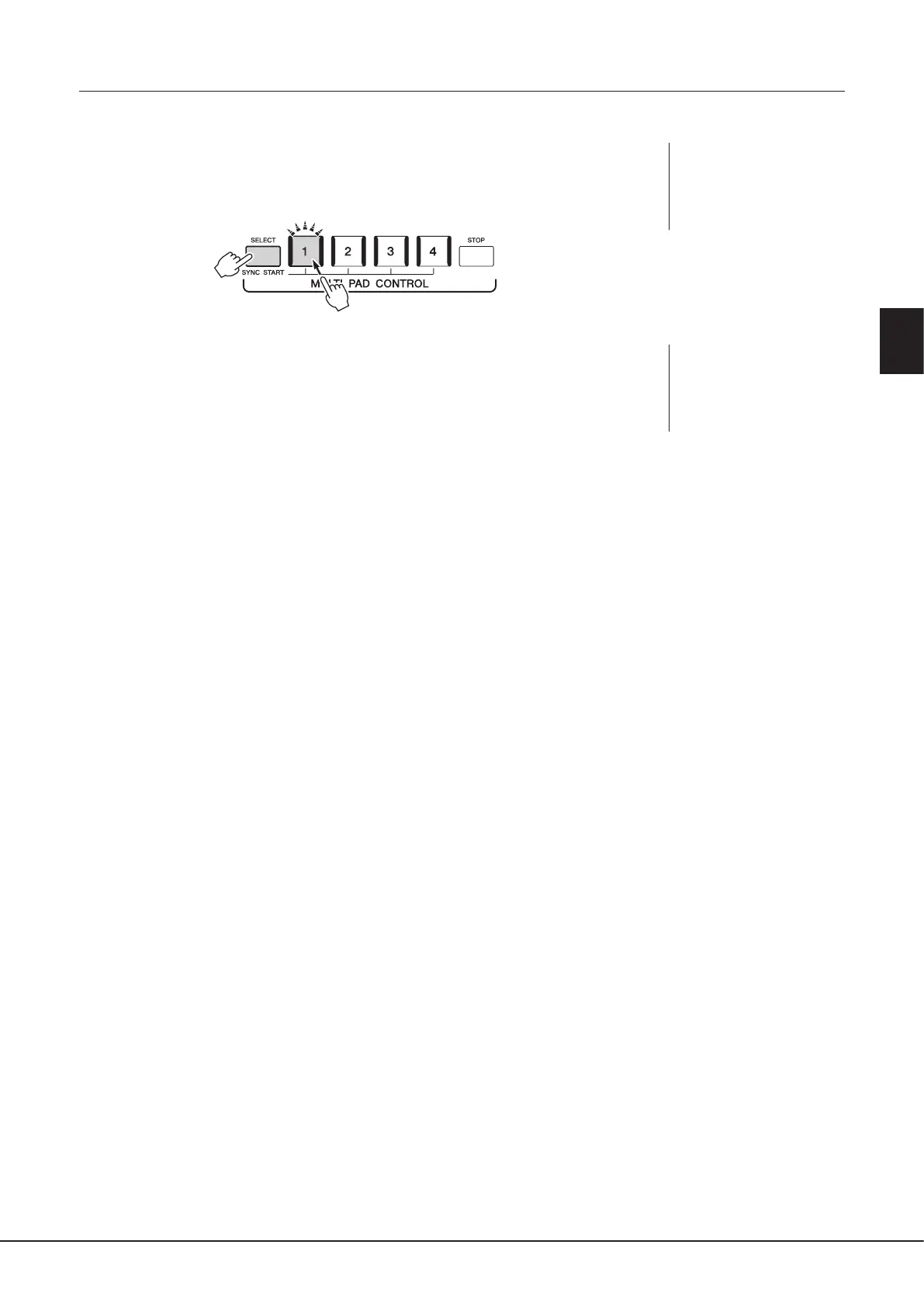
1 While holding the MULTI PAD CONTROL [SELECT] button, press the
desired button or buttons from [1]–[4].
The corresponding buttons ash in red, indicating standby status.
2 Start playback of the Multi Pad.
• When [ACMP] is o, press any note, or play back a Style.
• When [ACMP] is on, play a chord in the chord section, or play back a Style.
If you enable standby for a Multi Pad during Style or Song playback, pressing any note (when
[ACMP] is o) or playing a chord in the chord section (when [ACMP] is on) will start Multi Pad
playback at the top of the next measure.
NOTE
To cancel the standby status of
the selected Pad, carry out the
same operation, or simply press
the [STOP] button to cancel the
status of all Pads.
NOTE
When two or more Multi
Pads are in standby status,
pressing any one of them starts
simultaneous playback of all of
them.



 To Next Page