B95W
Description
90 / 306
5
05_Beschreibung_en.fm - V1.0 - 1.8.17
11
Submenu,
air-conditioning
control
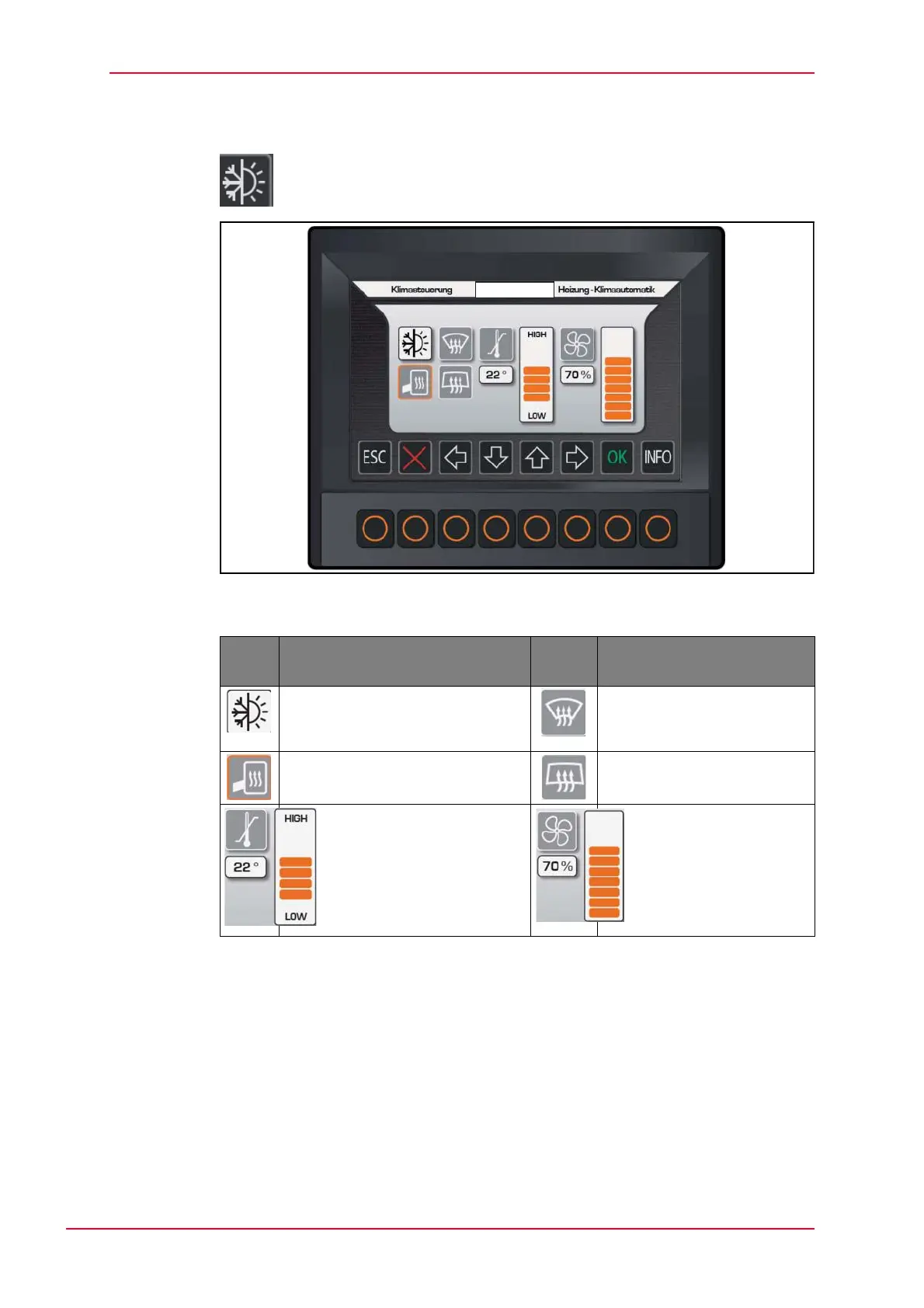
Activate by selecting menu
Fig. 5-25 Submenu, air-conditioning control
Tab. 5-12 Air-conditioning control pictograms
How to set the internal temperature and the fan speed:
Select the desired function with the cursor.
Change the temperature or fan speed by clicking on the up or down arrows,
which changes the size of the bar in the chart.
• These functions can also be carried out on the keypad with the corresponding
keys.
• The air-conditioning system (optional) can be switched off by pressing the
appropriate key on the keypad a second time.
Sym-
bol
Description Sym-
bol
Description
Activating heating and
air-conditioning
(air-conditioning system - optional)
Defrost front windshield
Mirror heating (optional) Heated rear windshield
(optional)
Internal temperature
pre-selection using bar
chart ranging between
16-26 °C in two steps.
Pre-selection of fan
speed


 To Next Page