START-UP
Axio Examiner Installing standard components Carl Zeiss
M60-2-0003 e 05/2012 29
(2) Inserting fold-down eyecups
To avoid scratches on glasses, the eyepieces are provided with glass protection rings made of rubber
These rings may be replaced by fold-down eyecups on an optional basis.
• To do so, pull off the glass protection rings (Figure 3-5/2) from the eyepieces, and put on the eyecups
(Figure 3-5/1).
Sometimes, the glass protection rings may stick very firmly in the eyepiece grooves, requiring a blunt
object (wood stick) to press them off.
3.1.5 Installing and removing "Push&Click" modules
− FL EC P&C reflector module,
− DIC FL analyzer module,
− Pol ACR analyzer module,
− D for IR-DIC analyzer module.
Reflector turret 5x 3.1.5.1
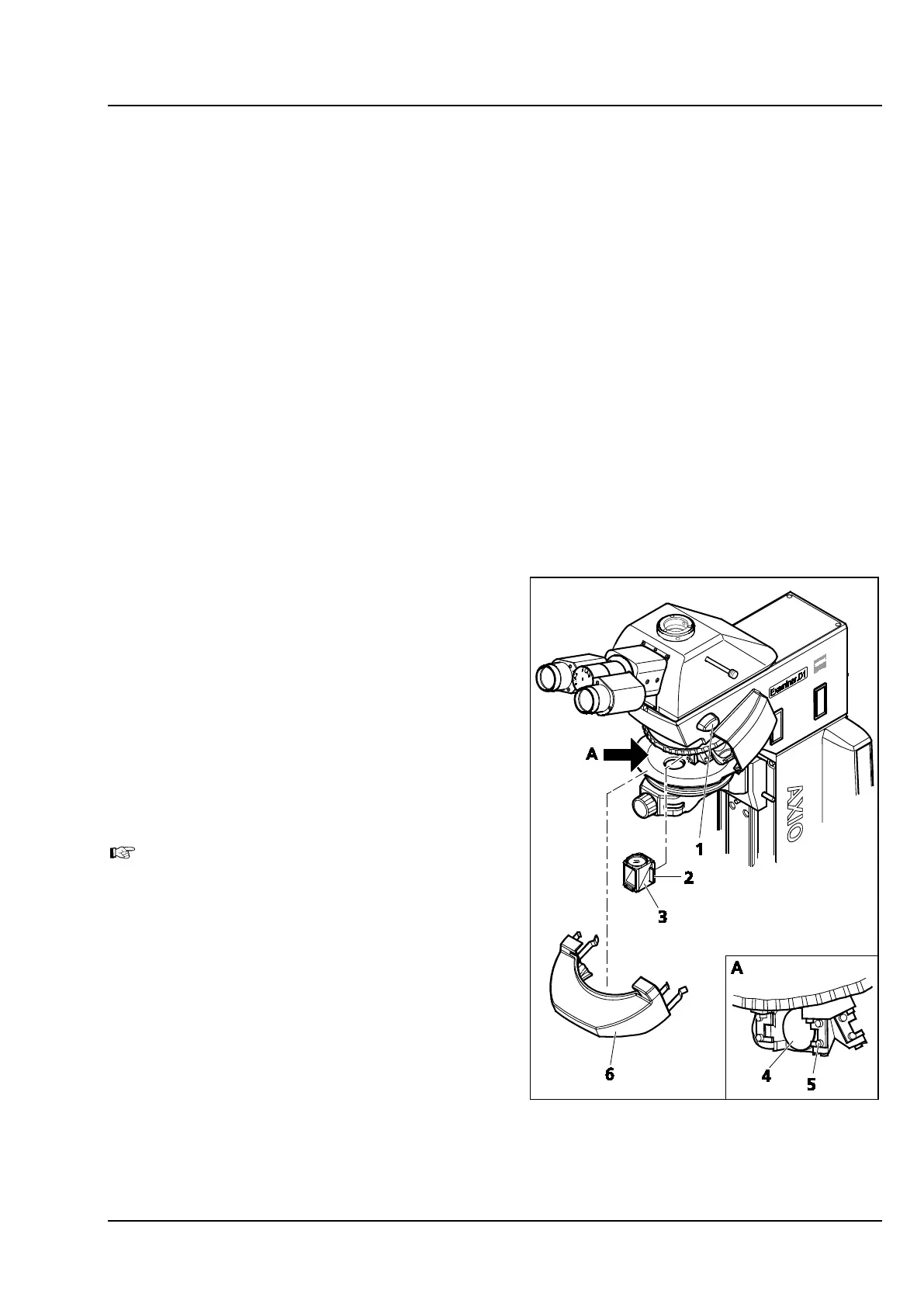
The 5x reflector turret is permanently installed to
the Axio Examiner.D1/.Z1 microscope top parts. To
either install or remove the modules, take off the
cap and proceed at an angle from the front side.
(1) Installing a module
• Set the shutter AL shift knob (Figure 3-6/1) to
the CLOSE position.
• Pull off the cap (Figure 3-6/6) toward the front.
The cap (Figure 3-6/6) is locked when the
shutter is not closed. Never use force to
remove the cap.
• Move the reflector turret position to be loaded
to an oblique front left-hand or right-hand
position.
• Insert the module (Figure 3-6/3) with the holder
elements (Figure 3-6/2) mounted to module's
right and left hand at an angle from below into
the upper spring elements (Figure 3-6/5) at the
reflector turret.
• Then tilt the module down (see Figure 3-6/4) to
ensure that the module also locks safely into
the lower spring elements of the reflector
turret.
Figure 3-6 Replacing the reflector module -
reflector turret 5x









 To Next Page