START-UP
Axio Examiner Installing standard components Carl Zeiss
M60-2-0003 e 05/2012 33
3.1.9 Attaching and removing the
condenser carrier
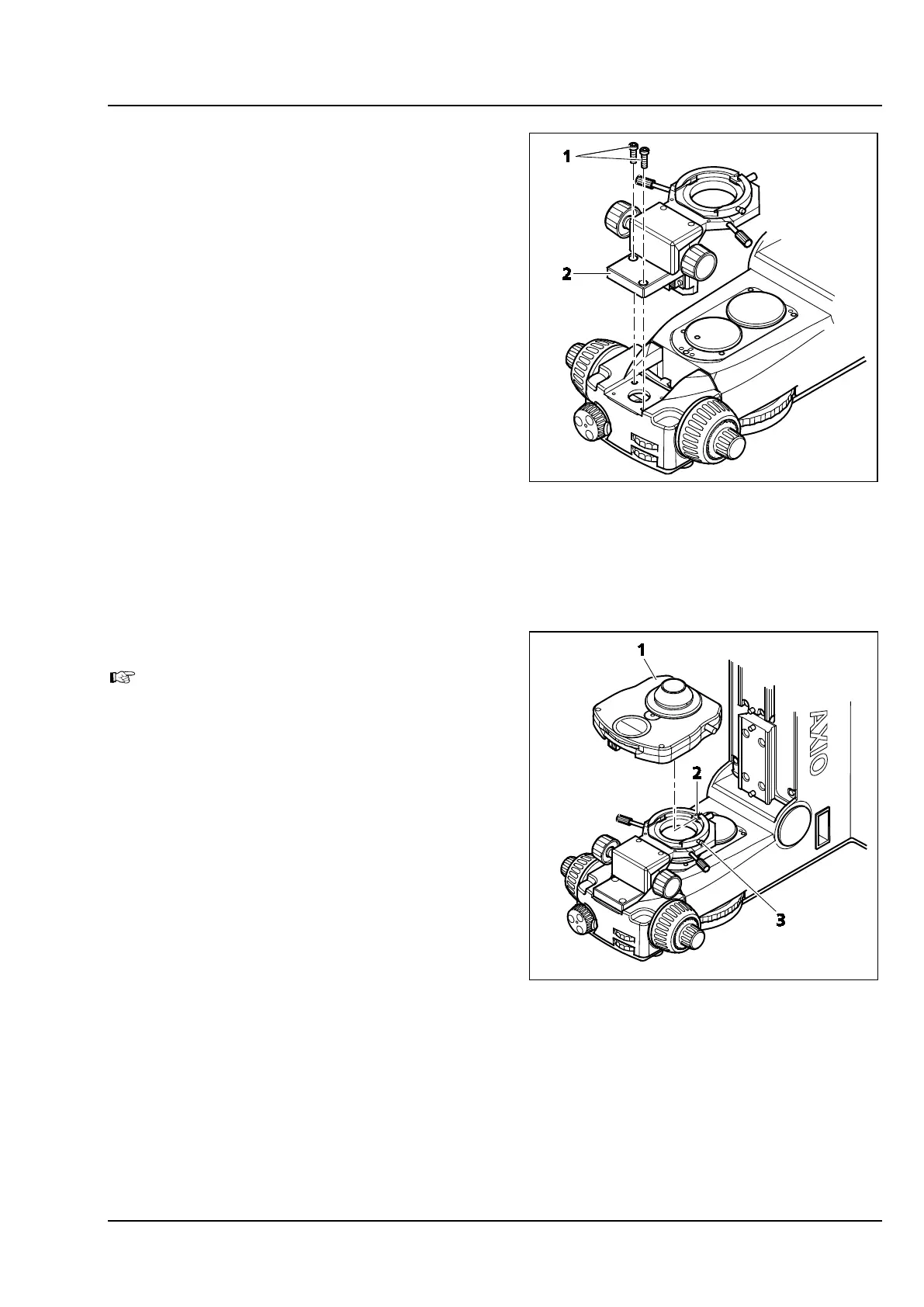
(1) Attaching the condenser carrier
• Unscrew the two hexagon socket screws
(Figure 3-12/1) in the cover plate at the stand,
and take off the cover plate.
• Put the condenser carrier (Figure 3-12/2) on the
stand, and fasten it using the two socket screws
(Figure 3-12/1).
(2) Removing the condenser carrier
• Hold the condenser carrier (Figure 3-12/2) with
one hand, and unscrew the two hexagon
socket screws (Figure 3-12/1).
• Take off the condenser carrier and lay it down
safely.
3.1.10 Installing the condenser
To replace the condenser, take off the stage
carrier first (see section 3.1.12).
• Put the condenser (Figure 3-13/1) on the
condenser carrier. To do so, direct the stud at
the condenser bottom toward the slot
(Figure 3-13/2).
• Slide the condenser into the condenser carrier
until it reaches its stop, and secure it using the
clamping screw (Figure 3-13/3).
Figure 3-12 Attaching & removing the
condenser carrier
Figure 3-13 Putting on the condenser









 To Next Page