START-UP
Axio Examiner Installing standard components Carl Zeiss
M60-2-0003 e 05/2012 41
• Press the spring lever (Figure 3-22/5) at the heat sink, and put the heat sink (Figure 3-22/1) over the
burner.
• Check for correct fit, and release the spring lever (Figure 3-22/5).
• Insert the bulb holder into the lamp housing, and push it in until it locks into place. Tighten the
clamping screw (Figure 3-21/1).
• Write down the counter reading shown at the hours-run meter (transformer). Replace the burner
when it has reached its nominal useful life of 100 hours.
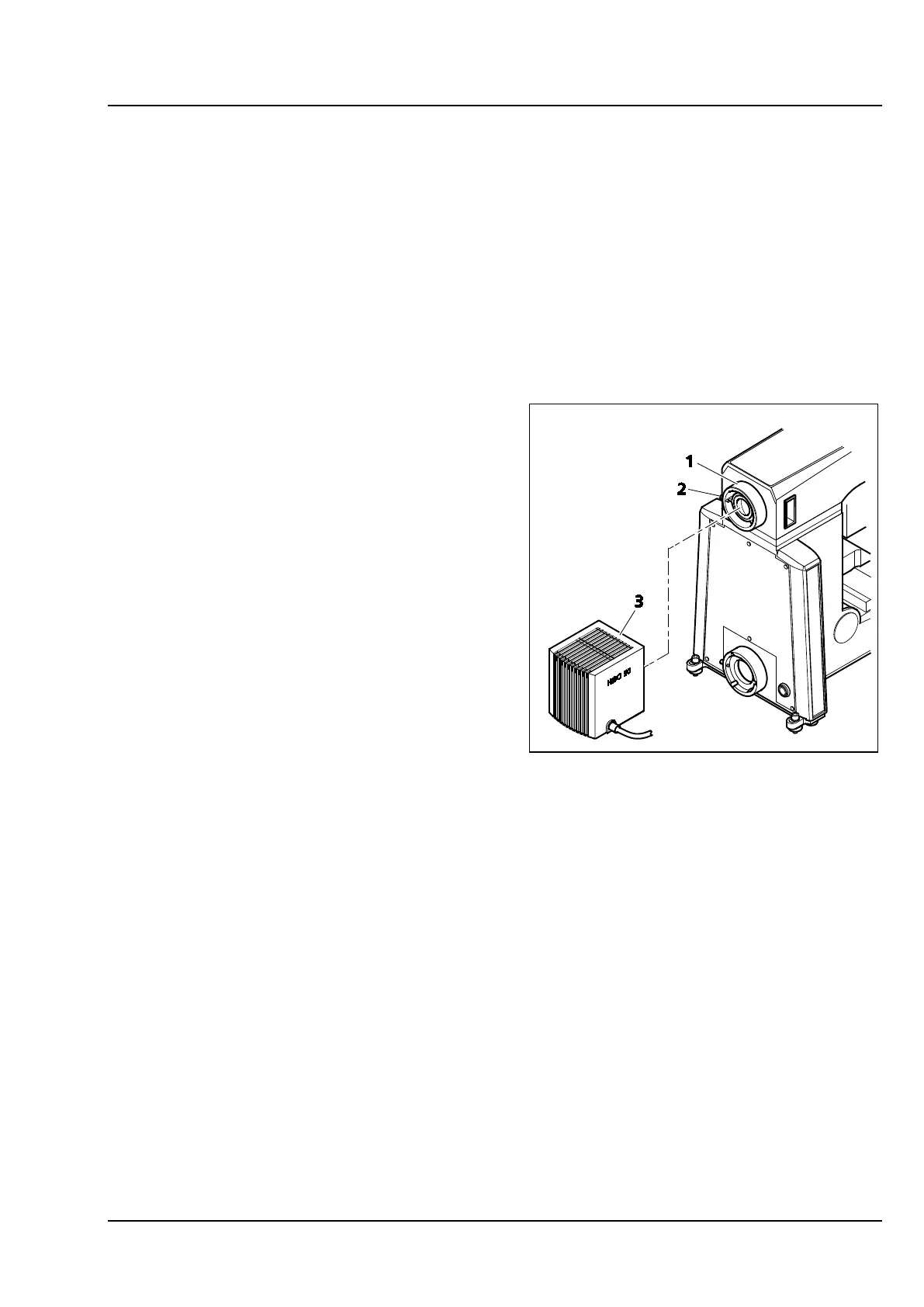
Attaching the HBO 50 illuminator 3.1.14.2
• Attach and align the HBO 50 illuminator
(Figure 3-23/3) at the connector socket
(Figure 3-23/1) in the stand top part, and
tighten the clamping screw (Figure 3-23/2).
• Connect the HBO 50 connection cable to the
transformer, and connect the transformer to a
mains outlet.
• Use the power button at the power-supply unit
front side to switch the HBO 50 illuminator
either on or off. The lamp will ignite
automatically when switched on.
Figure 3-23 Attaching the HBO 50









 To Next Page