START-UP
Carl Zeiss Installing optional components Axio Examiner
50 M60-2-0003 e 05/2012
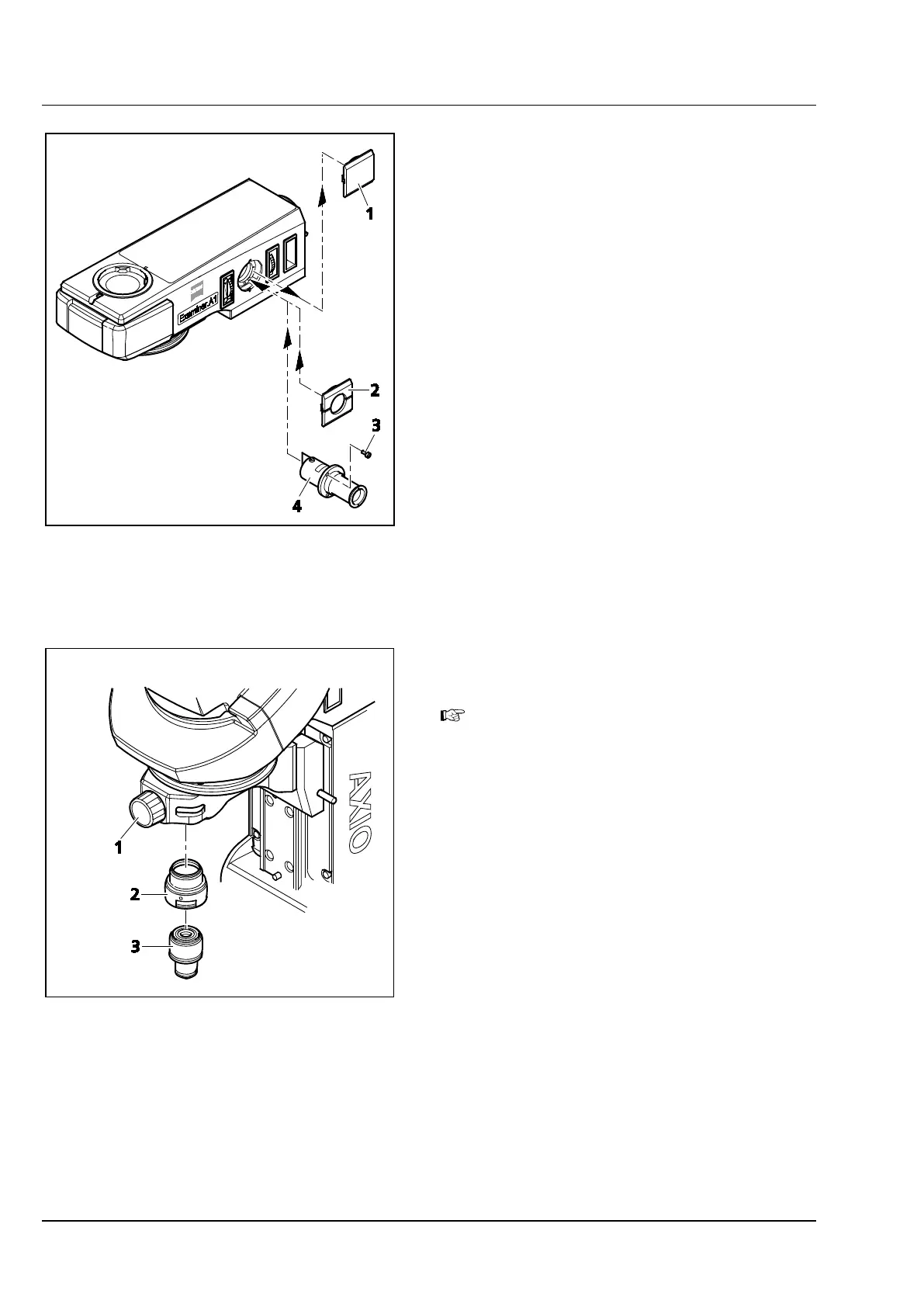
3.3.2 Inserting the adjusting aid into the
Axio Examiner.A1 upper
microscope part
• Remove the cap (Figure 3-33/1) from the
assembly opening for the adjusting aid.
• Insert the adjusting aid (Figure 3-33/4), and
screw it to the stand top part using the three
accompanying screws (Figure 3-33/3).
• Put on the cap with the opening
(Figure 3-33/2).
• Slide in the slidable adjusting aid socket.
3.3.3 Installing an adapter for 45 mm
objectives
Only for Axio Examiner.D1/.Z1.
• Use the shift knob (Figure 3-34/1) to move the
objective mount into the WORK position.
• If required, unscrew the objective or remove the
dust protection cap from the objective mount
or objective nosepiece.
• Screw in the 30 mm adapter (Figure 3-34/2).
• Screw the objective (Figure 3-34/3) into the
30 mm adapter.
Figure 3-33 Inserting the adjusting aid
Figure 3-34 Installing an adapter for 45 mm
objectives









 To Next Page