Section D Graphic Display
D-59
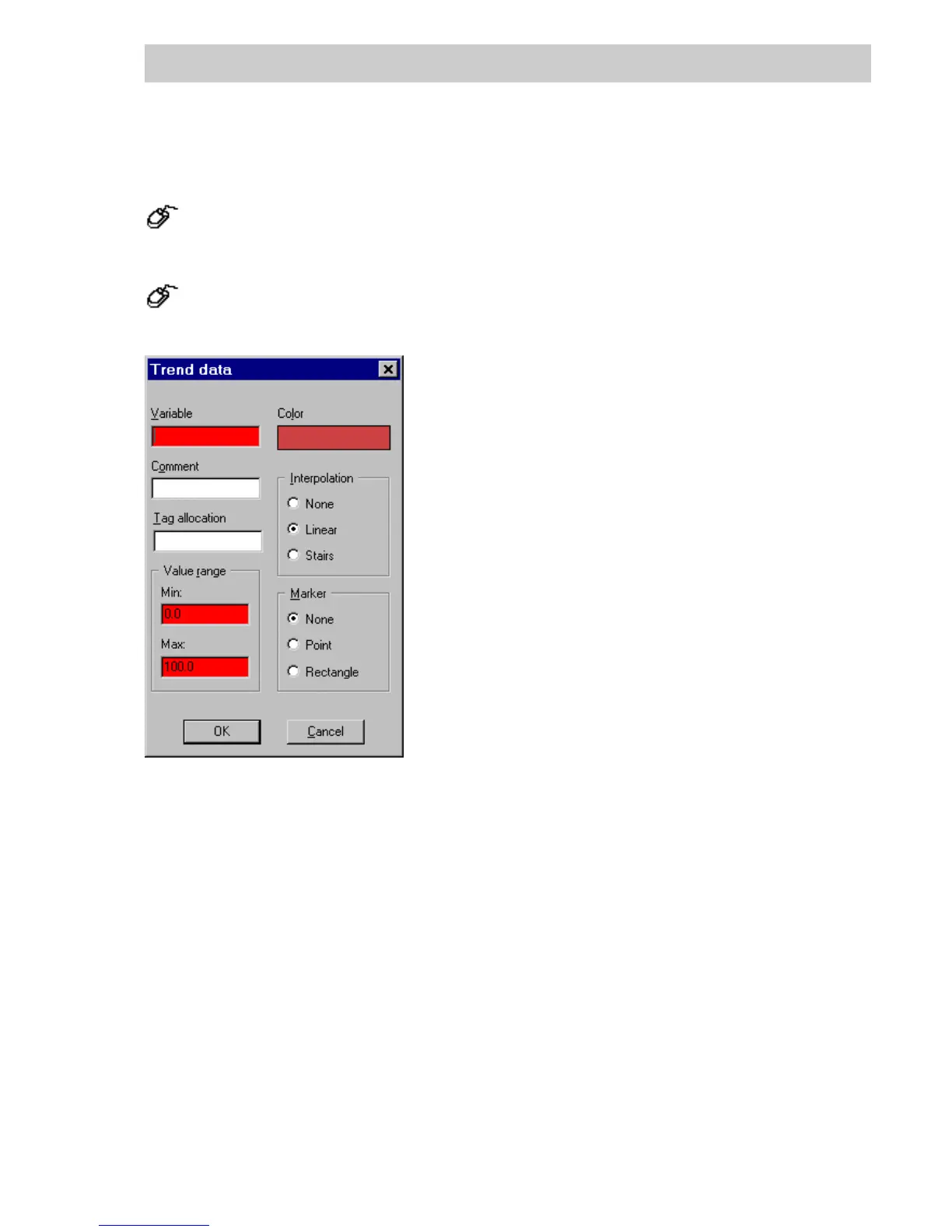
Trend window variables parameter
Insert new Trend window variable
→Press the INSERT buttonintheTrend window.
Change existing trend variable
→Select a specified variable,
→Press the E
DIT buttonintheTrend window.
Variable Enter trend variable directly or select via F2 function key.
Comment A comment with up to 19 characters may be entered; it will be displayed
to the left of the scaling and be visible only if Scale left is selected. (The
size of the trend window within the graphic display is defined by the
maximum length of the comments for all entered variables.)
Tag allocation Enter the name of a tag. It will be possible to call up this tag directly in
DigiVis via the Trend window. Enter the tag name directly or select via F2
function key.
Value range
Min. Start of scale range, in physical units,
Max. End of scale range, in physical units.
Color Specify trend color for the Trend window. Click on color field and make
color selection via the Color Selection parameter window (see page D-
13). Select color and confirm with OK. Selected color is displayed in the
color field.
tu0530us.bmp
Gross Automation, 1725 South Johnson Road, New Berlin, WI 53146, www.ssacsales.com, 800-349-5827



 To Next Page