Section D Graphic Display
D-88
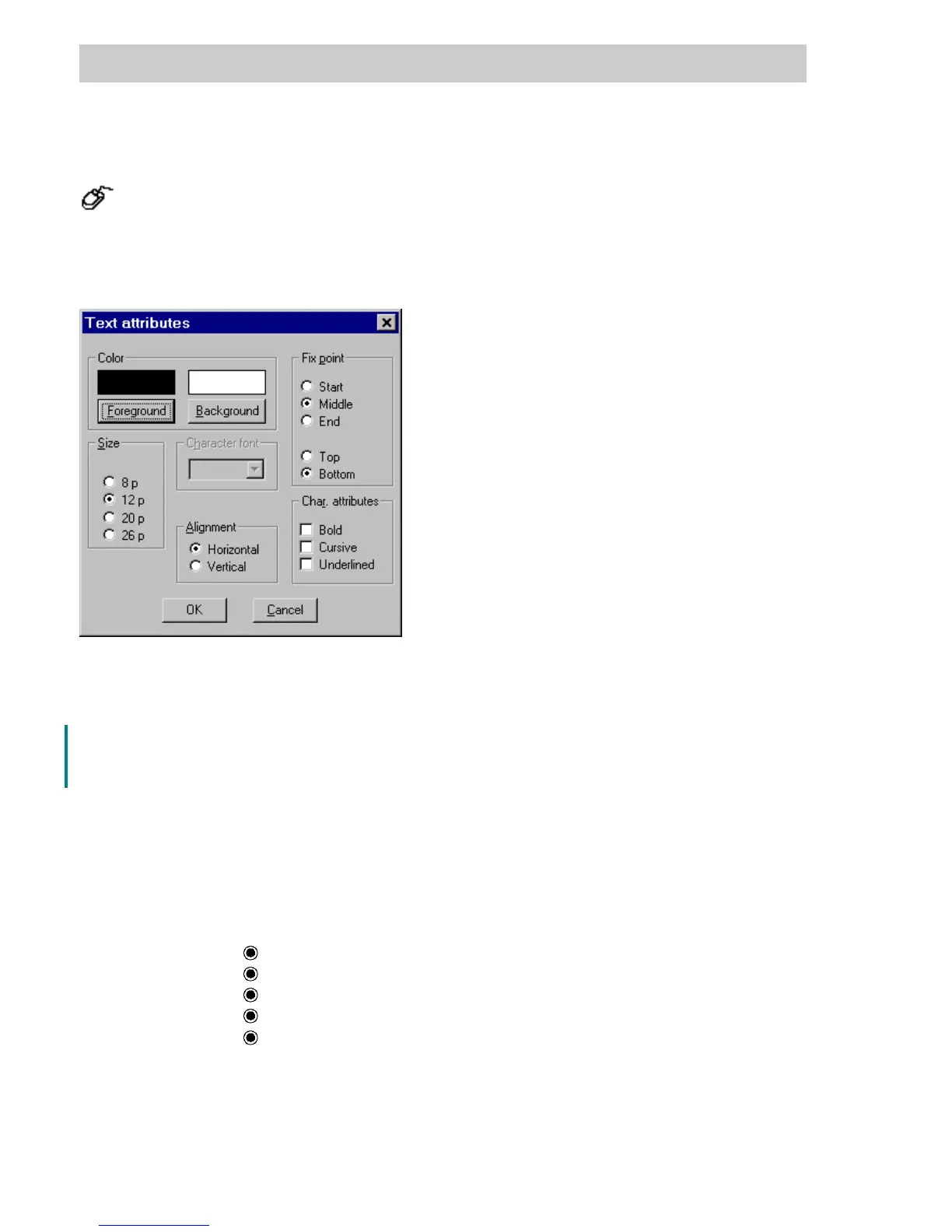
D 7.5.5 Text attributes
→Change → Text attributes.
Text attributes apply to the static graphic object text and to the dynamic objects alphanumeric
display, button, button field and radio button field. The attributes of selected texts can be
changed in a dialog window.
Color Any of 237 colors can be selected for foreground and background. In
addition, invisible may be selected as background.
Size Choice of text size in pixels.
Character font Arial, Courier or MS Sans Serif can be selected
Alignment There is a choice between horizontal and vertical text.
Fix point Point used for positioning a text. It is situated on the frame at the site
specified horizontally at start, middle or end and vertically by—top or
bottom.TheRotate and Horizontal/vertical Alignment functions turn the
text around this point.
The selections Top and Bottom are only available for object text.
Start
left frame edge
Middle
horizontal center of frame
End
right frame edge
Top
upper frame edge
Bottom
lower frame edge.
Character attribute Additional choice for text output between Bold, Cursive (italics) and
Underlined.
tu0753us.bmp
Gross Automation, 1725 South Johnson Road, New Berlin, WI 53146, www.ssacsales.com, 800-349-5827



 To Next Page