Home
Acer
Laptop
eMachines E720 Series
Page 91 (Removing the Switch Board)
Acer eMachines E720 Series - Removing the Switch Board
214 pages
Manual
Save Page as PDF
To Next Page
To Next Page
To Previous Page
To Previous Page
Loading...
Chapter 3
81
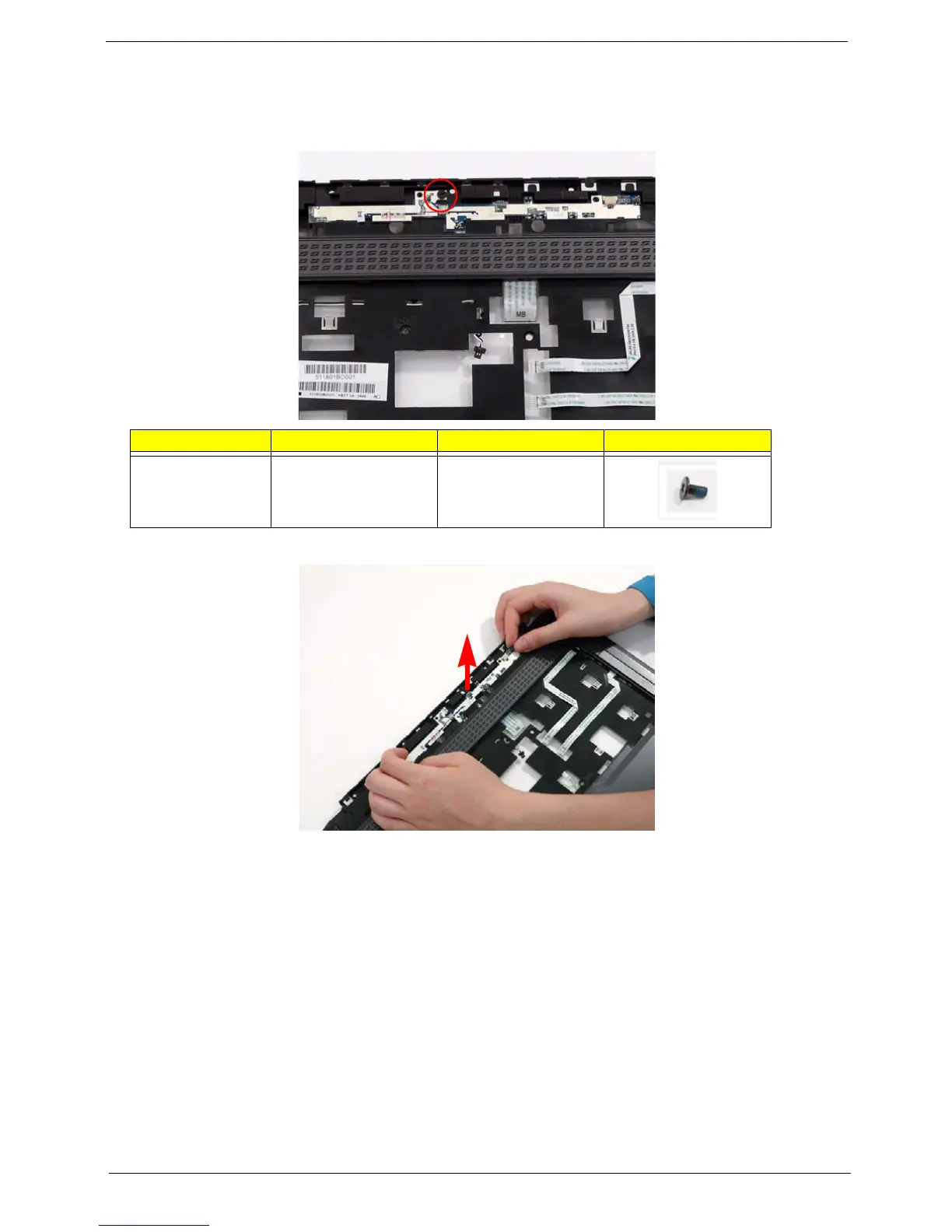
Removing the Switch Board
1.
See “Removing the Upper Cove
r” on page 68.
2.
Remove the single securing screw
.
3.
Lift the switch board and FFC up
and away from the upper cover
.
Ste
p
Size
Quantity
Screw T
ype
Switch Board
M2.5*4 (NL)
1
90
92
Table of Contents
Main Page
Default Chapter
2
Revision History
2
Table of Contents
7
System Specifications
11
Features
11
Dimensions and Weight
12
Privacy Control
12
Power Subsystem
12
Special Keys and Controls
12
System Block Diagram
13
Your Acer Notebook Tour
14
Front View
14
Closed Front View
15
Left View
16
Right View
17
Rear View
17
Bottom View
18
Indicators
19
Touchpad Basics
19
Using the Keyboard
20
Lock Keys and Embedded Numeric Keypad
20
Windows Keys
21
Hot Keys
22
Special Key
23
Using the System Utilities
24
Acer Gridvista (Dual-Display Compatible)
24
Hardware Specifications and Configurations
26
System Utilities
35
BIOS Setup Utility
35
Navigating the BIOS Utility
35
Information
36
Main
37
Security
38
Setting a Password
39
Removing a Password
39
Changing a Password
40
Power
41
Boot
43
Exit
44
BIOS Flash Utilities
45
DOS Flash Utility
46
Winflash Utility
47
Remove HDD/BIOS Password Utilities
48
Miscellaneous Utilities
51
Machine Disassembly and Replacement
53
Disassembly Requirements
53
General Information
54
Pre-Disassembly Instructions
54
Disassembly Process
54
External Module Disassembly Process
55
External Modules Disassembly Flowchart
55
Removing the Battery Pack
56
Removing the SD Dummy Card
57
Removing the Expresscard Dummy Card
58
Removing the Lower Covers
59
Removing the DIMM Modules
61
Removing the WLAN Module
62
Removing the TV Tuner Module
64
Removing the Hard Disk Drive Module
66
Removing the Optical Drive Module
68
Main Unit Disassembly Process
70
Main Unit Disassembly Flowchart
70
Removing the Switch Cover
72
Removing the Keyboard
73
Removing the Antenna
74
Removing the LCD Module
76
Removing the Upper Cover
78
Removing the Finger Print Reader
82
Removing the Upper Right Saddle
83
Removing the Left Speaker Module
84
Removing the Upper Left Saddle
85
Removing the Touchpad Bracket
86
Removing the Launch Board
88
Removing the Media Board
88
Removing the Ekey Board
89
Removing the Switch Board
91
Removing the Right Speaker Module
92
Removing the TV Board
93
Removing the Bluetooth Module
94
Removing the USB Board
95
Removing the Modem Module
96
Removing the Subwoofer Module
97
Removing the Main Board
98
Removing the RJ-11 Port
100
Removing the Thermal Module
101
Removing the CPU
103
Removing the VGA Module
104
LCD Module Disassembly Process
105
LCD Module Disassembly Flowchart
105
Removing the LCD Bezel
106
Removing the Inverter Board
107
Removing the Camera Module
109
Removing the LCD Panel
111
Removing the LCD Brackets and FPC Cable
112
Removing the Antennas
113
Removing the MIC Module
114
LCD Module Reassembly Procedure
115
Replacing the LCD Panel
115
Replacing the LCD Bezel
119
Main Module Reassembly Procedure
120
Replacing the VGA Module
120
Replacing the CPU
120
Replacing the Thermal Module
121
Replacing the RJ-11 Port
121
Replacing the Mainboard
123
Replacing Subwoofer Module
124
Replacing the Modem Module
124
Replacing the Usb Board
125
Replacing the Bluetooth Board
126
Replacing the TV Board
126
Replacing the Right Speaker Module
127
Replacing the Switch Board
128
Replacing the Ekey Board
128
Replacing the Media Board
130
Replacing the Upper Right Saddle
131
Replacing the Launch Board
132
Replacing the Finger Print Reader
132
Replacing the Touchpad Bracket
134
Replacing the Left Speaker Module
135
Replacing the Upper Cover
135
Replacing the LCD Module
137
Replacing the Antenna Cables
139
Replacing the Keyboard
140
Replacing the Switch Cover
140
Replacing the TV Tuner Module
141
Replacing the WLAN Module
143
Replacing the Hard Disk Drive Module
143
Replacing the DIMM Modules
144
Replacing the ODD Module
145
Replacing the Lower Covers
146
Replacing the Express and SD Card Trays
147
Troubleshooting
149
Common Problems
149
Power on Issue
150
No Display Issue
151
Random Loss of BIOS Settings
152
LCD Failure
153
Built-In Keyboard Failure
153
Touchpad Failure
154
Internal Speaker Failure
154
Sound Problems
155
Internal Microphone Failure
156
HDD Not Operating Correctly
157
ODD Failure
158
USB Failure (Rightside)
161
Modem Function Failure
161
Wireless Function Failure
162
Easytouch Button Failure
162
Mediatouch Button Failure
163
Fingerprint Reader Failure
163
Thermal Unit Failure
164
HDTV Switch Failure
164
External Mouse Failure
165
Other Failures
165
Intermittent Problems
166
Undetermined Problems
166
POST Codes Tables
167
Port 80 Codes
167
Post Key
169
Messages Displayed During POST
169
Jumper and Connector Locations
171
Top View
171
Bottom View
172
Clearing Password Check and BIOS Recovery
173
Clearing Password Check
173
BIOS Recovery by Crisis Disk
174
FRU (Field Replaceable Unit) List
177
Emachines E720/E520 Exploded Diagram
178
Emachines E720/E520 FRU List
179
Model Definition and Configuration
188
Emachines E720/E520 Series
189
Test Compatible Components
207
Microsoft® Windows® Vista Environment Test
208
Online Support Information
211
Index
213
Related product manuals
Acer eMachines E730 Series
314 pages
Acer eMachines G627
182 pages
Acer eMachines Series
54 pages
Acer eMachines E640 Series
314 pages
Acer eMachines eM250 Series
194 pages
Acer E5-475G
78 pages
Acer EX215-32
72 pages
Acer Aspire E15
83 pages
Acer Extensa 15
86 pages
Acer Aspire E 15
77 pages
Acer Extensa 355
89 pages
Acer Aspire E 17
78 pages












 To Next Page