Chapter 6. Accounts Payable
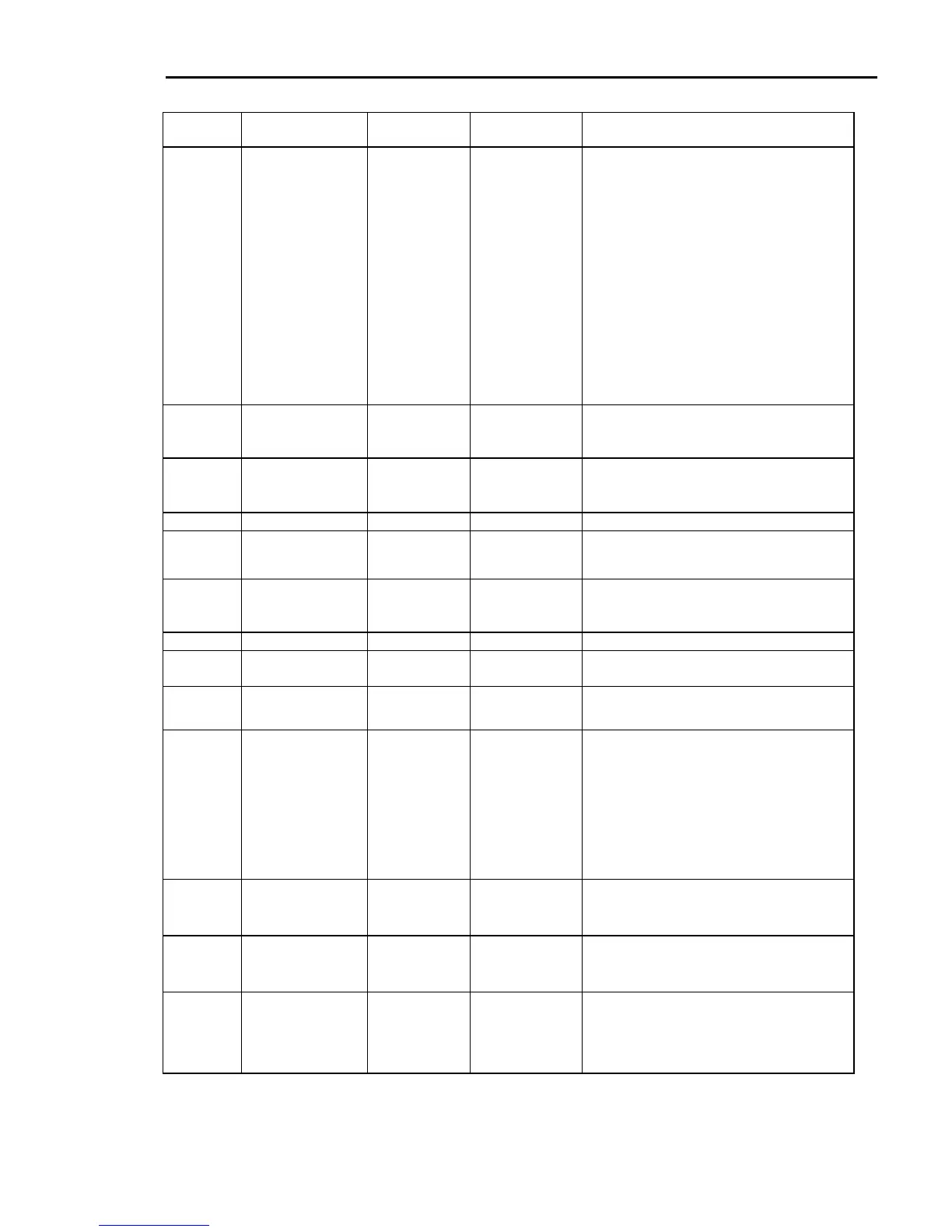
FIELD WHAT HOW LONG FOR EXAMPLE MORE...
VENDOR
NO
Vendor Number Up to 7 digits 1234567 1. Vendor numbers 100 and higher are used for
accounts where the transactions (invoices and
checks) are tracked through the A/P system.
2. Vendor numbers less than 100 (1-99) are one-
time or miscellaneous vendors. Set up a
different miscellaneous vendor for each type of
vendor terms you may encounter. All
miscellaneous vendors must have SEPARATE
CHECKS=Y.
3. At the time you enter an invoice for a
miscellaneous vendor, you will enter the vendor
name and address. The computer will also ask if
you want to save invoice information for 1099’s.
At the end of the year you will need to sort
through the saved information and determine
which miscellaneous vendors will require a 1099
form.
4. If you suspect that a miscellaneous vendor will
exceed the 1099 limits for the year, use a regular
vendor number (over 100).
NAME Vendor Name 30 characters
INTERMOUNTAIN
SUPPLIERS or
SMITH/DOUG
This controls how the account is alphabetized. See
Step 2 on page 72 for more explanation of how to
format the vendor name.
ADDR 1 P.O. Box or Attn
information
25 characters P.O. BOX 888 or
ATTN: Accounts
Receivable
ADDR 2 Street address 25 characters This can be the actual mailing address.
ADDR 3 City, state & zip
code
25 characters Newtown, CO
87101
1. Separate the city and state with a comma.
2. If the vendor has both a PO box and a street
address, use the zip code of the PO box.
PHONE Phone number 12 characters 800/222-3333
800-222-3333
222-3333 x123
Enter the phone number exactly how you wish it to
print on report and inquiry screens.
FAX NO Fax number 12 characters 702-222-4444
CONTACT Contact person 20 characters Bill W. or
Mrs. Johnson
Enter the name of the contact person for this
vendor. This is optional.
TERMS
DESC.
Terms Description 13 characters 1% NET 10
NET 30th
Enter the description of the terms for this vendor to
be displayed when selecting vendors at invoice
entry.
DISCOUNT
TERMS
(DAYS/
DATE)
Discount Terms 1 character 1=# days
2=date of month
1 = calculate the number of days from the invoice
date for due date. Then enter the number of days in
the DISCOUNT: DAYS field. For example, if
TERMS equals 1 and DAYS equals 10, the invoice
would be due 10 days past the date of the invoice.
1 = use date of month for the due date rather than a
number of days from the invoice date. For example
if TERMS equals 2 and DAYS equals 10, then
invoices would be due on the 10
th
day of the next
month. Enter the day of month in the next field,
DISCOUNT: DAYS.
DISCOUNT:
DAYS/DAT
E
Determines the
discount date if paid
within terms.
2 characters 10=10 days after
invoice date or 10
th
of the month
1. If TERMS equals 1, enter the number of days to
calculate the due date from the date of invoice.
2. If TERMS equals 2, enter the day of month for
the due date.
DISCOUNT:
PERCENT
Determines the
percent of discount
available if paid within
terms.
2 characters 1 = 1% discount
2 = 2% discount
If there is an allowable discount if paid on or before
the due date, enter the percentage next to
PERCENT. For example, take a 2% discount if paid
within 10 days from invoice date.
G/L DEBIT
ACCOUNT
General Ledger debit
account number
Up to 7 digits Standard G/L chart
of accounts–store
1
1312.01=Inventory
purchases
6020.01=Utilities
Enter the G/L account number for the debit entry
when an invoice is entered for this vendor. It can be
overridden at the time of invoice entry.
Dimensions 14 233



 To Next Page