Control panel with graphic
inter
face
Fonction
“Basic”
mode
“Advanced”
mode
•
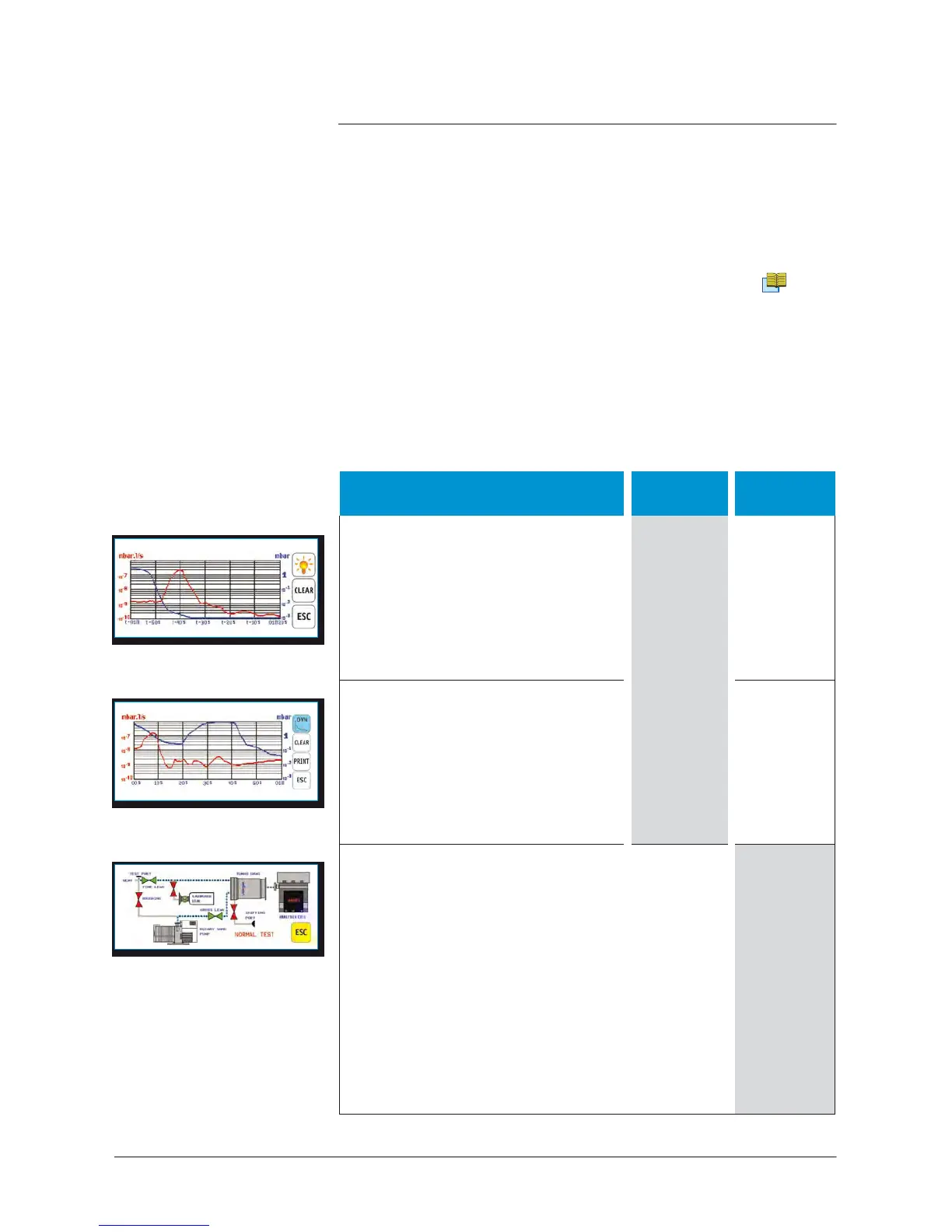
Dynamic
graph
It
shows
the helium signal, inlet
pressure
and reject
threshold
curves,
for a period between 30
s
and 4 h,
depending on
set
parameters.
It appears by default when we switch
from the standard interface to the
graphic interface.
X
•
Memorized
graph
It allows to show the historical of the
memorized helium signal, inlet
pressure
and reject
threshold
curves,
for a period between 3 h 16 mn and
900 h, depending on
set
parameters.
It allows to zoom in on the
curves
and
X
•
Vacuum diagram
It allows to show the operating
principle of the leak detector, its
components
and the leak detector
active
parts
during the different test
phases.
The
valve colour
corresponds
at
the
status
(opened
/
closed)
of
this valve when the
detector
is in
vacuum test,
sniffing
test, stand-by
or
autocalibration.
If a valve is manually activated, it
will
not change of colour on display
.
GB 02669
-
Edition 03
- June
08
Operating
principle
of
the standard
inter
face
Please
refer to the operating principle of the standard control panel.
C
110
Operating
principle
of
the graphic
inter
face
The
graphic interface offers 2 operating (“basic“ and “advanced“)
modes.
Dynamic
graph
Memorized
graph
Animated synoptic



 To Next Page