Display
Reach
the memorized graph by tapping on the key.
Note:
•
You can go to the memorized graph as soon as you have recorded
at least 2 points.
If no recording has been done, the following
message
displays:
NO
RECORDED
POINTS.
Push
”REC“ for start recording
Zoom
The
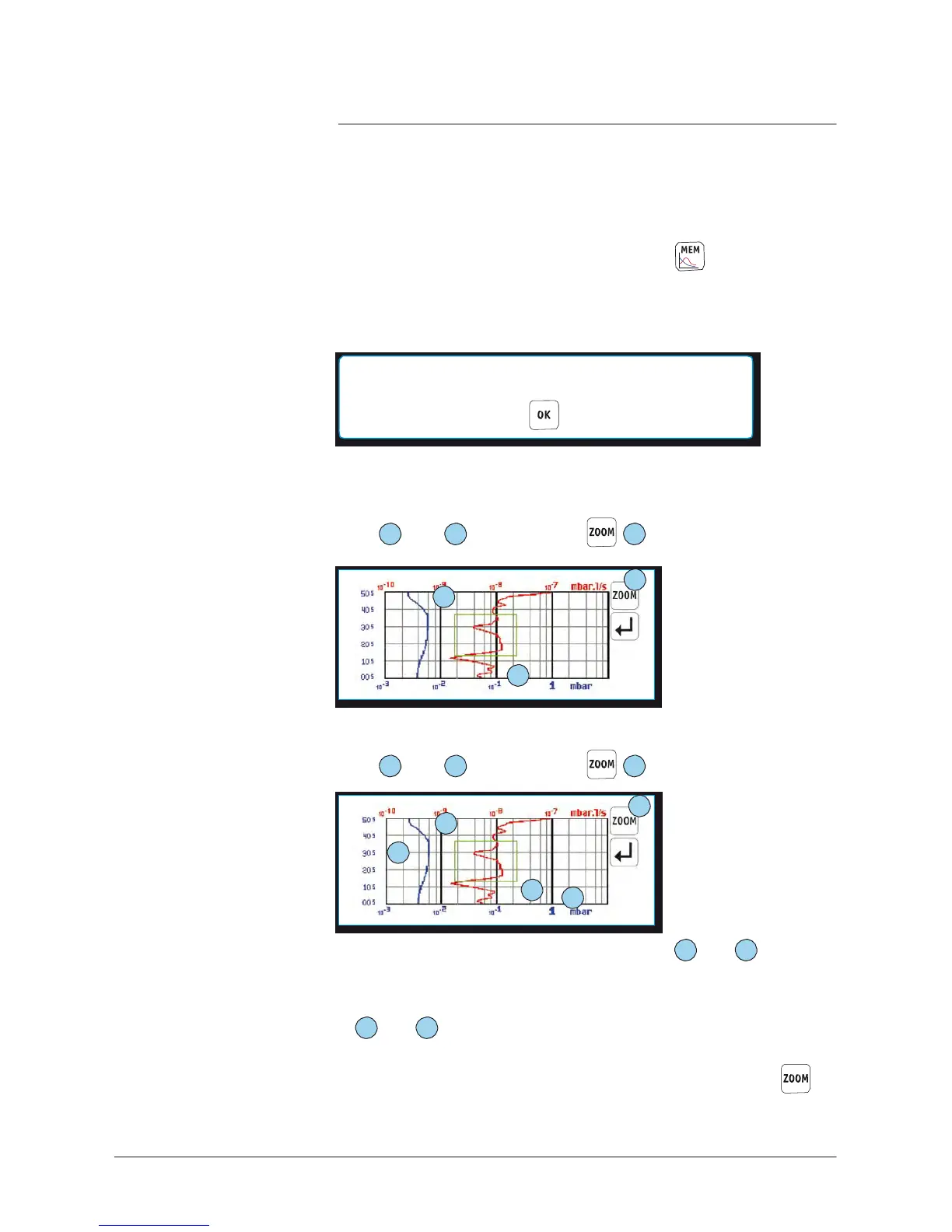
memorized graph allows you to enlarge curve areas.
You only should define the targeted area with 2 point:
•
Zoom in: with your finger or a pen, tap on the
screen
to set
point
1
,
and
2
, and tap on the
3
key.
3
1
x
x
2
•
Zoom in: with your finger or a pen, tap on the
screen
to set
point
1
,
and
2
, and tap on the
3
key.
3
2
x
x
5
x
1
4
x
•
To
return to the previous zoom out,
set
points
1
and
2
nearby
(maximum
40 zooms out could be memorized)
.
•
To
return to the original graph
(complete
zoom out), put the points
4
and
5
very
distant
.
Notes:
•
After having defined the targeted area, and before pressing
,
it is possible to modify the targeted area: move the area
sides
or
angles with the
finger
.



 To Next Page