Image type Settings Step 1: activate Step 2: start ex-
posure
Result
exposure button
or radiography
pedal
Static im-
age
exposure button
or radiography
pedal
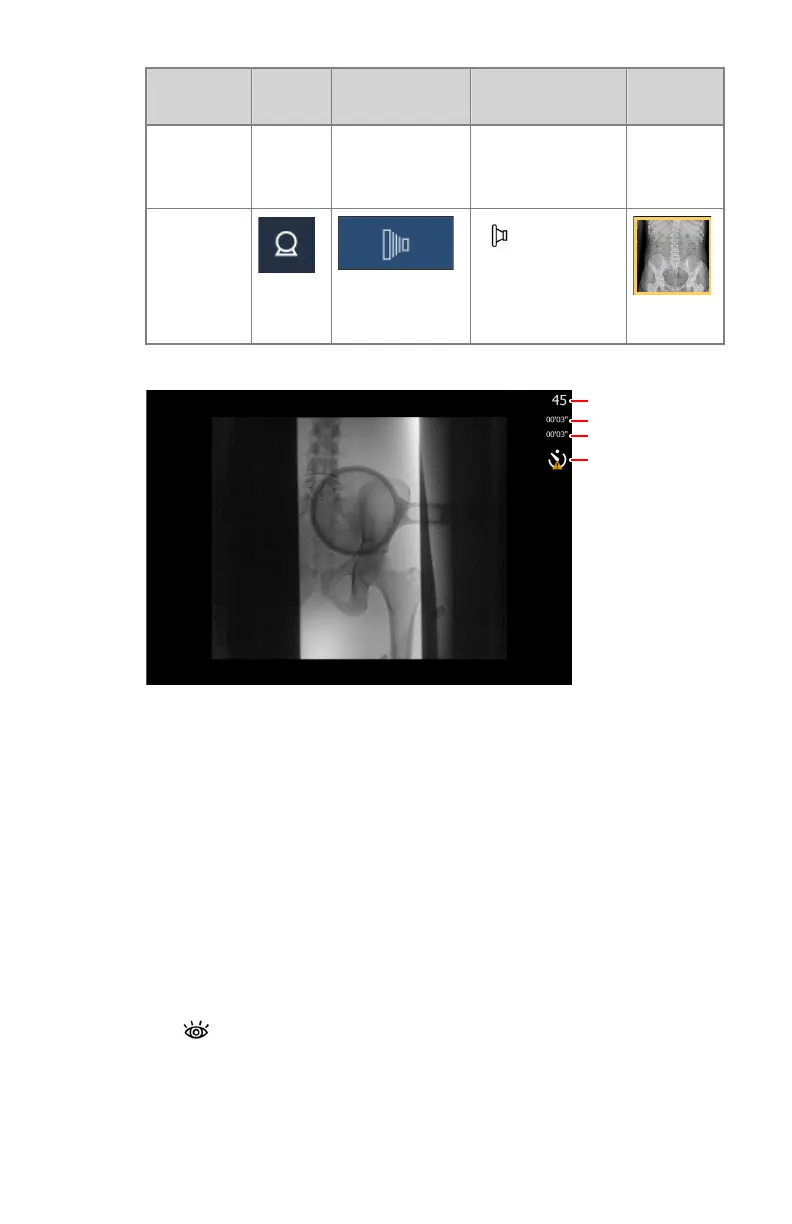
Information about the dynamic image is displayed next to the image.
1.
Current frame number
2.
Duration up till now of the current fluoroscopy or rapid sequence
exposure
3.
Total duration up till now of all fluoroscopy sequences in this
examination
4.
Warning sign for delay on real-time imaging
Figure 83: Dynamic image screen
A warning sign can be displayed if the real-time imaging is not
guaranteed.
6. Acquire a fluo sequence.
a) Press and hold down the fluoroscopy pedal to view a real-time
fluoroscopy image in the dynamic image screen.
b) Release the fluoroscopy pedal to stop the fluoroscopy sequence.
The fluo sequence is stored and displayed as a fluo sequence
thumbnail in the lower half of the Image Overview pane. The last
image of the sequence is visible in the thumbnail
120
| DR 800 | Basic Workflow
0392C EN 20210309 1049



 To Next Page