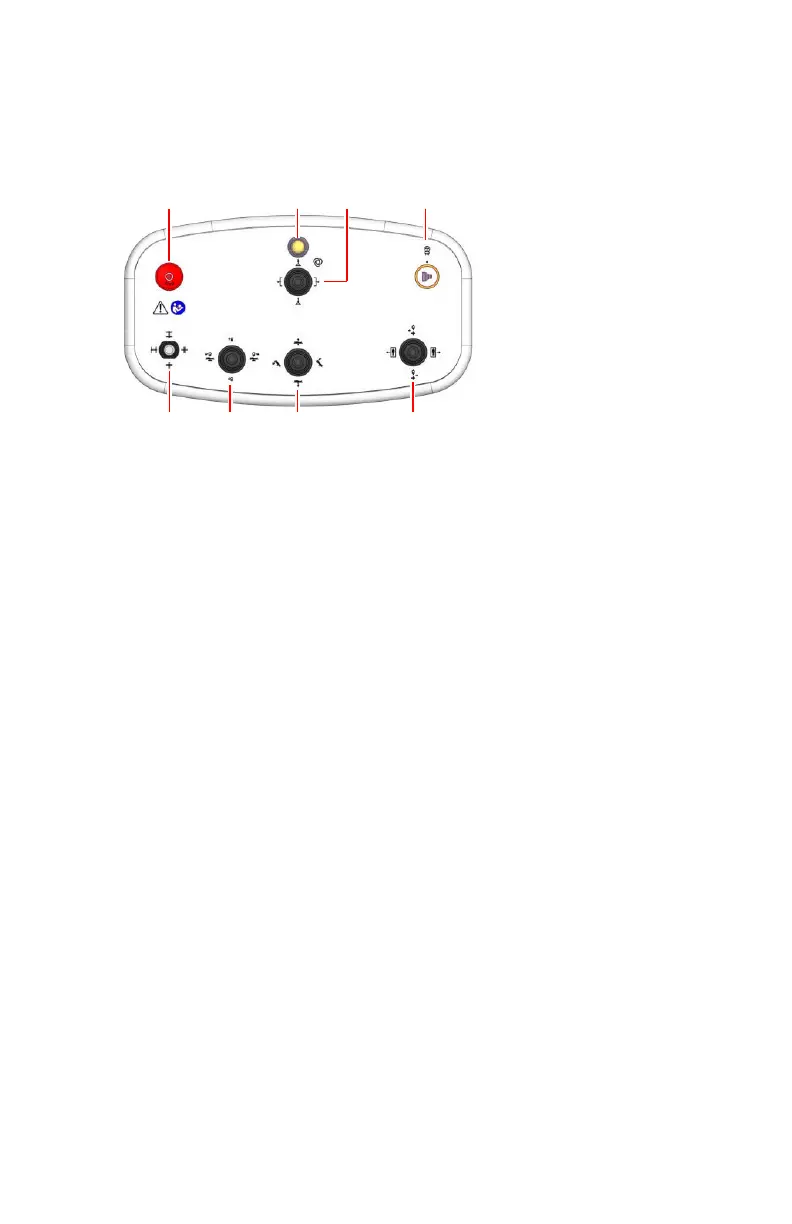
Position Controls
The position controls are available in the operator room. Optionally a wireless
console with position controls is available in the examination room.
1.
Emergency stop button for motor driven movements of the radiographic
table
2.
Indicator light is blinking if an automatic position is selected, until the
automatic movement has finished
3.
Move to the selected automatic position, while the indicator light is
blinking
While the indicator light is off:
• Longitudinal displacement of the tabletop
• Operation of the compressor
4.
Exposure button
5.
• Transversal displacement of the tabletop
• Longitudinal displacement of the DR detector
6.
• Table tilting angle
• Table height
7.
• X-ray tube tilting angle
• Source image distance (SID)
8.
Collimator
Figure 3: Position controls
To allow movement using one of the joysticks, keep the button on the joystick
pressed while operating the joystick. Movement may stop on preconfigured
threshold positions and can be continued by releasing the joystick and
operating it again.
The tilting angle to which the joystick lever is pushed controls the speed of the
movement.
The direction in which the joystick is pushed, corresponds to the direction in
which the region of interest is moved on the image as it is visible on the
monitor.
DR 800 | Introduction |
21
0392C EN 20210309 1049



 To Next Page