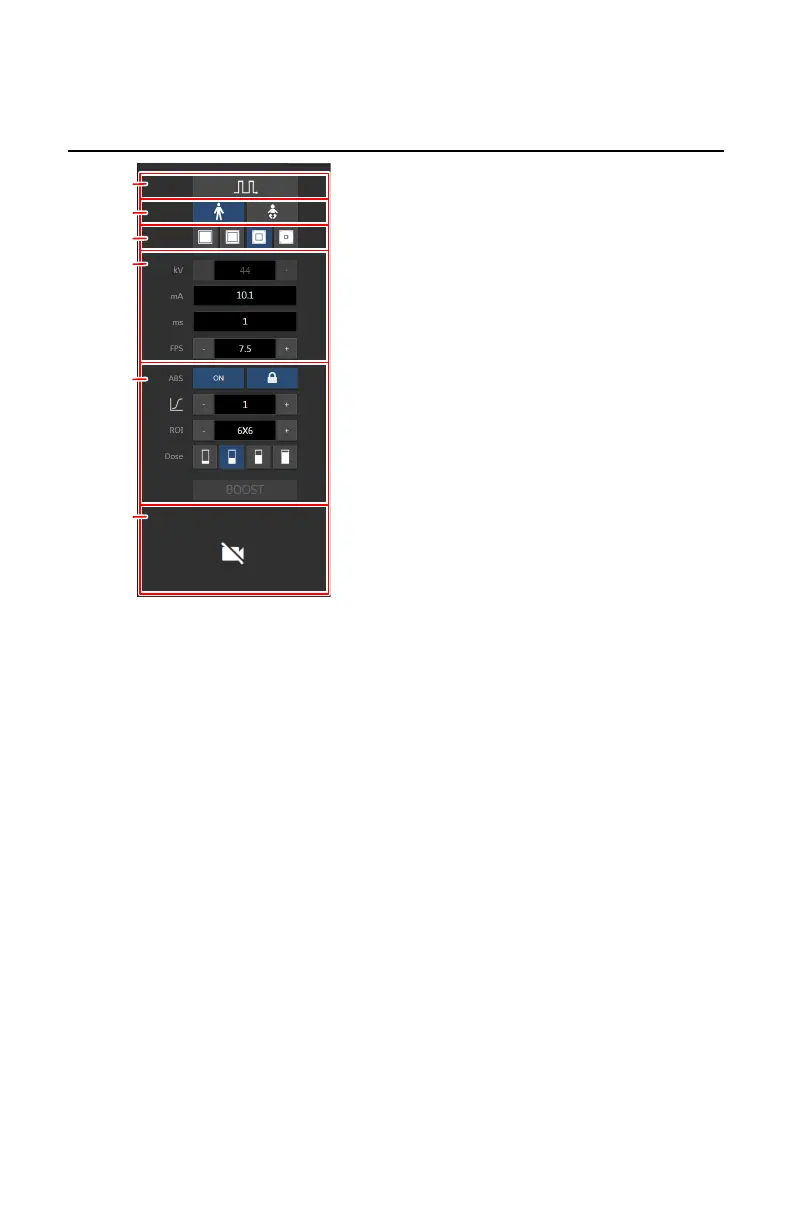
Generator controls for fluoroscopy or roadmapping
1.
Pulsed fluoroscopy and continuous fluoroscopy
2.
Patient age group
3.
Sensor area
4.
Radiographic parameters
5.
Automatic brightness system
6.
Collimator camera
Figure 158: Generator controls (example for pulsed fluoroscopy)
To change a value, use the + and - buttons. The values increase or decrease
step by step each time the corresponding button is pushed. To change a value
without repeatedly pushing the buttons, push the value twice. The buttons
change into arrow up and arrow down buttons. Push and hold the button to
change the value.
Topics:
• Fluoroscopy imaging modes
• Patient age group
• Sensor area
• Radiographic Parameters for fluoroscopy
• Automatic Brightness System (ABS)
• Collimator camera
DR 800 | Software Console |
219
0392C EN 20210309 1049



 To Next Page