DR workflow for digital tomosynthesis
This workflow is available only on DR systems that support digital
tomosynthesis.
The result of a digital tomosynthesis examination is an acquisition sequence
and a reconstruction sequence.
The acquisition sequence is a sequence of static images that is acquired during
the tomographic movement of the X-ray tube around the center of the region
of interest. The images of the acquisition sequence are not of diagnostic
quality. The acquisition sequence is the input for calculating the
reconstruction sequence.
The reconstruction sequence is a set of slices, representing the 3D volume of
the examined bodypart within a specified region of interest.
To perform a digital tomosynthesis examination:
1. Add a digital tomosynthesis group to the Image Overview pane.
If a digital tomosynthesis group has already been added based on data
from the RIS, this step can be skipped.
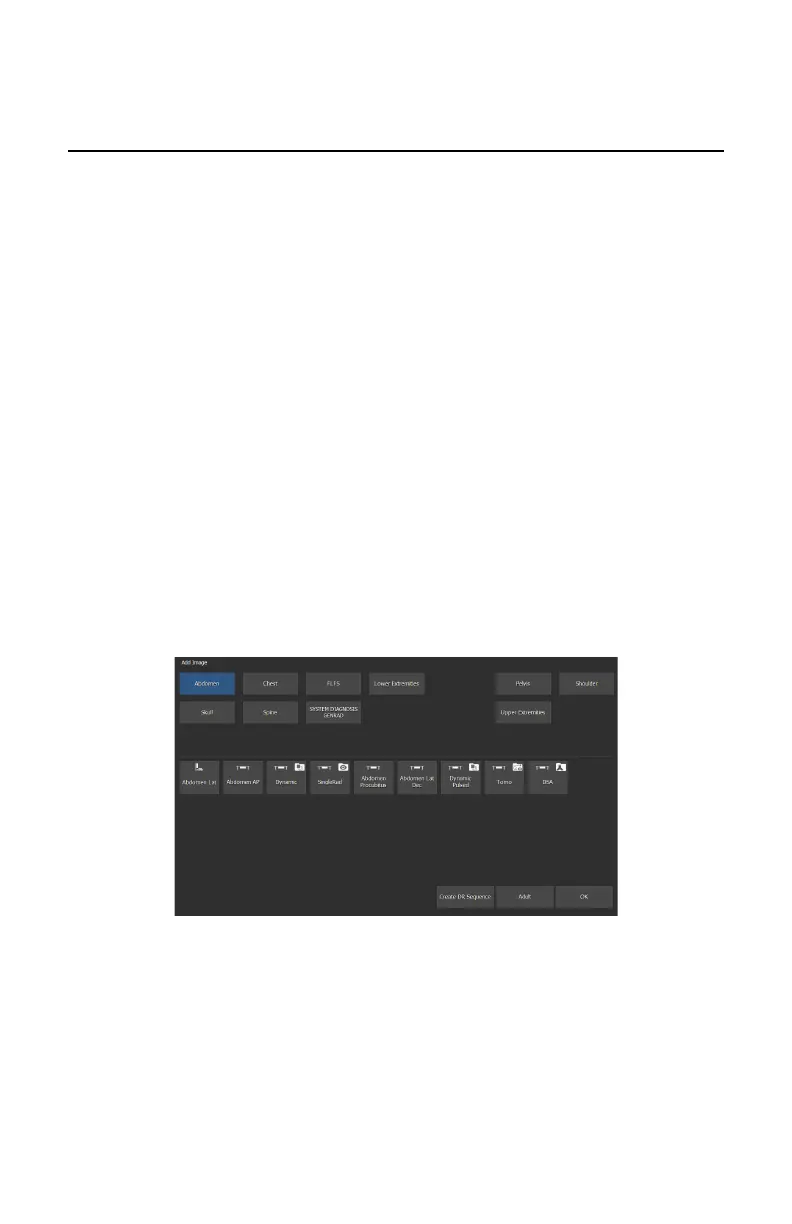
a) In the Examination window, click Add Image.
The Add Image window appears.
Figure 89: Add Image
b) Specify the exam group and exam type by clicking on the buttons.
c) Select an exam type that is configured as a digital tomosynthesis group
and click OK.
The digital tomosynthesis group thumbnail is added to the Image
Overview pane.
A digital tomosynthesis group thumbnail is indicated with an icon in the
top right corner of the thumbnail.
124
| DR 800 | Basic Workflow
0392C EN 20210309 1049



 To Next Page