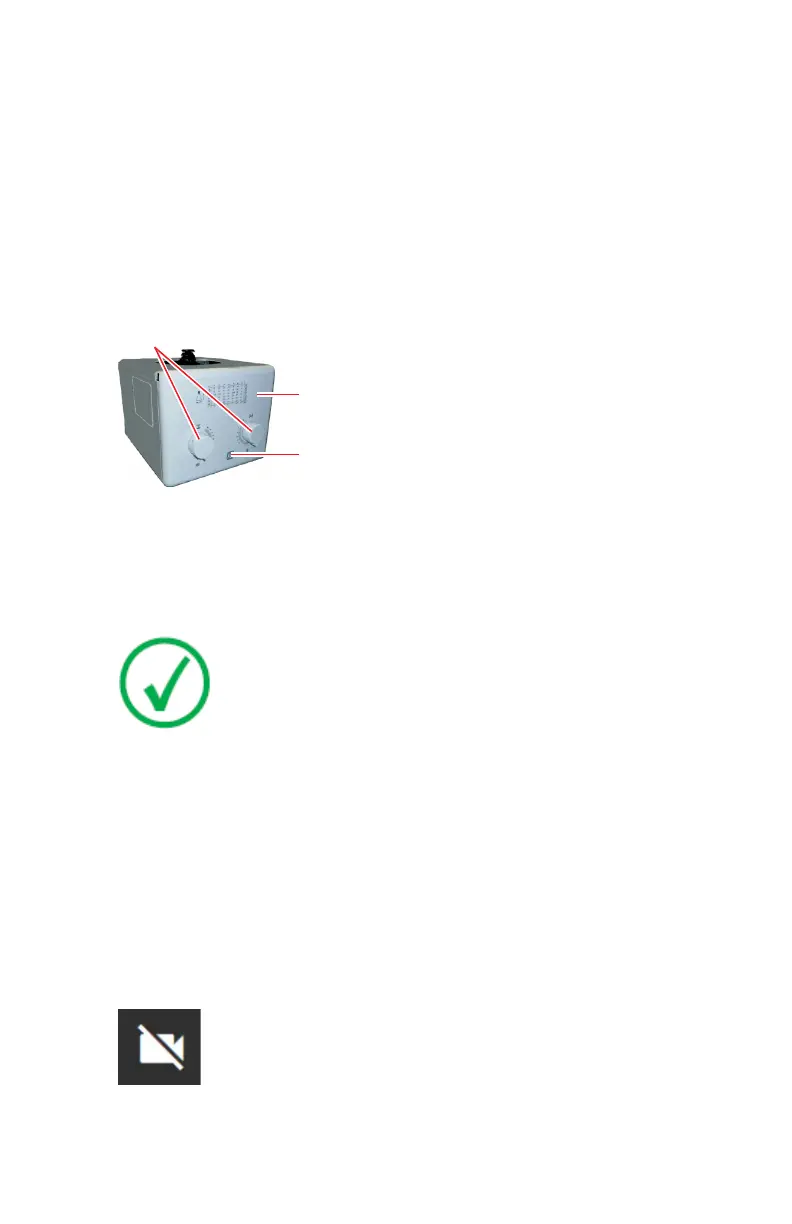
Collimator
The collimator controls consist of a button to switch on the collimator lamp
and two knobs to open or close the internal blades of the collimator.
When pressing the collimator lamp push-button, the collimator light turns on.
It remains lit for 30 seconds before it switches off automatically (lighting time
can be configured).
Exposure field on the receptor is adjusted by setting the two knobs. The table
on the front panel shows the number to set with the knobs to open the blades
according to the SID and X-ray field to be used.
1.
Knobs to open or close the Collimator blades
2.
Indicator light that lights up while the X-ray tube is selected
3.
Collimator lamp push-button
Figure 19: Collimator controls
Note: Refer to the corresponding collimator manual for extended
information about operation or technical description needed to
maintain compliance with Standard IEC 60601--1--3: 2008.
Topics:
• Collimator camera
• Collimator rotation
Collimator camera
The collimator has a built-in camera to visualize the anatomical region of
interest on the software console while adjusting the patient position remotely.
To hide the camera image on the software console, push the image. To display
the camera image, push the camera icon.
Figure 20: Camera image is not displayed
36 | DR 800 | Introduction
0392C EN 20210309 1049



 To Next Page