Publication 1756-UM050A-EN-P - December 2001
5-2 Using Rack Optimized I/O
Set Up the Hardware
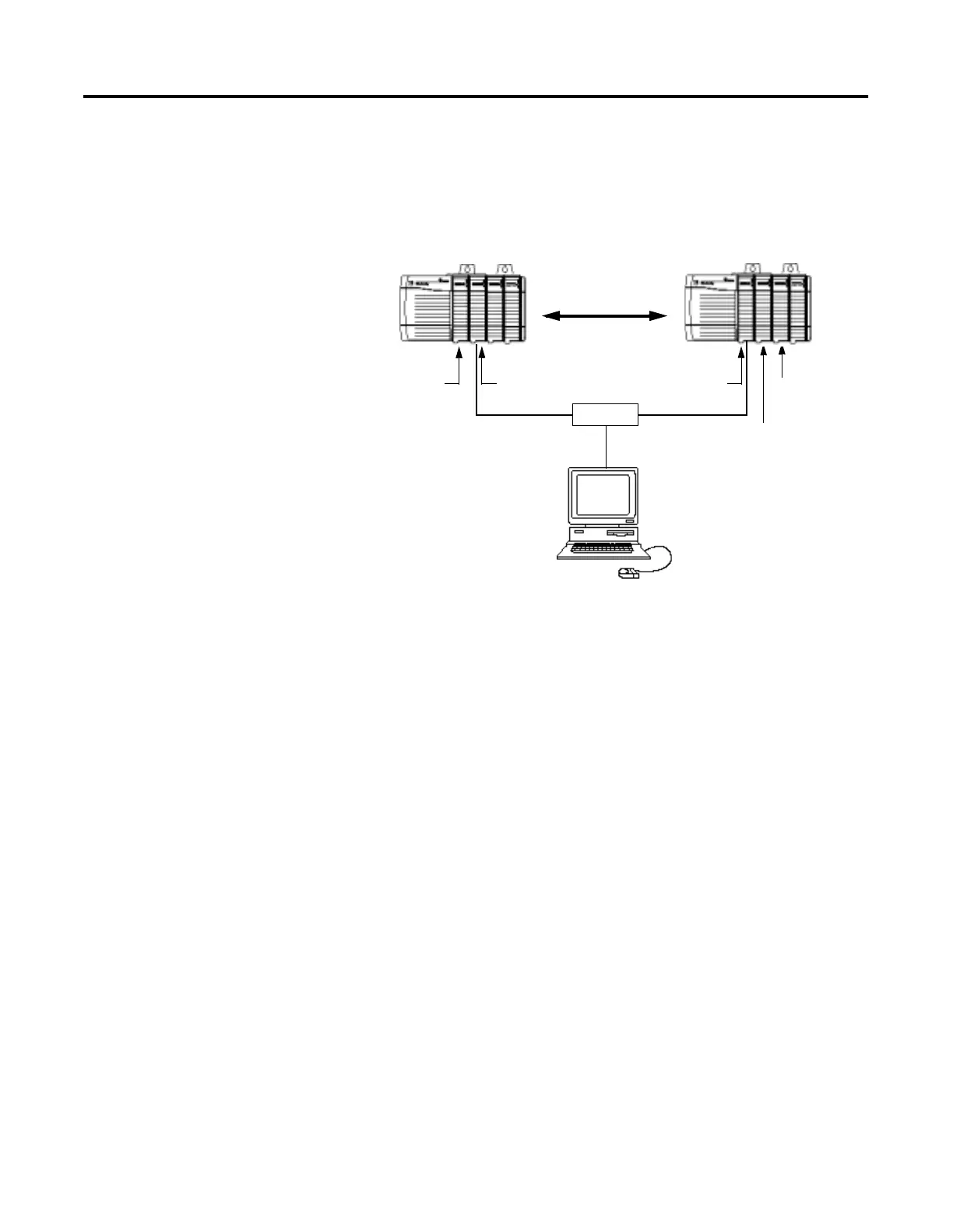
For this example, one ControlLogix chassis contains a Logix 5550
controller in slot 0 and a 1756-ENBT module in slot 1. A second
chassis contains a 1756-ENBT module in slot 0 and the I/O modules in
slots 1 and 2.
To work along with this example set up your system as shown above.
• Note that in the example application, the Logix5550 controller,
I/O modules, and the 1756-ENBT modules are in the slots
shown above.
• Verify the IP addresses for your PC and 1756-ENBT modules
(see chapter 4).
• Verify that all wiring and cabling is properly connected.
• Make sure you have your communication driver (e.g.,
AB_ETH-1) configured in RSLinx as described in Appendix C.
Data
Slot 0 1 Slot 0 1 2
Switch
Programming
130.130.130.1
Terminal
Local
Chassis
Remote
Chassis
1756-IB16I
Digital Input
1756-OB16I
Digital Output
Logix5550
Controller
1756-ENBT
130.130.130.2
1756-ENBT
130.130.130.3


 To Next Page
 Loading...