Operating
101
0000010038-003- GB
Operating
6.3.3 Setting the speed
Three rotational speeds can be set for the main saw drive by moving over the
V-ribbed belt:
• 3000 / 4000 / 5000 rpm
Changing the rotational speed
The belt tension is automatically set when the screw is turned back!
A rotational speed of only 3000 rpm is permissible with a saw blade dia-
meter of D = 550 mm (only for machines without scoring unit), for VARIO
3500 rpm.
Optimum position for changing speed/belt: Tilt saw unit to 25°!
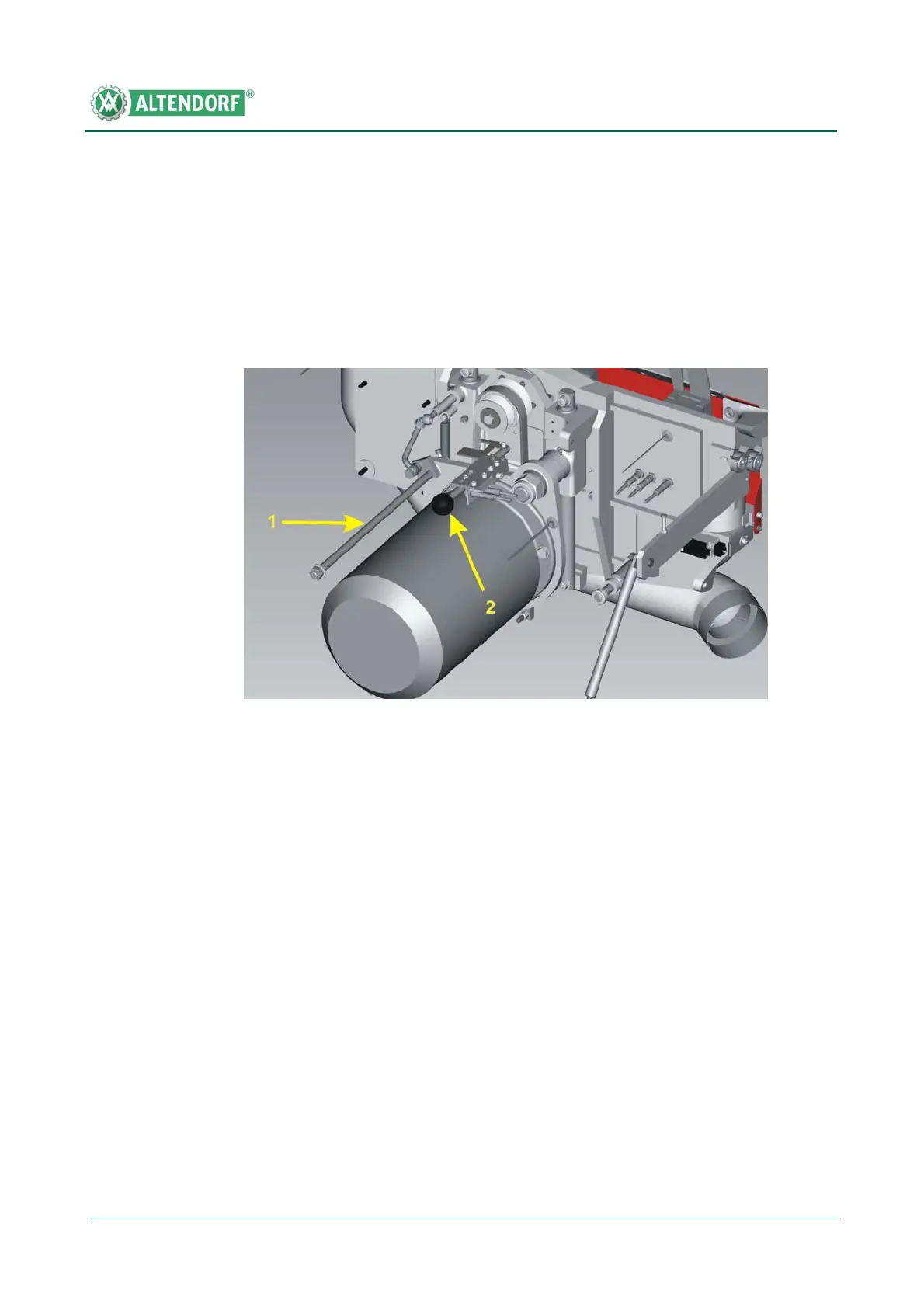
Fig. 6-24 Changing the rotational speed
[1] Switch off the drive.
[2] Open the machine door.
[3] Turn screw 1 counterclockwise until it engages.
[4] Set belt guide 2 to the required rotational speed.
[5] Place the V-ribbed belt so that it runs in the recess of the belt guide and into the
vertical opposite grooves of the belt pulley.
[6] Turn screw 1 clockwise.


 To Next Page