Operating
99
0000010038-003- GB
Operating
6.3.2 Switching the saw drives on and off
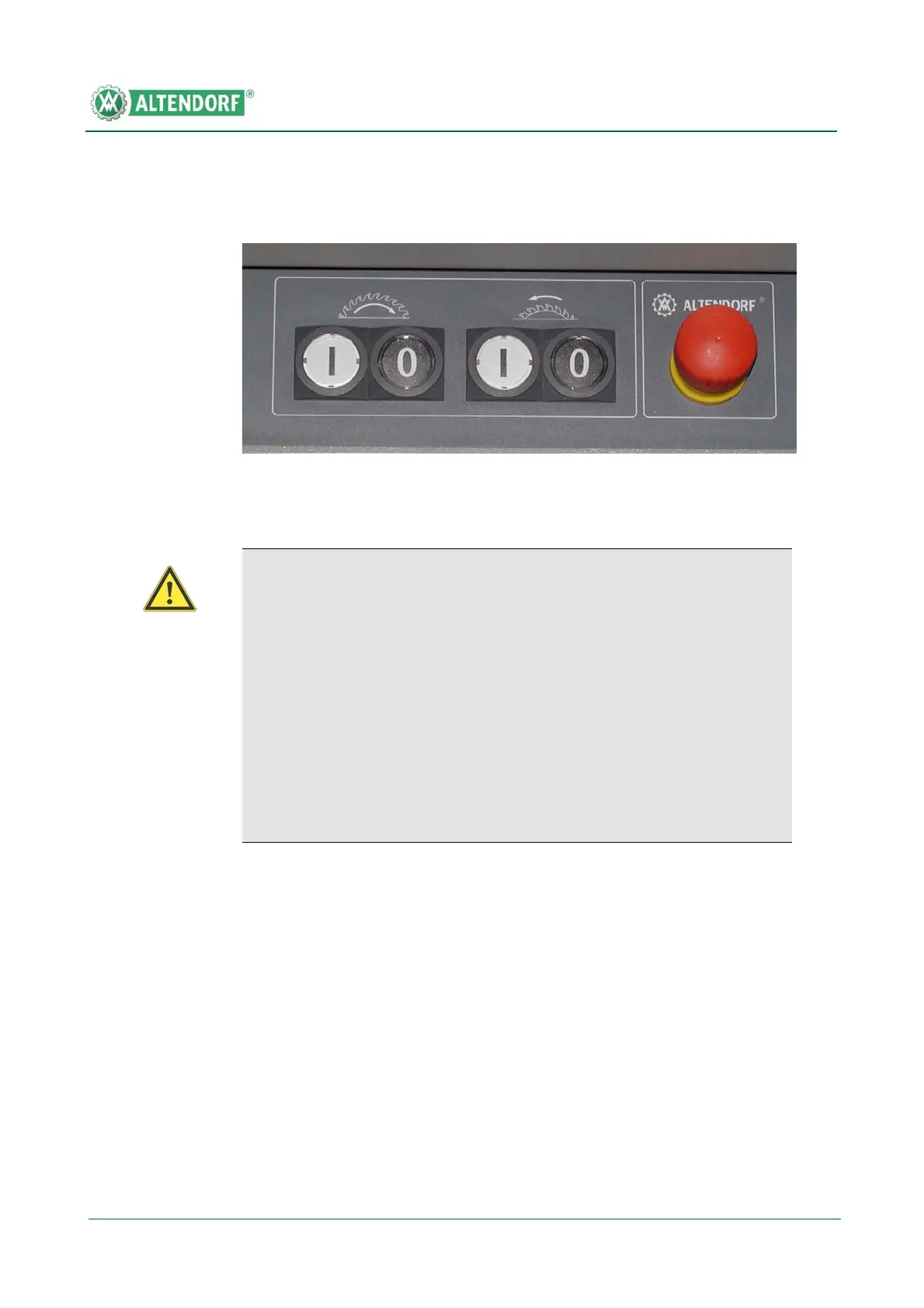
Press the white push button I with the main saw symbol in the operating panel
to start the main saw drive. After switching on the main saw, this button is lit.
The scoring saw can only be started when the main saw has reached its opera-
ting speed. To do so, press the white push button I with the symbol of the sco-
ring saw. This button lights up when the scoring saw has been switched on.
To switch off, press the black button marked “0”.
Fig. 6-22 Switches for saw drives
Warning!
• Before switching on the machine, make sure that all protective
devices required for the respective work cycle are attached and ope-
rative. In addition, check that the saw blades are correctly fitted and
that there are no workpieces or other objects in their vicinity. Check
whether the correct rotational speed has been preselected to match
the saw blade and the work cycle to be performed. Check that the cir-
cular saw blade is running in the correct direction by briefly switching
on.
• Make sure that the extraction system switches on at the same time
as the saw drives.


 To Next Page