APPENDIX D: RS-485 COMMUNICATION
LW500A/LW600A PULSED Nd:YAG LASER
D-4 990-539
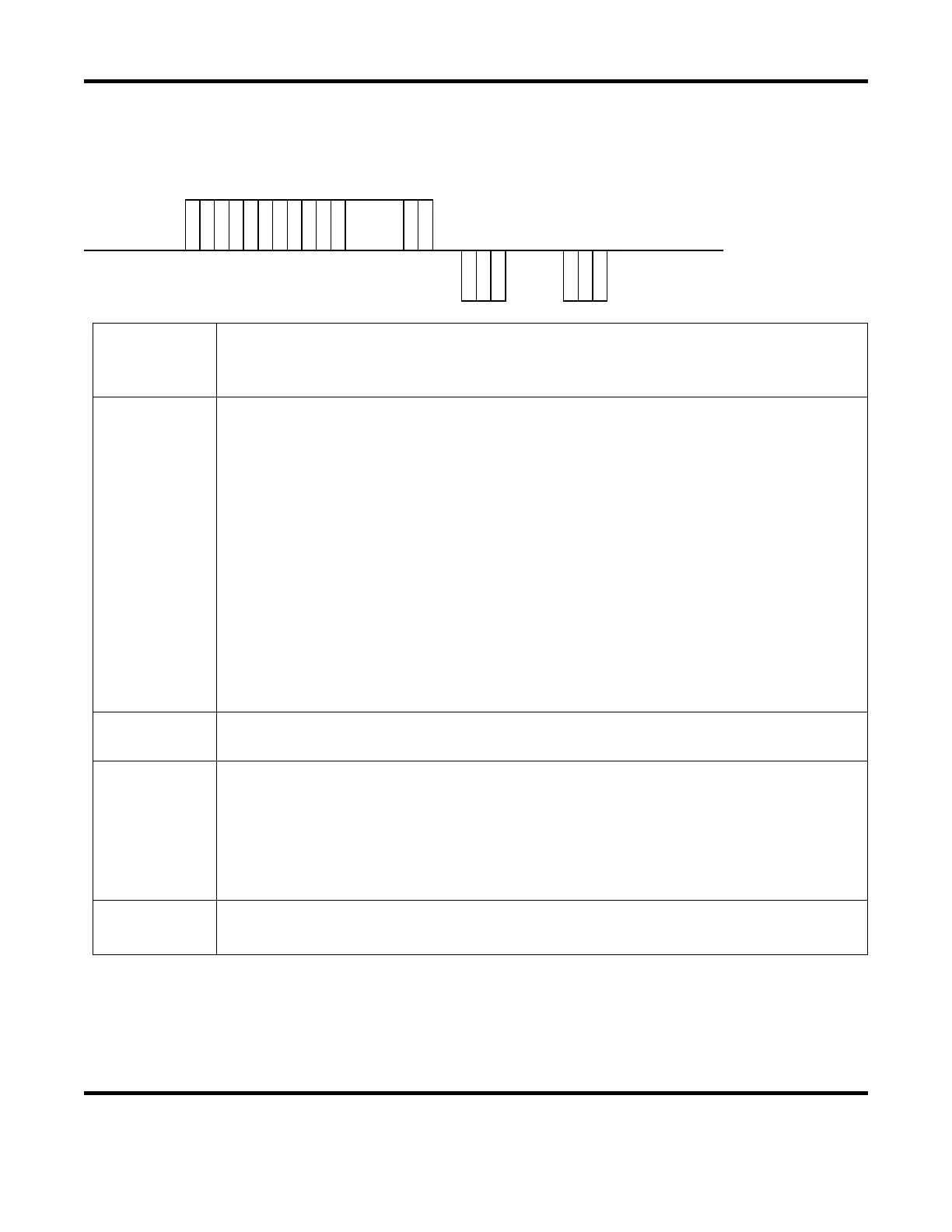
Data Write Command (W)
The Setting Data command (code: W) is used to set weld schedule parameters.
Host
Computer
S
T
X
C
H
1
C
H
0
W
L
A
1
L
A
0
S
H
1
S
H
0
D
T
1
D
T
0
:
DATA
E
T
X
B
C
C
Laser
Response
C
H
1
C
H
0
A
C
K
or
C
H
1
C
H
0
N
A
K
CH1 / CH0
The Laser Unit (CH1 = tens, CH0 = ones). Valid data range = 00 to 31 (default = 00).
Each Laser needs its own unique network address (when connected serially).
Refer to page D-2 for details on setting the Network # (i.e. Laser Unit address).
LA1 / LA0
Classification Number (LA1 = tens, LA0 = ones). Enter a classification number based on
the task you want to perform. Refer to page D-6 through D-11 for classification details.
Valid Classifications for the W command:
99 Cooler Settings (Note: set Schedule Number [SH1 / SH0] to 00).
84 Common Schedule settings for both FIX and FLEX modes.
85 Schedule settings for FIX mode.
86 Schedule settings for FLEX mode, TIME 01 to 10
87 Schedule settings for FLEX mode, TIME 11 to 20
88 Schedule settings for FLEX mode, POWER 01 to 10
89 Schedule settings for FLEX mode, POWER 11 to 20
75 SEAM ON/OFF setting
76 SEAM setting value, SHOT 01 to 10
77 SEAM setting value, SHOT 11 to 20
78 SEAM setting value, POWER 01 to 10
79 SEAM setting value, POWER 11 to 20
SH1 / SH0
(Welding) Schedule Number (SH1 = tens, SH0 = ones). Valid data range = 00 to 31
Use two spaces () to keep the current Schedule Number (no change)
DT1 / DT0
Data No. (DT1 = tens, DT0 = ones).
Enter the appropriate Data No. (data value) for the specified Classification Number.
Refer to Page D-6 through D-11 for Data No. details.
Use Classification 99 to write data in a batch:
data: (Data No. 1),(Data No. 2),(Data No. 3),… (Note: insert comma between values).
When writing a 99 command, all monitor data values (noted with an
*) will not be written.
ACK / NAK
ACK = Transmitted data is valid.
NAK = Transmitted data is not valid or Laser is not in Communication control mode.


 To Next Page