57
Rammax 1515-M/-MC/-MI/-MCI
Index: a; Issued 08/2010
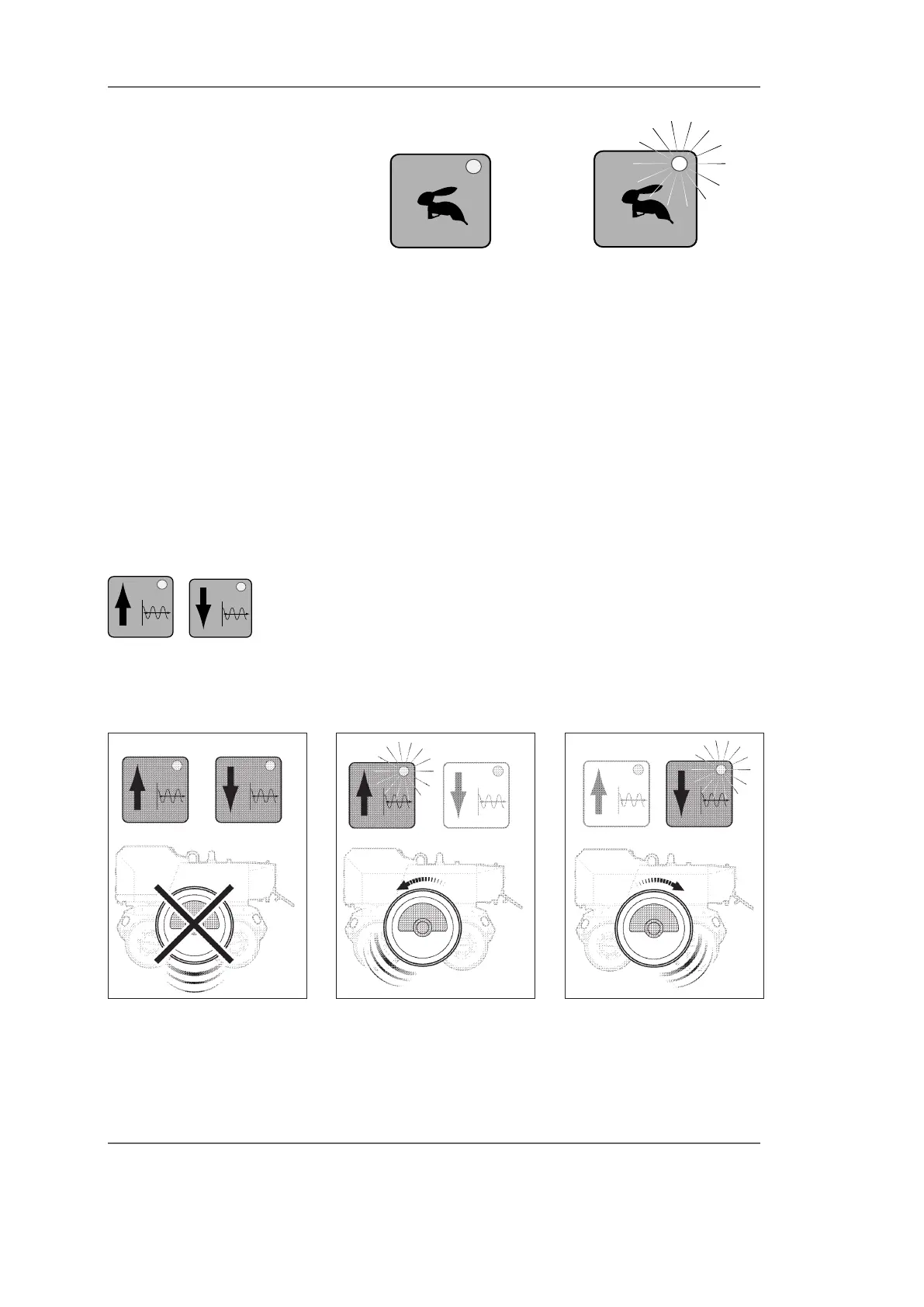
Fig. SE14 Fast traverse switched
off
Fig. SE15 Fast traverse switched
on
The fast traverse button has a locking function. It remains
switched on after it has been pressed. Press the fast traverse
button once again to switch the function off.
The fast traverse function will be switched off automatical-
ly if:
One of the dafety devices trips
The vibration function is switched on
The machine is shutdown.
You cannot switch over to fast traverse if the vibration function
is switched on. Switch the vibration function off rst and then
switch the fast traverse function on.
Vibration buttons
These buttons are used to switch the vibration function On
and Off. The vibration function has two rotational directions:
Vibrate forward and vibrate backward.
The vibration buttons have locking functions. They remain
switched on after either button is pressed. The diode on the
active button illuminates when the vibration function is swit-
ched on (Figs. SE16 - SE18).
Fig. SE16 Vibration switched off Fig. SE17 Vibrate forwards Fig. SE18 Vibrate backwards
Reversing the rotational direction
Only one vibration button and therefore one rotational direc-
tion can be active at any time. Press the vibration button for
•
•
•
•
controls


 To Next Page