34
MU Series (Windows)
User’s Manual
Using the Soware
Recording & Saving a Video (Connued)
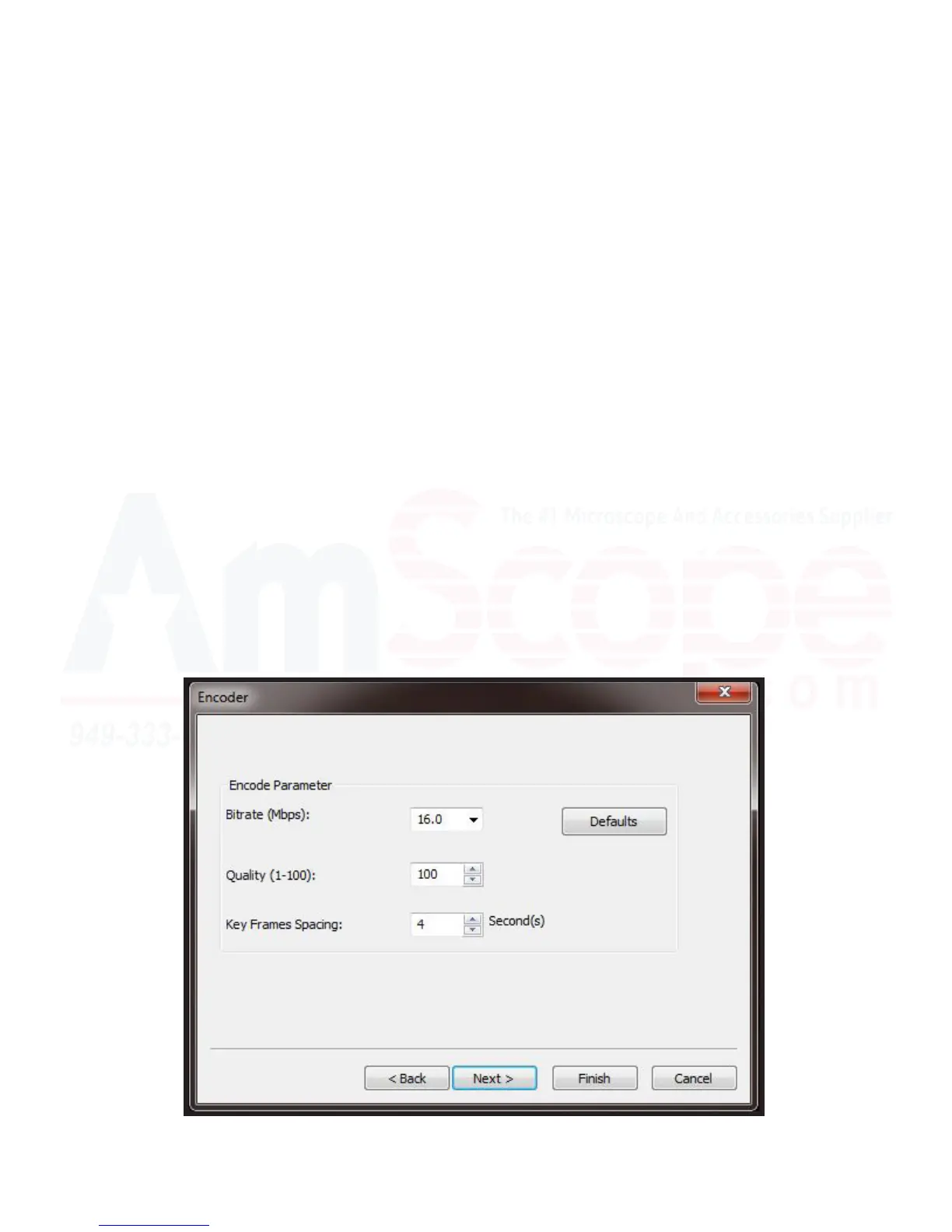
4. The “Encoder” menu will appear next, asking what parameters you would like to use to encode your video,
such as what bitrate you would like to use, the quality, and the key frame spacing. If unsure, leave these at de-
fault.
“Bitrate (Mbps)” is the numbers of megabits per second that can be transmied along a digital network. In this
case, it is how many megabits per second the video will record to the le. A larger number will have more bits,
and thus, a higher playback quality, however, will also have a much larger le size, and require greater processing
power for both recording and playback.
“Quality” is a percentage in this case, and can be set anywhere between 0 and 100 to improve le size, ease of
playback/transmial. It is set to 100 by default, however, can be adjusted as needed.
“Key Frames Spacing” refers to the me between frames in which the encoder will re-evaluate the video image
and record a full frame, rather than recording just the changes. Unlike tradional lm, digital recordings oen
only record what has changed in an image in between frames, rather than capturing an enre frame each me,
in an eort to speed up frame rates and minimize le sizes. Adjusng this higher will cause your encoder to
speed up recording, however, will drop image quality if you have rapid moon in your sample. Lowering it will
increase your quality at the expense of frame rate.
When done, please press “Next” to connue.












 To Next Page