Chapter 3 Measurement
3-66
3.5.2 Setting PTT
This section describes the PTT (Push to Talk) setting. Press (PTT) in
the main function menu to enable/disable PTT.
When PTT is On, press
twice to turn it Off. Additionally, when the
measurement mode is changed from RX mode to TX mode, PTT is
automatically set to Off.
PTT
■
Summary
Enables/disables the PTT.
■
Options
On Enables PTT.
Off Disables PTT.
3.5.3 Audio Generator Window
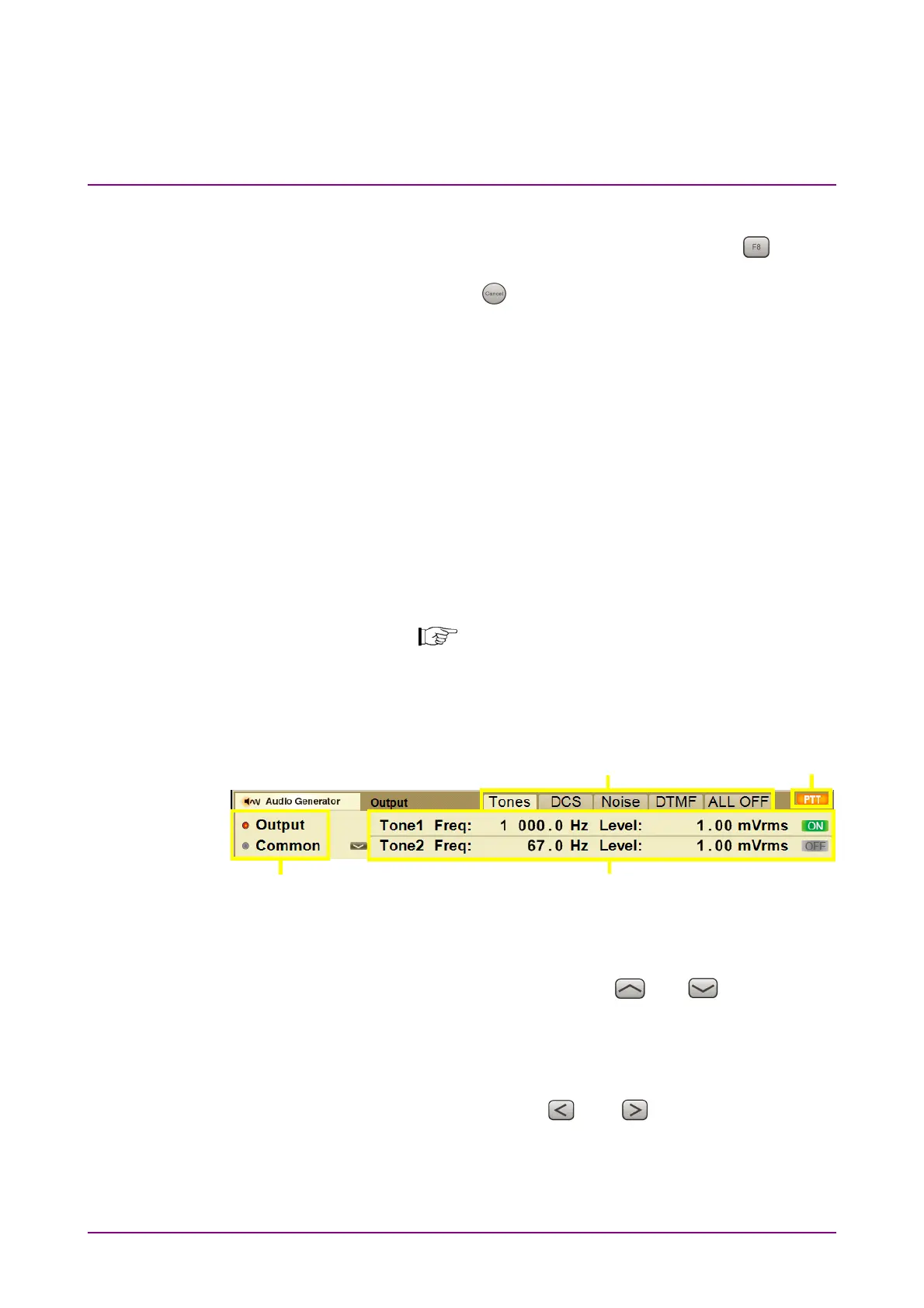
The Audio Generator window displays AF signal output setting.
Figure 3.2.1.2-1 TX Mode + Audio Generator Screen
In the Audio Generator window, the display can be changed and the
parameters can be set by using the rotary knob, Cursor key, Enter key,
and Cancel key.
[2]
[4]
[3]
[1]
Figure 3.5.3-1 Audio Generator Window (No parameter is selected)
[1] Selecting Output/Common
Selects Output or Common by using
and . Then the
parameters displayed in [4] are changed.
Output Displays the selected waveform parameter.
Common Displays the AF signal type and impedance.
[2] Selecting waveform
Selects waveform by using
and . The selected AF signal
mode is highlighted and the parameters are displayed in [4].



 To Next Page