Chapter 2 Preparation
2-2
2.1 Part Names
This section describes the panel keys for operating this application and
connectors used to connect external devices. For general points of caution,
refer to
MS2830A Signal Analyzer Operation Manual (Mainframe
Operation) or MS2840A Signal Analyzer Operation Manual (Mainframe
Operation)
.
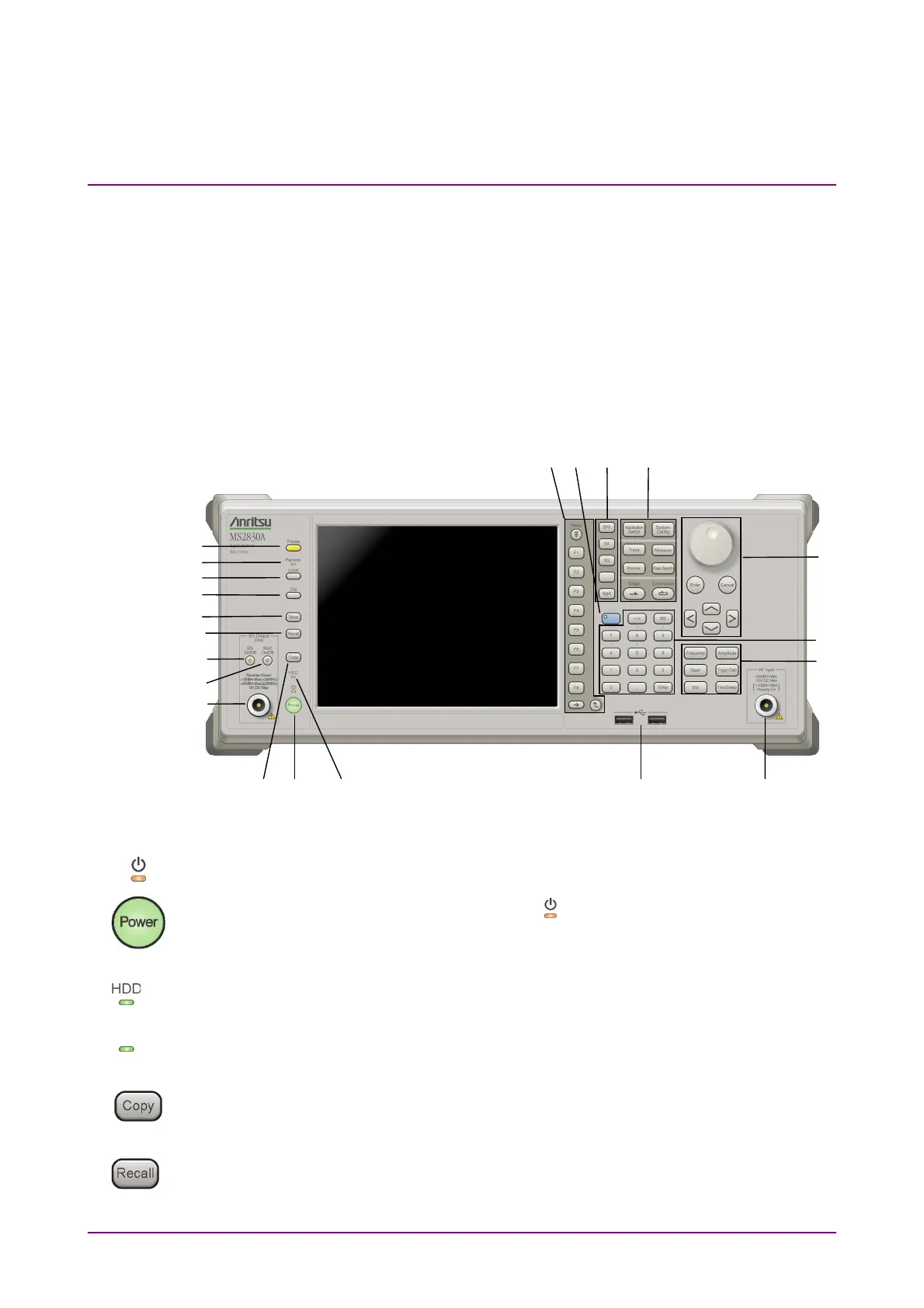
2.1.1 Front panel
This section describes the front-panel keys and connectors.
9
8
7
6
5
4
3 2 1
17
20
18
19 16
11
15
13
10 21 12 14
Figure 2.1.1-1 Front panel
1 Power switch
Press to switch between the standby state (AC power supplied) and
power-on state. The Power lamp
lights orange at Standby and green at
Power On. Press the power switch for about 2 seconds.
2 Hard disk access lamp (MS2830A)
Lights when accessing the internal hard disk
SSD access lamp (MS2840A)
Lights when accessing the internal SSD
3 Copy key
Press to capture display screen and save to file.
4 Recall key
Press to recall parameter file.
SSD



 To Next Page