3.2 Basic Operation
3-7
3
Measurement
3.2 Basic Operation
3.2.1 Screen layout
This section describes the screen layout of this application. The
MX269018A has two types of screen: TX mode screen for transmission
measurement and RX mode screen for reception measurement.
The screens of TX mode and RX mode vary depending on the installed
option.
3.2.1.1 TX mode screen
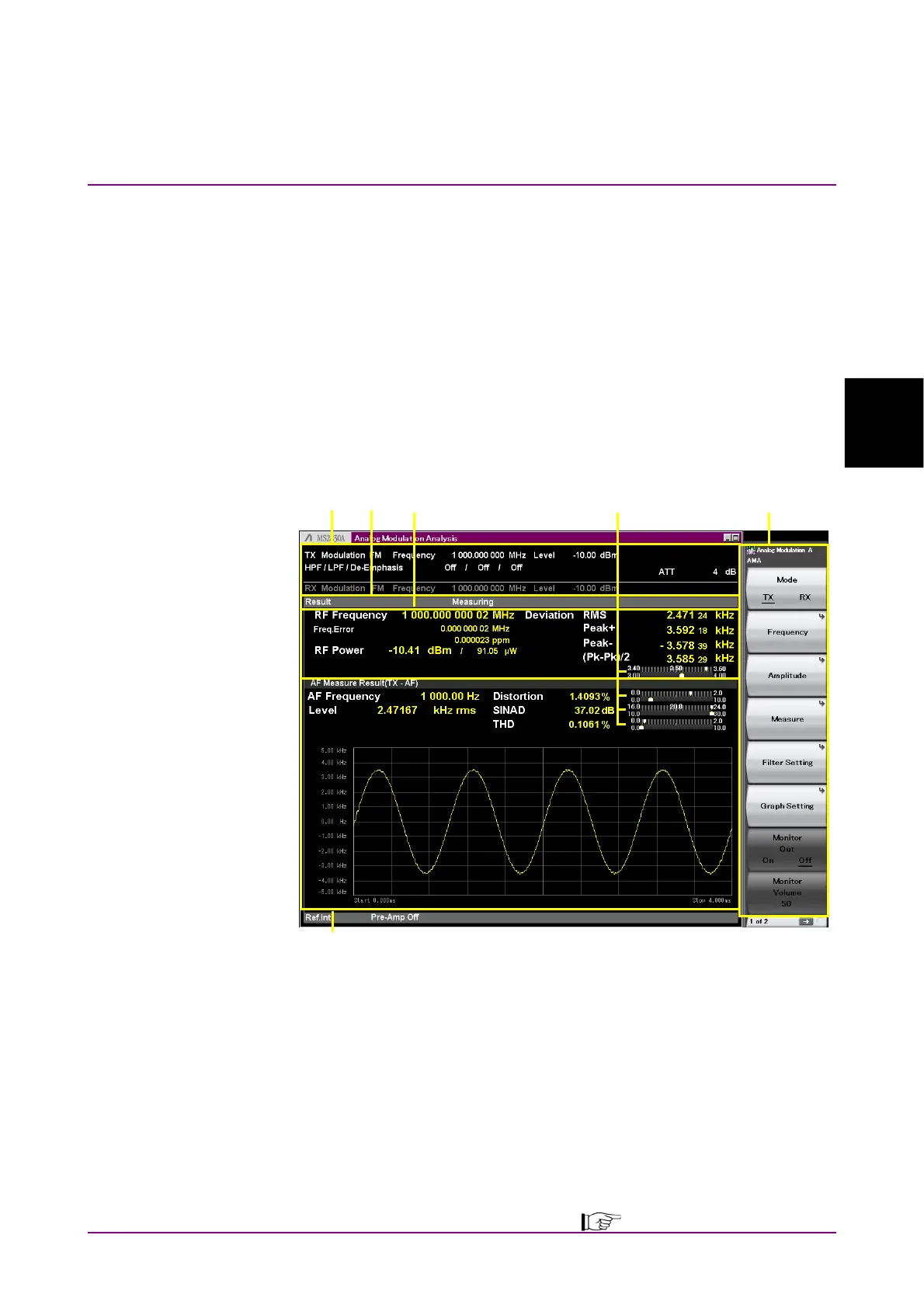
When the MS2830A-018/118 Audio Analyzer is not installed or MS2840A,
selecting TX mode displays the screen below.
[1]
[5]
[2] [3] [4][6]
Figure 3.2.1.1-1 TX Mode Screen
[1] Measurement parameter
Displays the specified parameter.
[2] Status message
Displays signal status.
[3] Result window
Displays the measurement results for frequency, level, and
modulation index of RF input signals.
Setting Display Mode can narrow down the items to display.
3.4.8.3 Setting Display Mode



 To Next Page