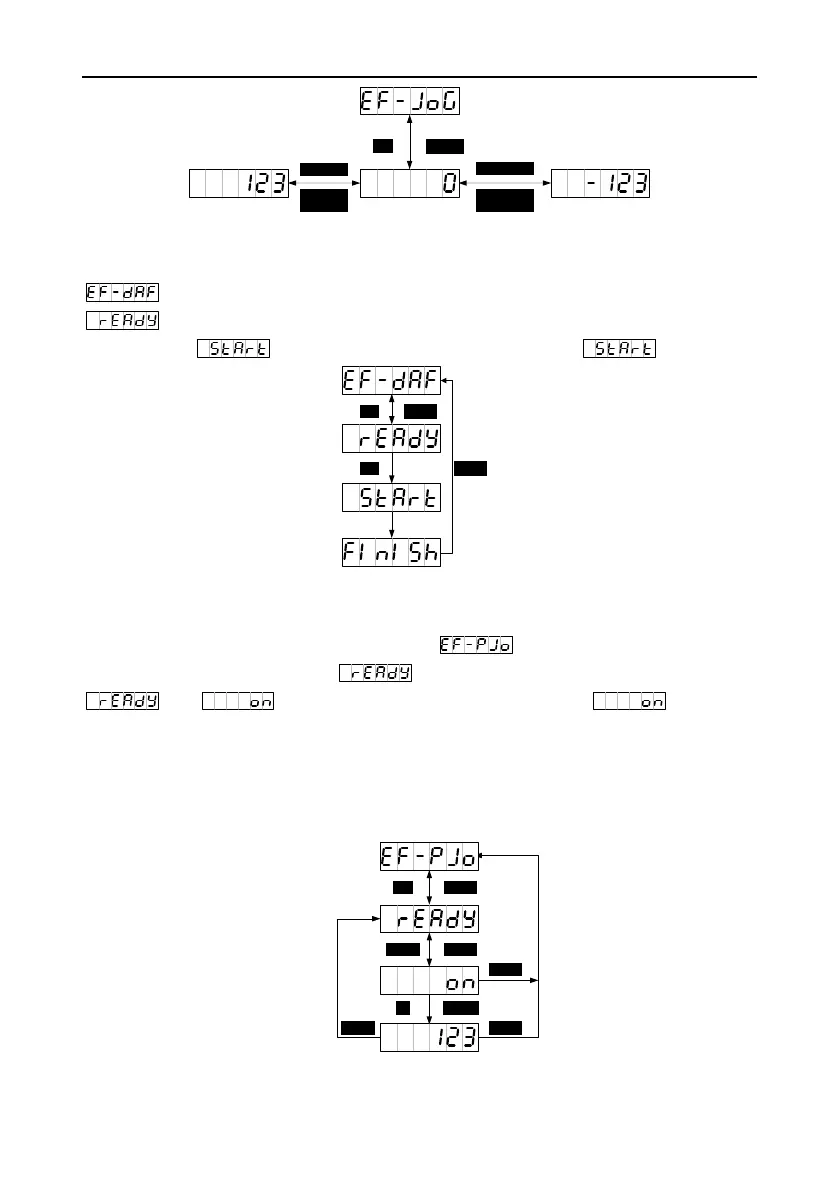
5.2.5.3 Factory parameter restoring
You can press MODE to switch to the auxiliary function mode. You can press UP/DOWN to enter the
menu and press SET to enter the default parameter restoring screen, displaying
. Then you can press SET to restore default parameters. During the restoring process, the
screen displays . When the process ends, the screen displays .
5.2.5.4 Program jogging
After the run parameters P5.00–P5.05 are set, you can press MODE to switch to the auxiliary function
mode. Then you can press UP/DOWN to enter the menu and press SET to enter the
program jogging screen, displaying . Then you can press SHIFT to switch between
and to enable and disable program jogging. On the screen, you
can press UP or DOWN to start program jogging. The use of the UP or DOWN key is associated with
P5.00. If the motor running direction is counterclockwise, the UP key must be used for the starting. If
the motor running direction is clockwise, the Down key must be used for the starting. After the starting,
the current rotation speed of the motor is displayed.


 To Next Page