AS64 series AC servo drive Operating and running
-75-
5.2.5.5 Inertia identifying
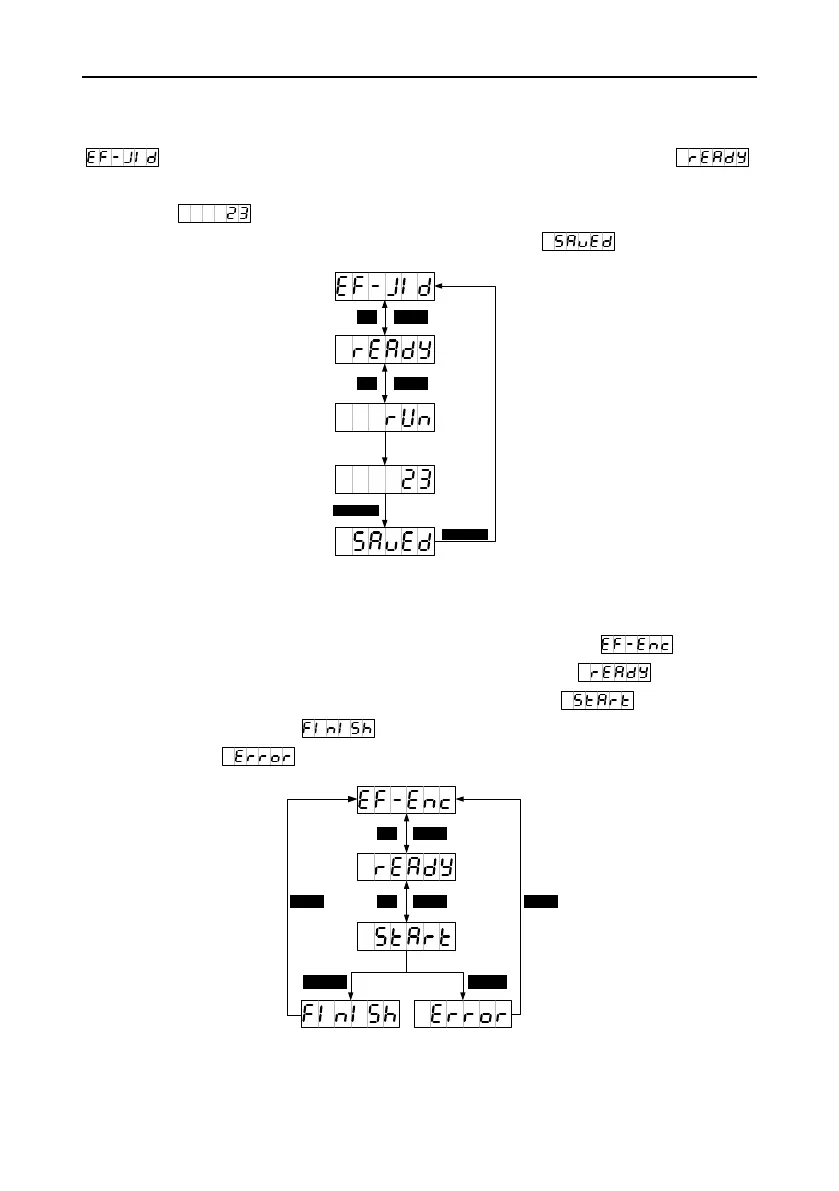
You can press MODE to switch to the auxiliary function mode. You can press UP/DOWN to enter the
menu and press SET to enter the inertia identifying menu, which displays .
Then you can press SET to enable inertia identifying. After inertia identifying is complete, the result
data such as is displayed about three seconds and then saved automatically. The screen
returns to the parameter setting menu automatically after displaying about two seconds.
5.2.5.6 Absolute encoder clearing
If a multiturn absolute encoder is used, the homing operation for the mechanical system must be
performed after the first power-on. You can press UP/DOWN to enter the menu and
press SET to enter the absolute encoder clearing menu, which displays . Then you can
press SET to enable absolute encoder clearing. The screen displays . If the clearing is
successful, the screen displays . If the encoder type does not match or the clearing fails,
the screen displays .


 To Next Page