Conguring Client Settings
Conguring Service Access Settings
202
4.6.14 Conguring Advanced View Connection Settings
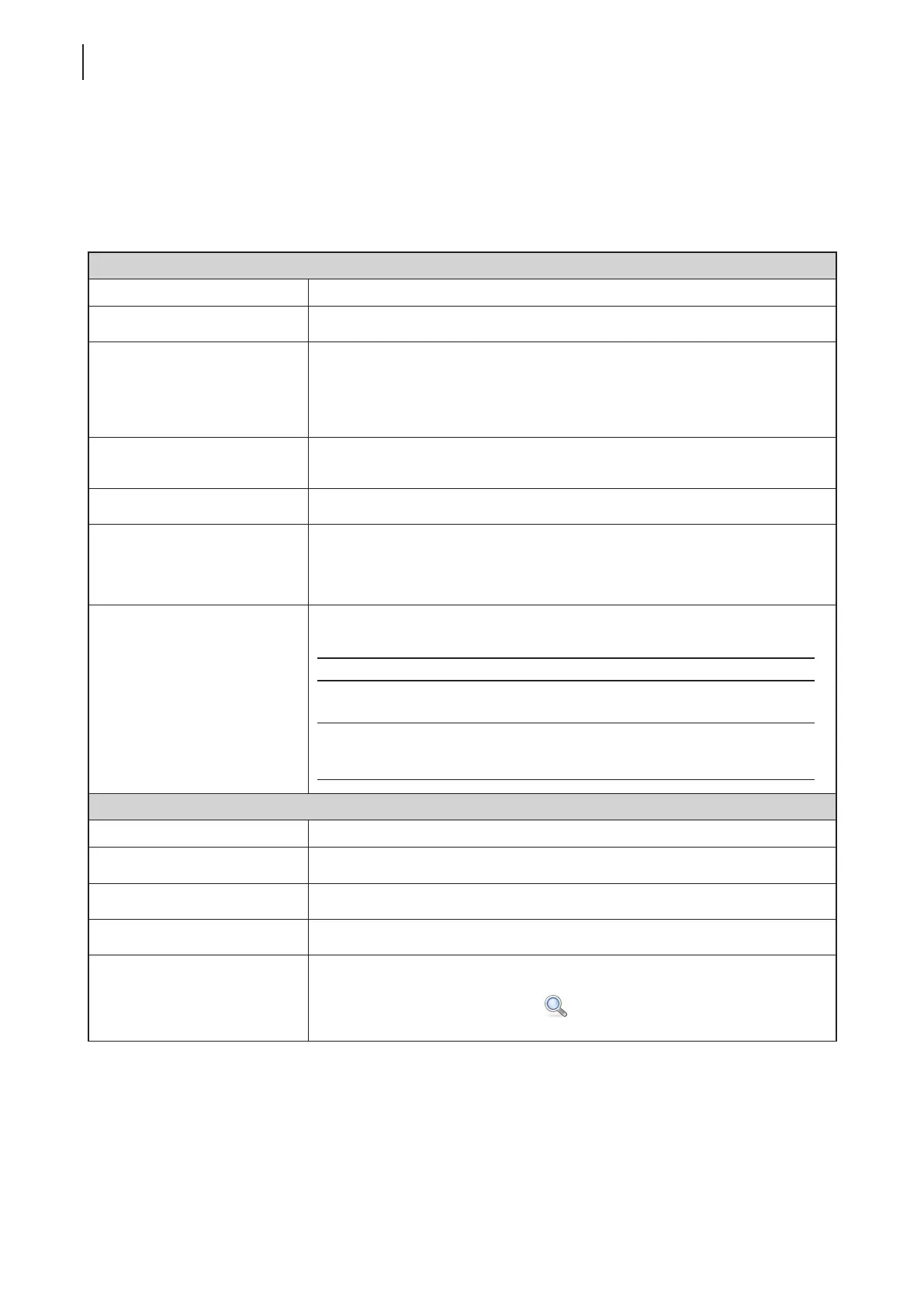
The table below provides a description of each setting item for View connections. Please refer to this table to
congure advanced settings and customize shortcuts on the local desktop and START menu for service access.
General Sub-tab
Server Settings
Item Description
Session Name Type in the name for VMware View or Horizon View sessions.
Connection Server
Type in the computer name or IP address of the View Connection Server.
NOTE: For more information on View Connection Server, please visit VMware
website at www.vmware.com.
Port
Type in the port number used to communicate with the View Connection Server.
To use the default value, simply leave it blank.
Use secure connection (SSL) Check/Uncheck to enable/disable secure connection.
Certicate Checking Mode
Click the drop-down menu to select if to check server identity certicates
and if to connect to untrusted servers. Three options are available: Do not
verify server identity certicates, Warn before connecting to untrusted
servers, and Never connect to untrusted servers.
When Connection Ends
Click the drop-down menu to select what to do when the connection ends. Two
options are available: Return to VMware Pool and Quit VMware Client.
Option Description
Return to VMware Pool
When the connection ends, return to the Desktop
and Application list for given credentials.
Quit VMware Client
When the connection ends, close VMware Client.
To access virtual desktops and applications, you
need to provide the credentials again.
Login Settings
Item Description
Username Type in the user name for authentication.
Password Type in the password for authentication.
Domain Type in the domain name of the View Connection Server.
Desktop / Application Name
Type in the desktop / application name. Or, leave it blank for users to select one.
NOTE: You can use the Search icon
to help you discover available desktops
or applications for a given set of credentials.



 To Next Page