Getting Started
Learning the Basics
20
Topic 1: Powering On Your t180L/t180LB
To start using your t180L/t180LB, please do the following:
1. Ensure that your monitor is connected and turned on.
NOTE
• Please note that you need to connect and turn on your monitor before powering
up the thin client. Otherwise, the client may fail to set an appropriate resolution
for the connected monitor.
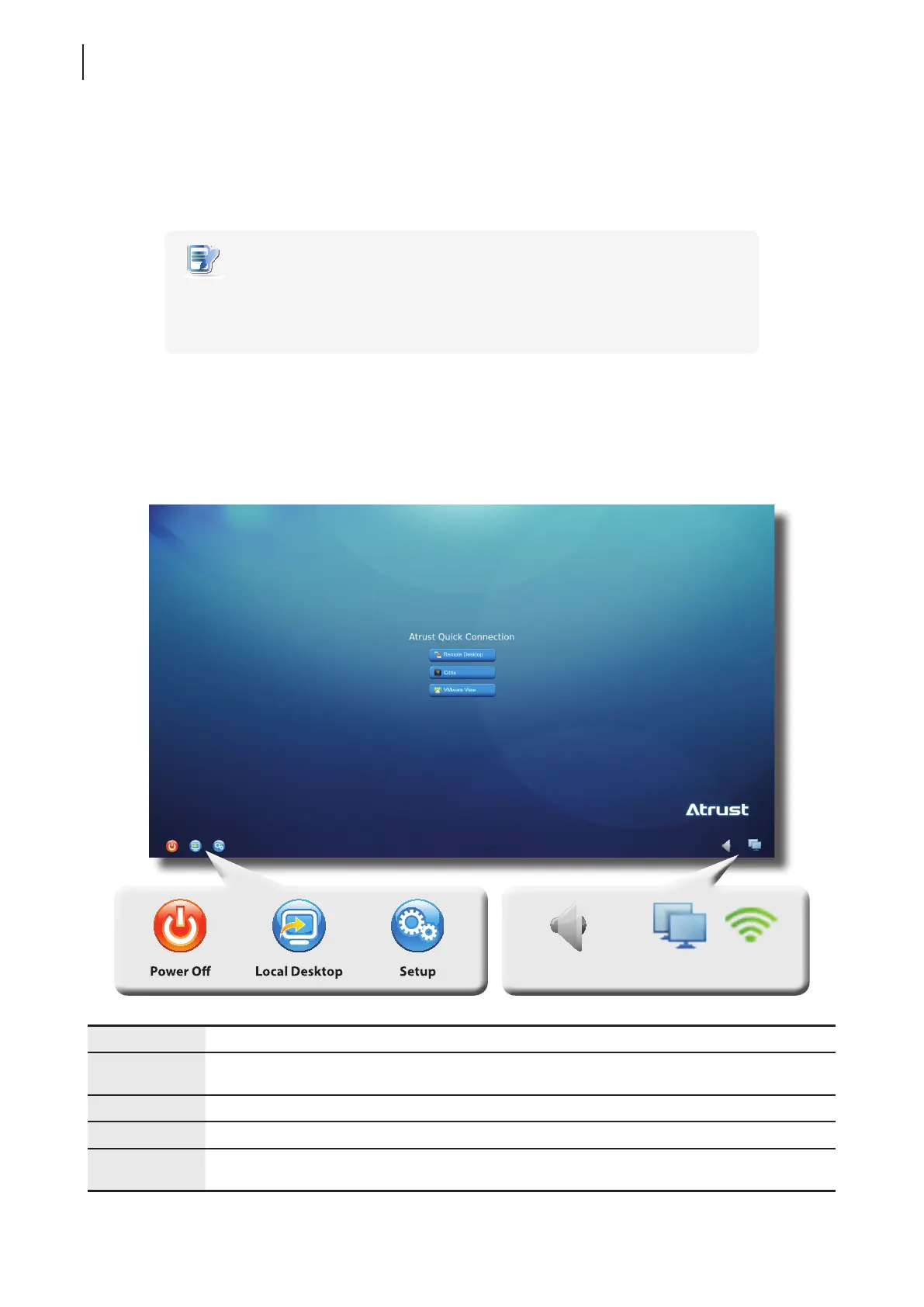
2. Press the Power button to turn on the client. Wait a moment for Atrust Quick Connection screen to appear.
3. (a) Go to Topic 2 to set the time zone for the rst time use.
(b) Go to Topic 4 if the time zone had been set.
Power Off Click the icon to suspend, shut down, or restart the system.
Local Desktop
Click the icon to enter the local Linux desktop.
To return to this screen from the local Linux desktop, see Topic 3.
Setup Click the icon to launch Atrust Client Setup.
Mixer Click the icon to congure audio settings.
Network
Indicates the network type (wired or wireless) and status.
Click the icon to congure network settings.
Atrust Quick Connection Screen
NetworkMixer



 To Next Page