54
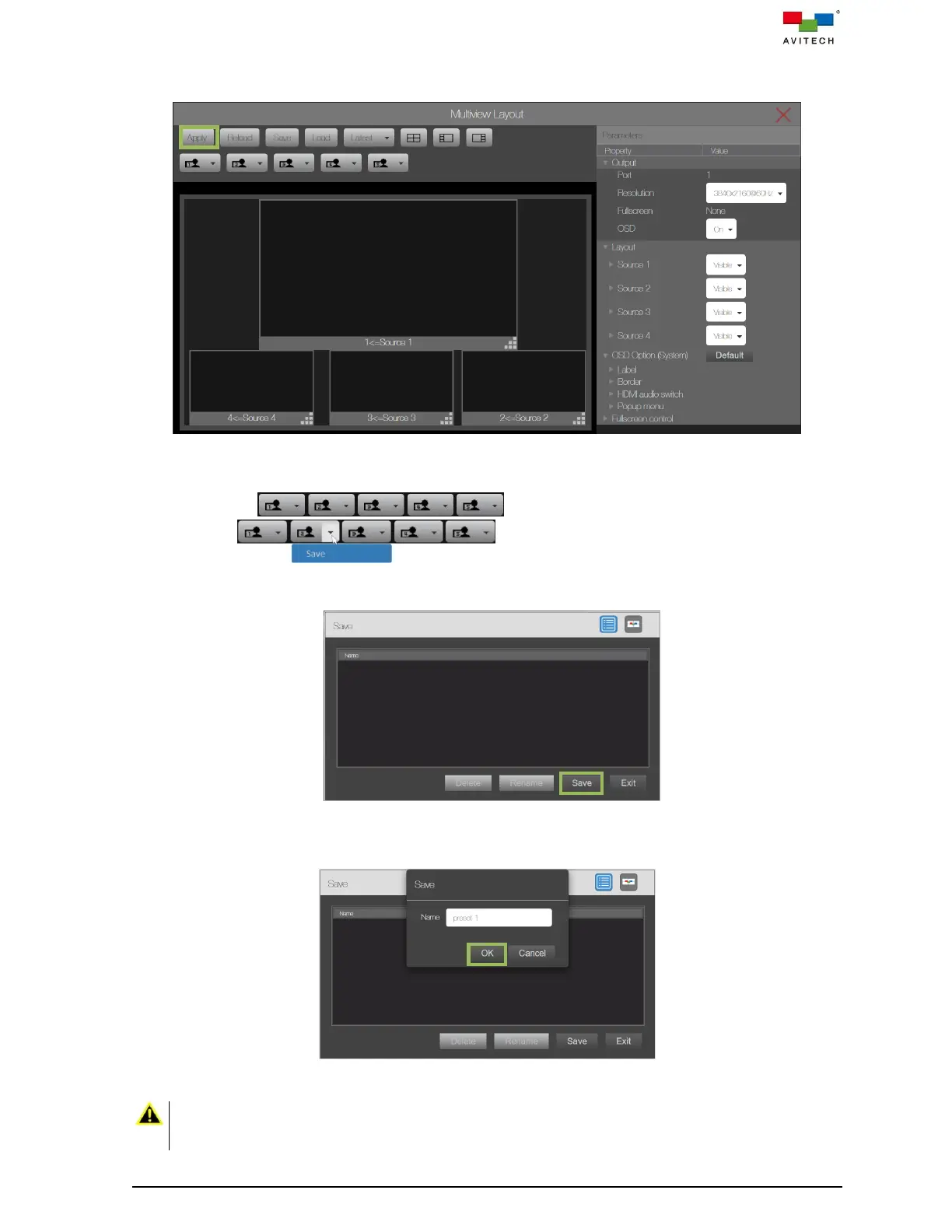
Step 4. Upon completing the layout adjustment, click Apply on the top-left corner. This will apply the
multiview layout you have configured to the respective output.
Figure 4.1.1.8 Multiview Layout: Apply
Step 5. To save the configured layout to a user-icon preset (1 – 5) for later use. Select any of the
user-icon , and then click the down arrow on the user-icon
(1 – 5) in the top bar and then click Save from the
drop-down menu to save the configured layout as one of the user-icon layout (1 – 5).
Or, click the Save button in the top bar and click Save button in the Save window.
Figure 4.1.1.9 Multiview Layout: Save User Preset Window
Then designate the file name for the preset and then click OK.
Figure 4.1.1.10 Multiview Layout: Save User Preset
When load a user-icon or latest preset with OSD turn Off and window overlay configuration, upon turning
On the OSD feature, the Sequoia 4K60 will automatically return to factory default quad-view multiview
layout due to hardware limitation.



 To Next Page