BD BACTEC™ FX40 Instrument User’s Manual
32
location, you should leave this value set at 1. Instrument numbers appear in report headers.
Instrument numbers must be unique in a BD EpiCenter™ configuration.
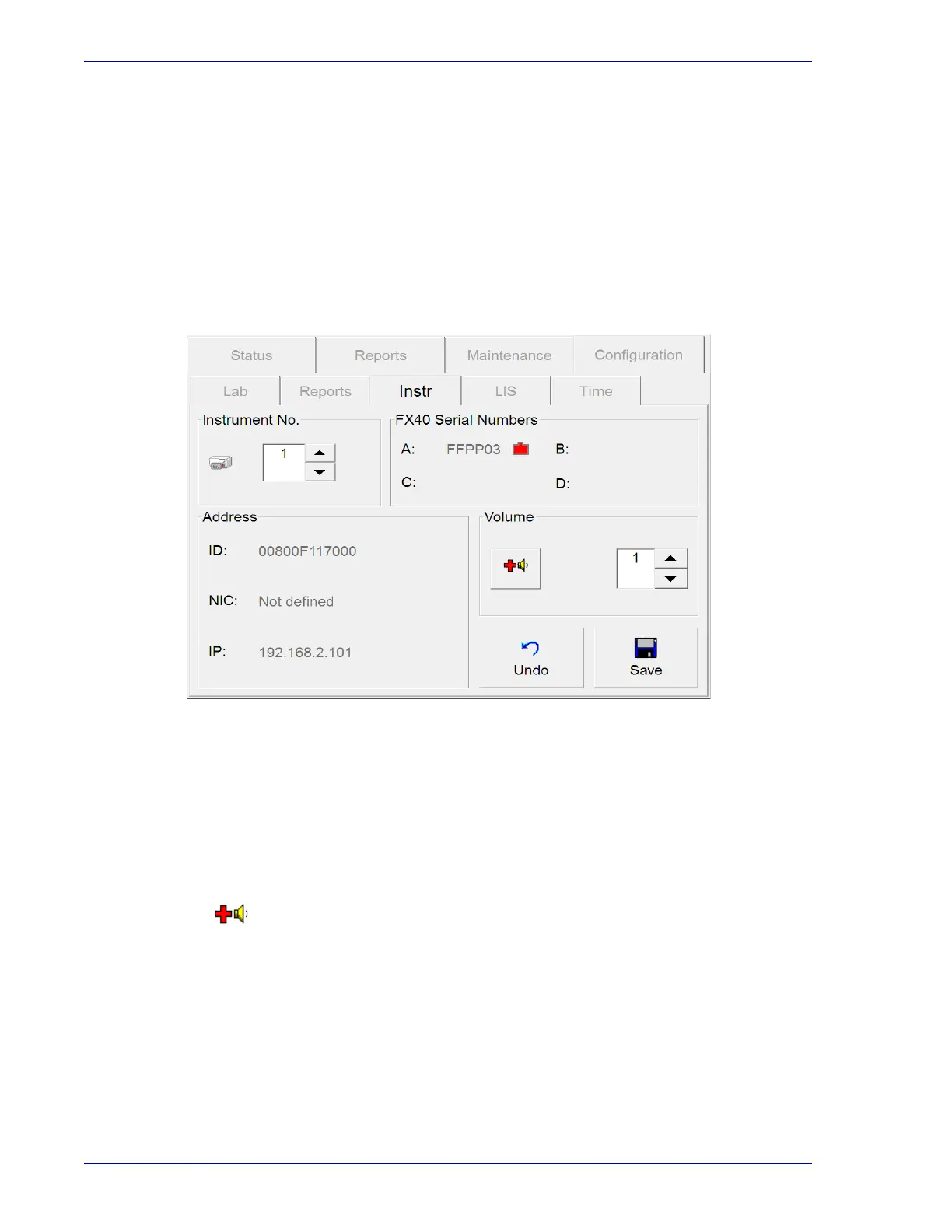
BD BACTEC™ FX40 Serial Numbers
Read-only fields showing the instrument Serial Numbers. This number is set at instrument
installation. A, B, C, and D represent up to 4 instruments that can be configured in a local
cluster. If there is only one instrument, A is used.
An icon appears to the right of each Serial Number. The icon is red (see Figure 2-6) if a device
is not connected to the Network port. The icon is green if a device is connected to the Network
port.
Figure 2-6 – Instrument Configuration Display (BD BACTEC™ FX40 Serial Number icon red)
Address
Read-only fields showing network configuration information.
• ID shows the original MAC address of the network interface card
• NIC shows the current MAC address of the network interface card
• IP shows the Internet protocol address
Select the volume of the Positive Vial audible alarm. The default setting is 8. To increase or
decrease the volume, select
▲ or ▼ to increase or decrease the value in the field from 1
(softest) to 10 (loudest).
Select Volume to hear a sample of the current volume.
The volume of other instrument audible alarms is controlled by the system software and
cannot be adjusted.
Volume











 To Next Page