Appendix
219
B
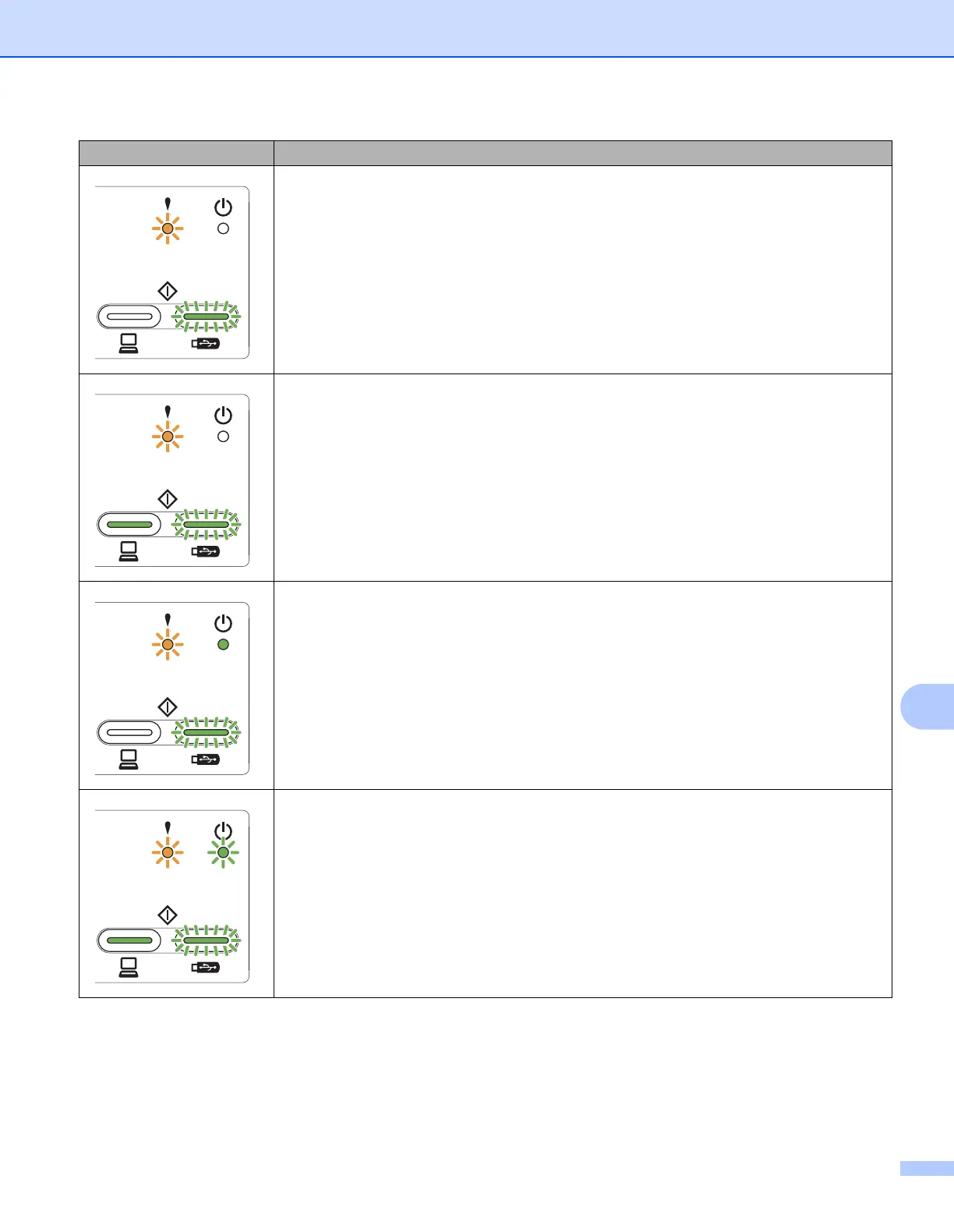
Storage Full
The inserted USB flash drive is full. Press any button and then do one of the following:
Delete unused files or folders from the USB flash drive and then try again.
Use a USB flash drive that has available space.
Access Error
The USB flash drive was removed when being accessed. Press any button.
Protected Device
The inserted USB flash drive is write-protected. Remove the protected USB flash drive,
press any button and then do one of the following:
Turn off the USB flash drive’s write-protection and then try again.
Use a USB flash drive that has write-protection turned off.
Too Many Files
Your machine cannot save to a USB flash drive if it contains too many files. Remove the
USB flash drive, press any key and then do one of the following:
Delete unused files or folders from the root folder of the USB flash drive and then try
again.
Use a USB flash drive that contains fewer than 999 files.
LEDs Machine Status





 To Next Page