Printing a Tube or Label Using the P-touch Keyboard
14
2
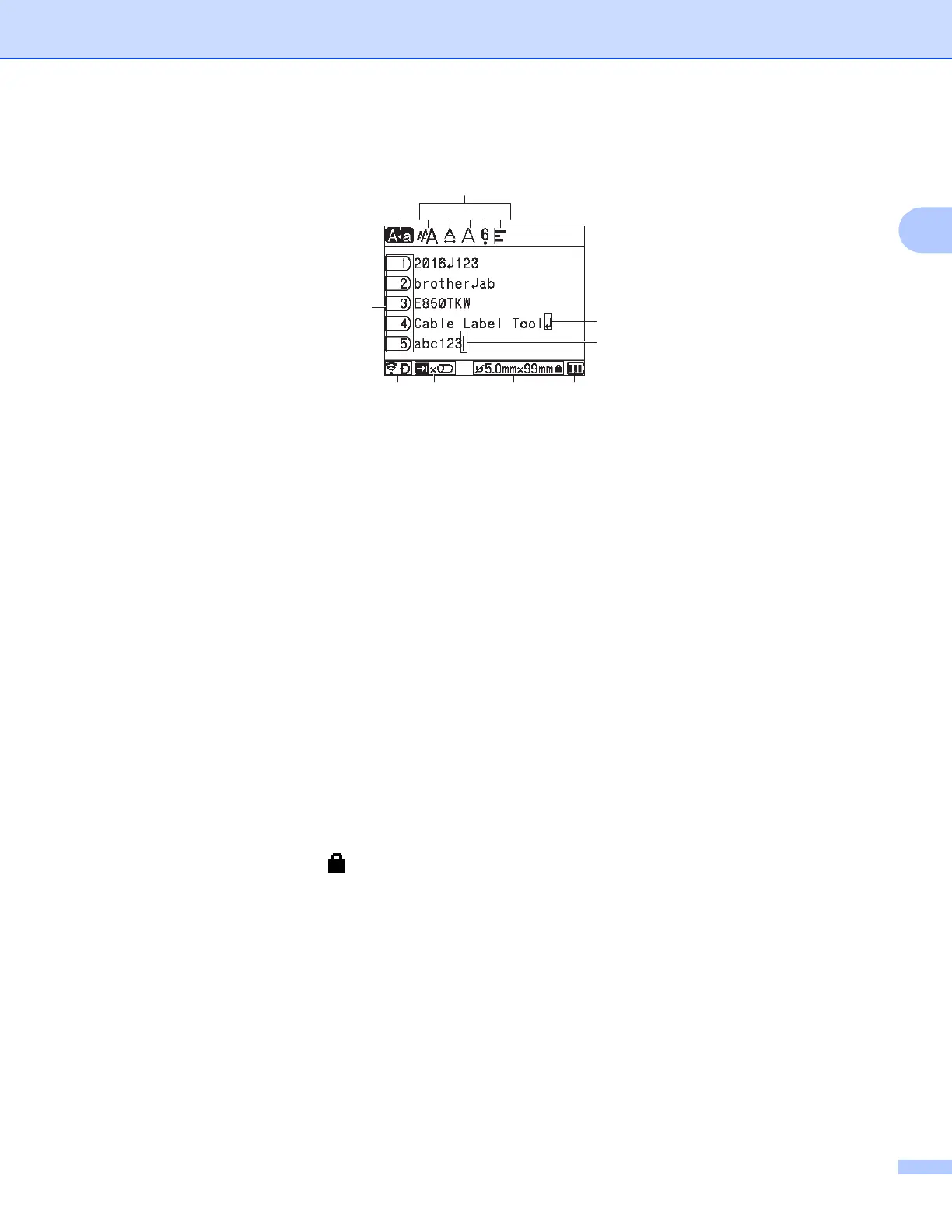
Tube Creation Screen
1 Caps Mode
Indicates that the Caps mode is on.
2 Style Guidance
Indicates the current character size (A), character width (B), style (C), 6/9 accent (D), and alignment (E)
settings.
3 Page Number
Indicates the page number.
4 Enter/Return Symbol
Indicates the end of a line of text.
5Cursor
Indicates the current data input position. Characters are entered to the left of the cursor.
6 Wireless Connection
Indicates the current status of the wireless connection. See Wireless Connection in the explanation of
the Home screen.
7 Tab Key Display
Indicates that you can press the Tab key to display the print quantity setting screen.
8 Tube Size
Indicates the tube size as follows according to the entered text: Tube diameter × Tube length. If the tube
length has been specified, also appears on the right side of the tube size.
9 Battery Level
Indicates the remaining battery level. It appears only when using the Li-ion battery. See Battery Level
in the explanation of the Home screen.


 To Next Page
 Loading...








