To wire the WiFi box for operation, perform the following steps:
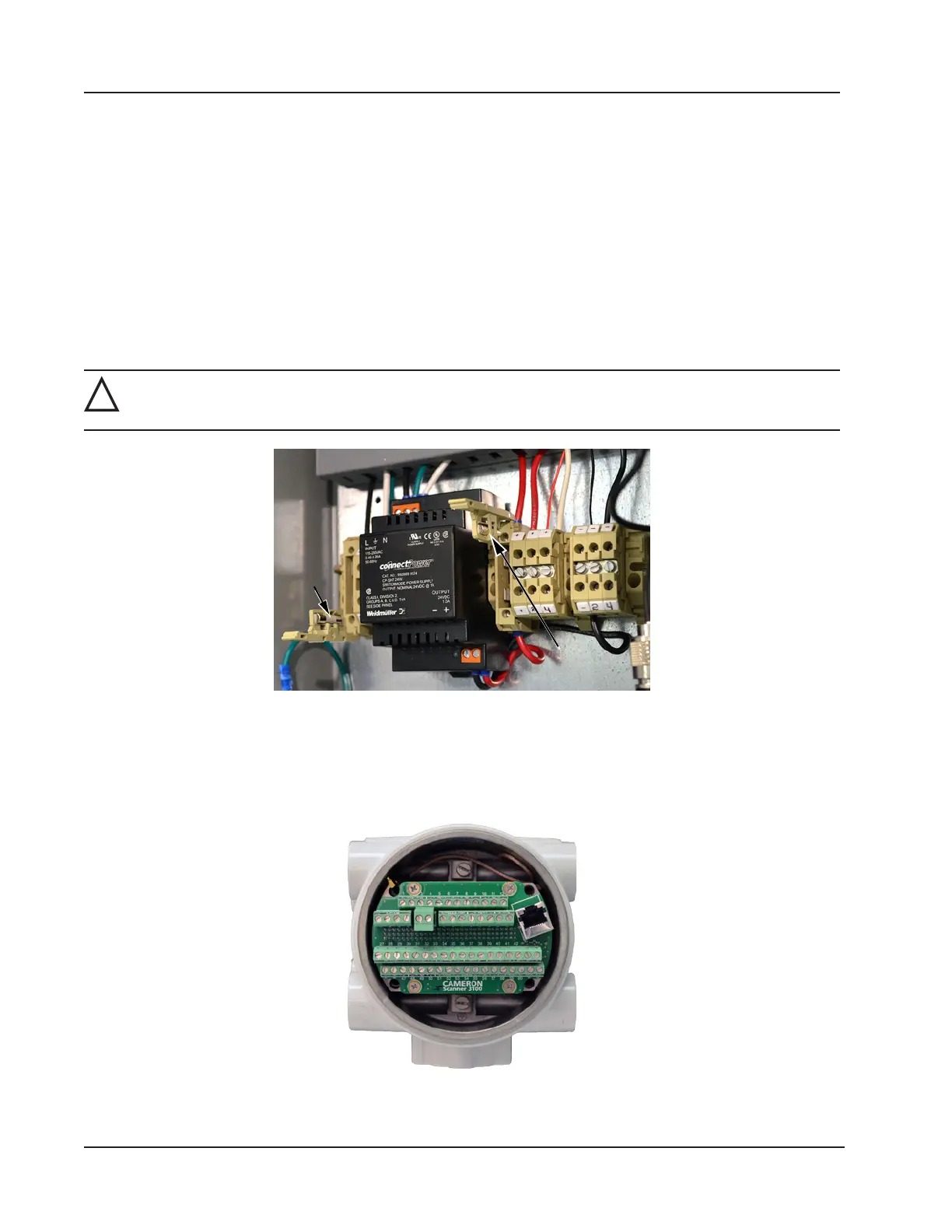
1. Open the door of the WiFi box and open the F1 and F2 fuse housings on the power block (Figure 4.5). Fuse F1
opens from the top. Fuse F2 opens from the bottom.
2. Connect a ground wire to the external ground located on the bottom left side of the WiFi box (Figure 4.4, page
73).
3. Disconnect the external power supply that will power the WiFi box using a disconnect breaker switch or other means
of locking out power.
4. Attach the antenna to the WiFi box as follows:
a. Connect the black antenna cable to the antenna connection located on the bottom of the box behind the Ethernet
connection hub as shown in Figure 4.4, page 73.
b. Twist the antenna connector clockwise to tighten.
!
WARNING: Do not connect/disconnect equipment unless the area is known to be non-hazardous. The
Scanner 3100 poses no hazard when opened in a safe area.
F1 fuse
housing
F2 fuse
housing
Figure 4.5—F1 and F2 fuse housing, opened
Connect the Scanner 3100 to the WiFi box as follows:
c. Remove a conduit port plug from the Scanner 3100 enclosure.
d. Remove the rear lid of the Scanner 3100 enclosure to access the terminal board (Figure 4.6).
Figure 4.6—Rear view of Scanner 3100 showing terminal board
74
Section 4 Scanner 3100 EFM













 To Next Page