105
Contents
Preparation/
Setup
Print Using a
Computer
Appendix
IndexPrint/SaveInput/Edit
Names of
Components
Maintenance/
Printer Settings
Trouble-
shooting
3
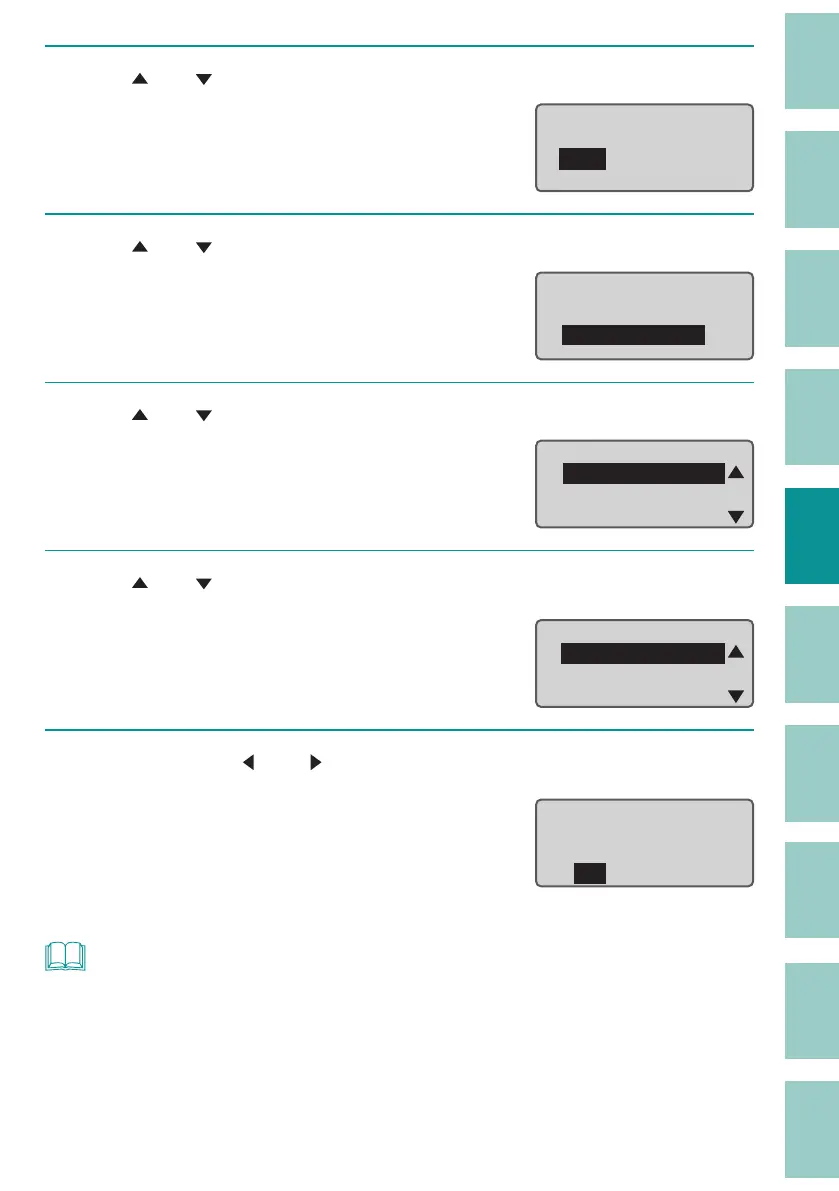
Use [ ] or [ ] to select "Add" and press the [Enter] key.
Load
New
Add
4
Use [ ] or [ ] to select "Text+settings" and press the [Enter] key.
Add
Text+settings
Text only
ɻ
5
Use [ ] or [ ] to select "Folder 1" and press the [Enter] key.
Select Folder
Folder 1
Folder 2
Folder 3
6
Use [ ] or [ ] to select "A-1," and then press the [Enter] key.
An "X" will be displayed next to the name of les
that cannot be "Add" loaded due to the size of
the data.
Select File
A−1
A−2
A−3
7
Select "Yes" with [ ] or [ ] and press the [Enter] key.
The "Loading..." message will be displayed, and
then the display returns to the character input
display.
The last page of the loaded data will be
displa
yed.
Add
A−1
text+settings?
Yes No
NOT
• When a le with text exceeding the cut length is inserted into data with a speci ed cut length, if you
load it as "text only," the characters past the cut length will be deleted, then the text will be displayed.


 To Next Page