125
Contents
Preparation/
Setup
Print Using a
Computer
Appendix
IndexPrint/SaveInput/Edit
Names of
Components
Maintenance/
Printer Settings
Trouble-
shooting
Screen Con guration
Main Screen
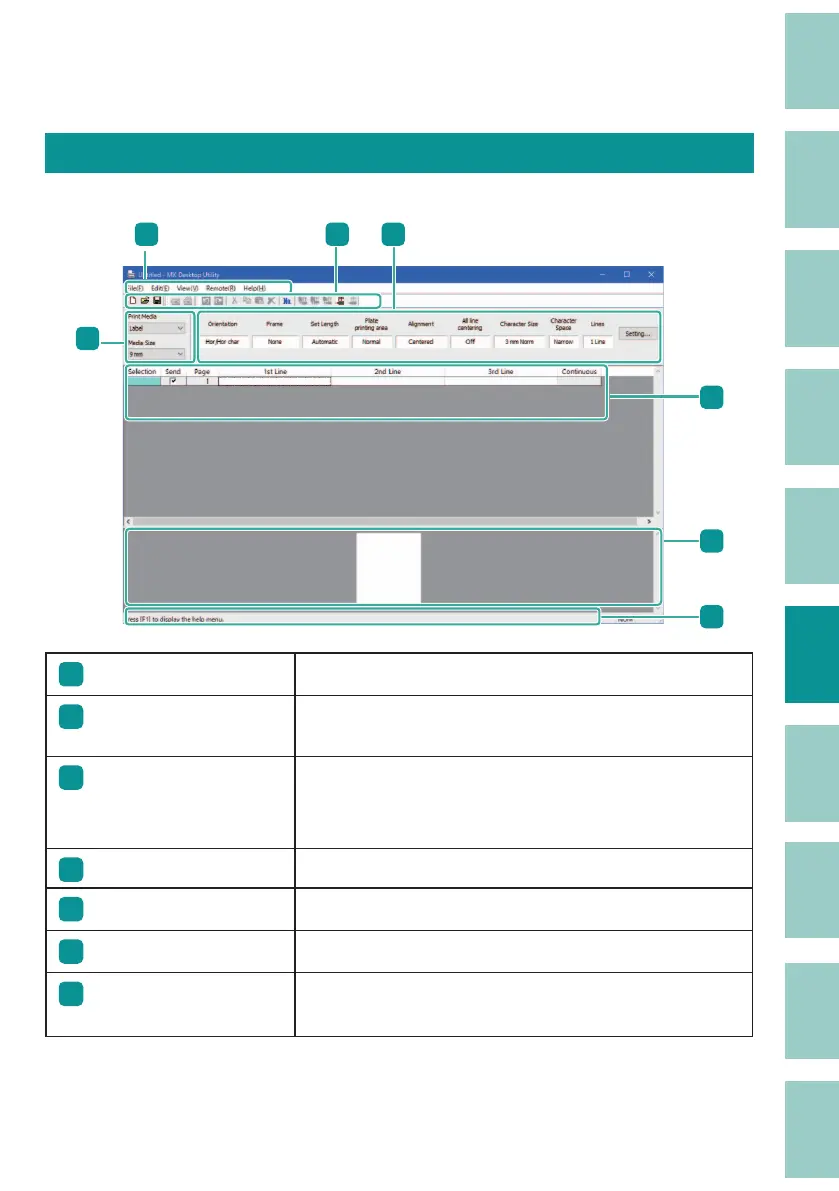
The main screen of the MK Desktop Utility is organized as follows.
3
4
5
6
7
1
2
1
Menu bar
For more information, refer to
"Menu Bar (P.126)"
.
2
Toolbar
For more information, refer to
"Toolbar (P.129)"
.
There is a Data Toolbar, a Send Toolbar and an Edit Toolbar.
3
Format Setting Area
Displays the formatting information for the selected page.
For more information about format setting, refer to
"Con gure the Format Setting (P.138)"
.
4
Data List
Displays the list of data being edited.
5
Preview Area
Displays the image of the printed result.
6
Status Bar
Displays information about the current status.
7
Print Media Selection
Area
Sets the type and size of the print media.



 To Next Page