6
Contents
Preparation/
Setup
Print Using a
Computer
Appendix
IndexPrint/SaveInput/Edit
Names of
Components
Maintenance/
Printer Settings
Trouble-
shooting
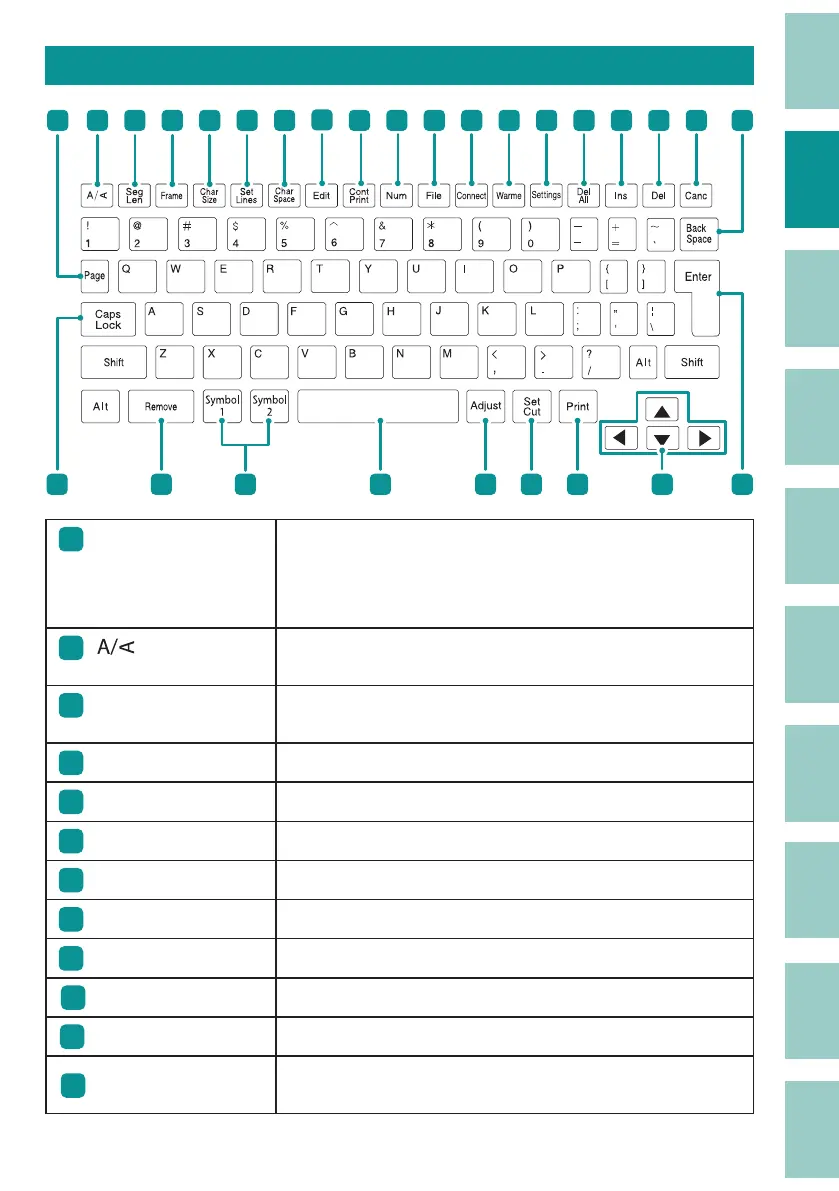
Names and Functions of Keys
1
2 3
4 5
6 7
8
10
11
12 13 14 15 16 17 18 19
9
202122232425262728
1
[Page] key
This key allows you to check the page number of the currently
displayed page and the total number of pages in the data. You
can also check the remaining memory capacity of the printer.
(P.36)
2
[ ] key
Speci es the page orientation (portrait/landscape) and text
direction (portrait/landscape).
(P.45)
3
[Seg Len] key
Speci es the length of one tube (or one label), character
alignment, and margins.
(P.54)
4
[Frame] key Sets a frame around the text.
(P.44)
5
[Char Size] key Sets the character size.
(P.42)
6
[Set Lines] key Sets the number of lines.
(P.48)
7
[Char Space] key Sets the space between characters.
(P.47)
8
[Edit] key Edits a page.
(P.65)
9
[Cont Print] key Sets up repeat printing of a page.
(P.84)
10
[Num] key Sets numbering for text.
(P.49)
11
[File] key Sets up the saving and loading of data.
(P.102)
12
[Connect] key
Sets the connection method when printing from a PC
(P.122)
or tablet device
(P.204)
.



 To Next Page