92
Contents
Preparation/
Setup
Print Using a
Computer
Appendix
IndexPrint/SaveInput/Edit
Names of
Components
Maintenance/
Printer Settings
Trouble-
shooting
Cutter Settings
Changing the Set Cut
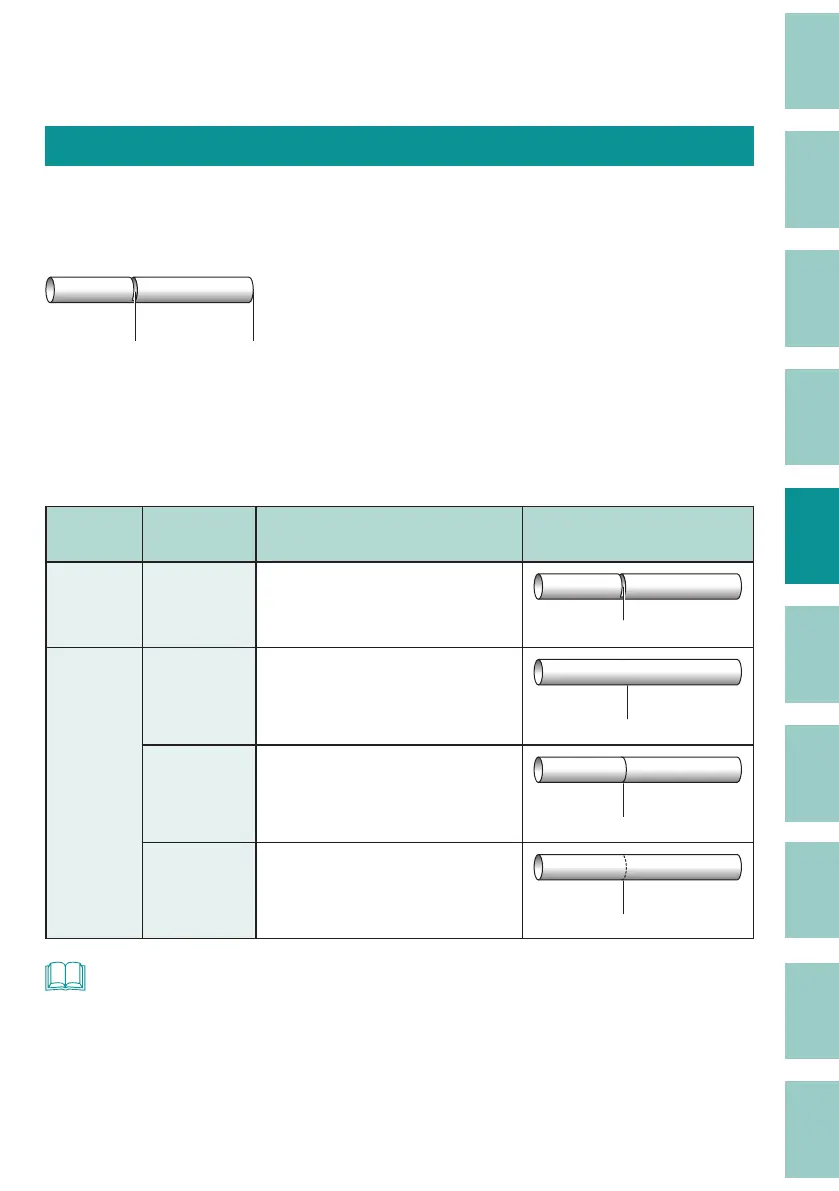
This product automatically cuts the print media when printing is nished. (Full cut) In addition,
a half cut is made between the tubes and labels after printing, so that you can cut the tubes by
hand or cleanly peel o labels from release paper.
Half cut Full cut
A1 Pump Room
■
Changing the Half Cut Settings
The default setting is "(Half Cut) On."
If you do not want to use a half cut, you can print the cut line (solid/dotted line).
Half cut
Cut line
settings
Details Print Preview
On
(Default
Setting)
-
After printing, cut lines are added
between tubes and labels.
A1
Pump Room
Half cut
O
O
No cut between tubes or labels
after printing, and no cut line will
be printed.
No cut line
A1 Pump Room
Line
A solid cut line will be printed
between tubes and labels after
printing.
Line
A1 Pump Room
Dotted
A dotted cut line will be printed
between the printed tubes and
labels.
A1 Pump Room
Dotted
NOT
• When printing on a plate, no half cut is made regardless of the half cut setting. However, the cut line
will be printed as set.



 To Next Page