21
Contents
Preparation/
Setup
Print Using a
Computer
Appendix
IndexPrint/SaveInput/Edit
Names of
Components
Maintenance/
Printer Settings
Trouble-
shooting
Loading the Print Media
Loading a Tube or Plate
IMPORTANT
• Do not use the following types of tubes. Not only will the product not print cleanly, but use with such
tubes may also cause a malfunction.
- Broken - Crushed - Twisted - Uneven thickness
- Soiled - Uneven - Wet
• You cannot print on dirty tubes or plates. Wipe off any dirt or dust with a dry cloth. Also, do not use
tubes or plates that have oil or other stains that cannot be wiped off.
NOT
• Please purchase commercially available tubes and plates for use. For more information on the sizes
that can be used, refer to
"Print Media (P.228)"
.
• The procedure for removing set print media from the printer, please refer to
"Replacing the Print
Media (P.27)"
.
• Periodically clean or replace the cleaner of attachment. Dirt on the cleaner will cause print smears. For
details, refer to
"Cleaning/Replacing the Cleaners (P.188)"
.
1
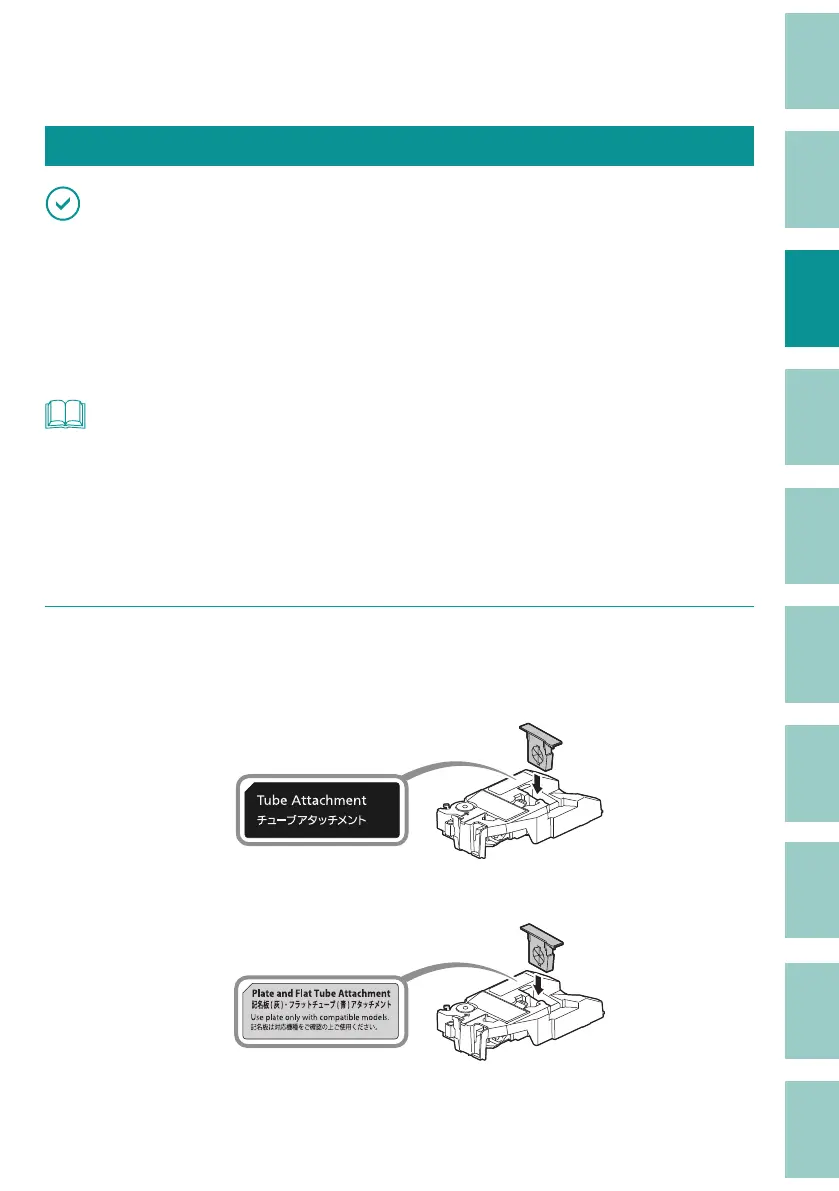
Prepare the attachment.
For tubes (round)
Use the cleaner (blue) by attaching it to the tube attachment.
For flat tubes
Use the cleaner (blue) by attaching it to the (optional) plate and flat tube attachment.



 To Next Page