13
Contents
Preparation/
Setup
Print Using a
Computer
Appendix
IndexPrint/SaveInput/Edit
Names of
Components
Maintenance/
Printer Settings
Trouble-
shooting
Use with Batteries
If you are outdoors or in any other place where you do not have access to a power supply, you
can use the product with batteries.
A
TI
• Be sure to use fully charged "eneloop AA Standard Model Batteries (Part No. : BK-
3MCCA (for North America), BK-3MCCE (for Asia)." Do not use any other type of
battery. Failure to do so may result in re, malfunction, or injury.
1
Prepare 6 "eneloop AA Standard Model Batteries (Part No. : BK-3MCCA (for
North America), BK-3MCCE (for Asia)" (Sold separately).
2
Make sure that the power is turned o .
3
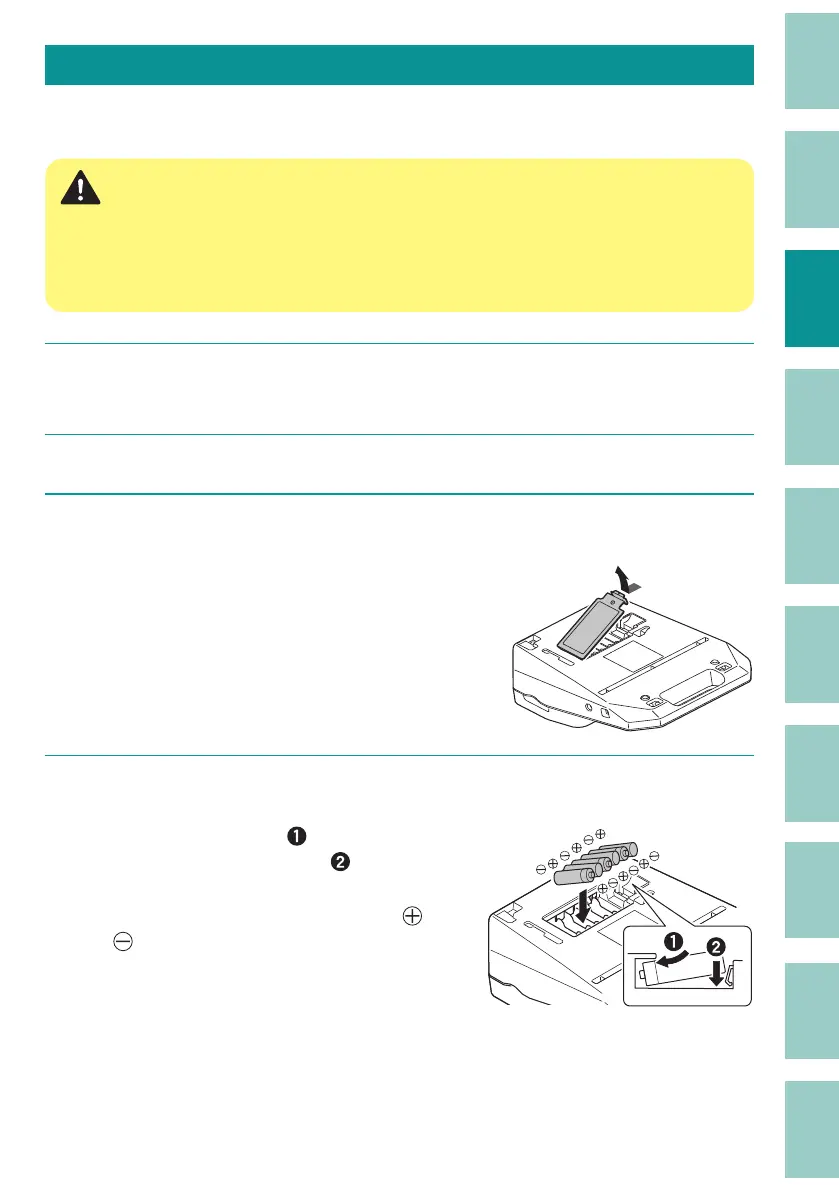
Remove the battery cover.
4
Insert the batteries.
As shown in the gure, insert the battery
terminal into the printer, and
push it in.
Paying attention to the direction in which you
inser
t the batteries, as marked with the
and
symbols.
●



 To Next Page